10
www.teejet.com
Direction to Boom
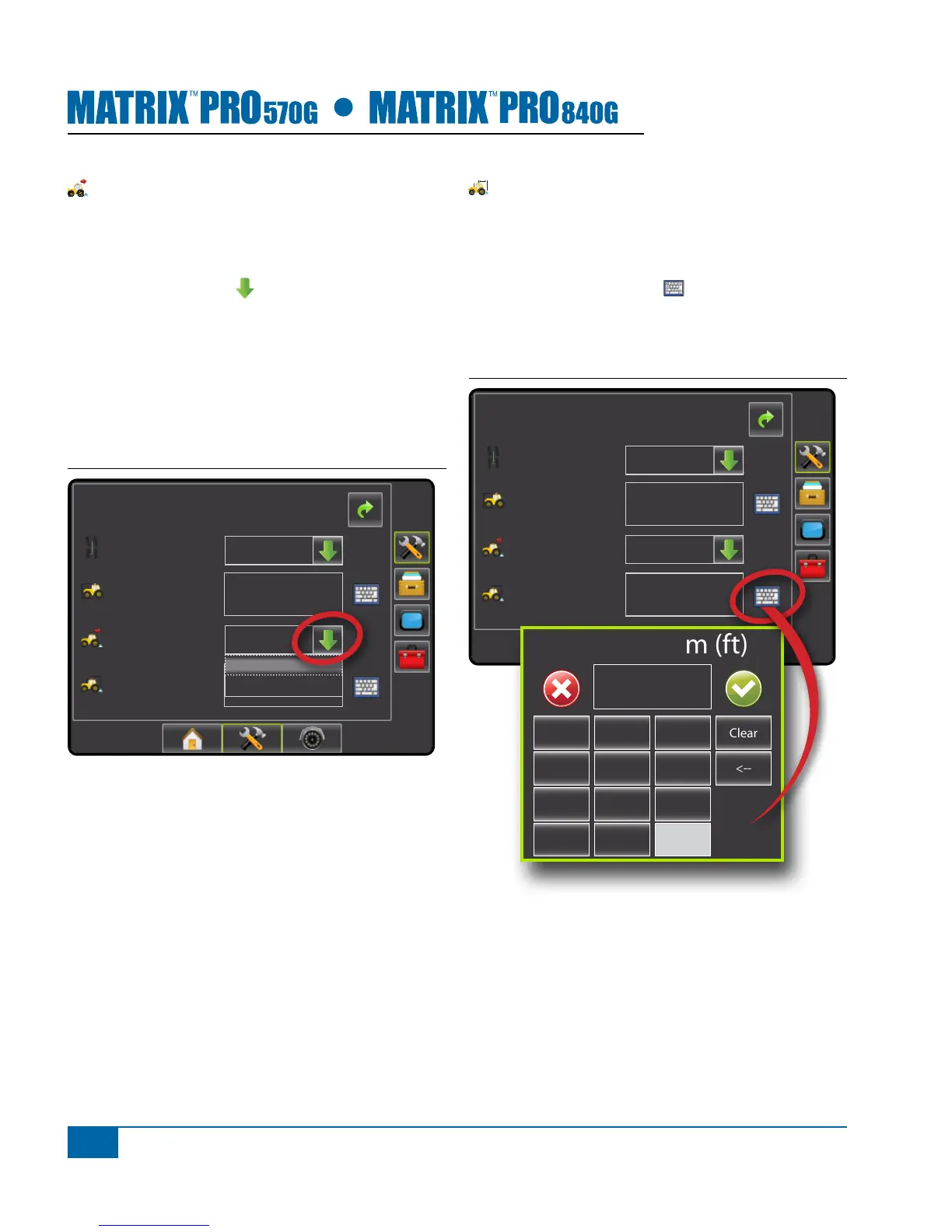
Direction to Boom sets whether the boom is located
behind or in front of the GPS antenna as the vehicle
moves in a forward direction. Default is Backward.
1. Press DOWN arrow to access the list of
options.
2. Select:
►Backward – indicates the boom is located
behind the GPS antenna
►Forward – indicates the boom is located in front
of the GPS antenna
Figure 1-13: Direction to Boom
Cong-> Vehicle
12.50 ft
0.00 ft
Front Wheel
Vehicle Type
Ant Height
Dir to Boom
Dist to Boom
Backward
Backward
Forward
Distance to Boom
Distance to Boom denes the distance from the GPS
antenna to the boom. Range is 0.0 - 164.0 feet / 0.0 -
50.0 meters. Default is 0.0 feet / 0.0 meter.
1. Press the KEYPAD icon .
2. Use the entry screen to establish the distance from
the GPS antenna to the boom.
Figure 1-14: Distance to Boom
Cong-> Vehicle
12.50 ft
0.00 ft
Front Wheel
Backward
Vehicle Type
Ant Height
Dir to Boom
Dist to Boom
Dist to Boom (ft)
1 2 3
0.00
Clear
4 5 6 <--
7 8 9
0 .
+/-


 To Next Page