8
www.teejet.com
Vehicle Setup
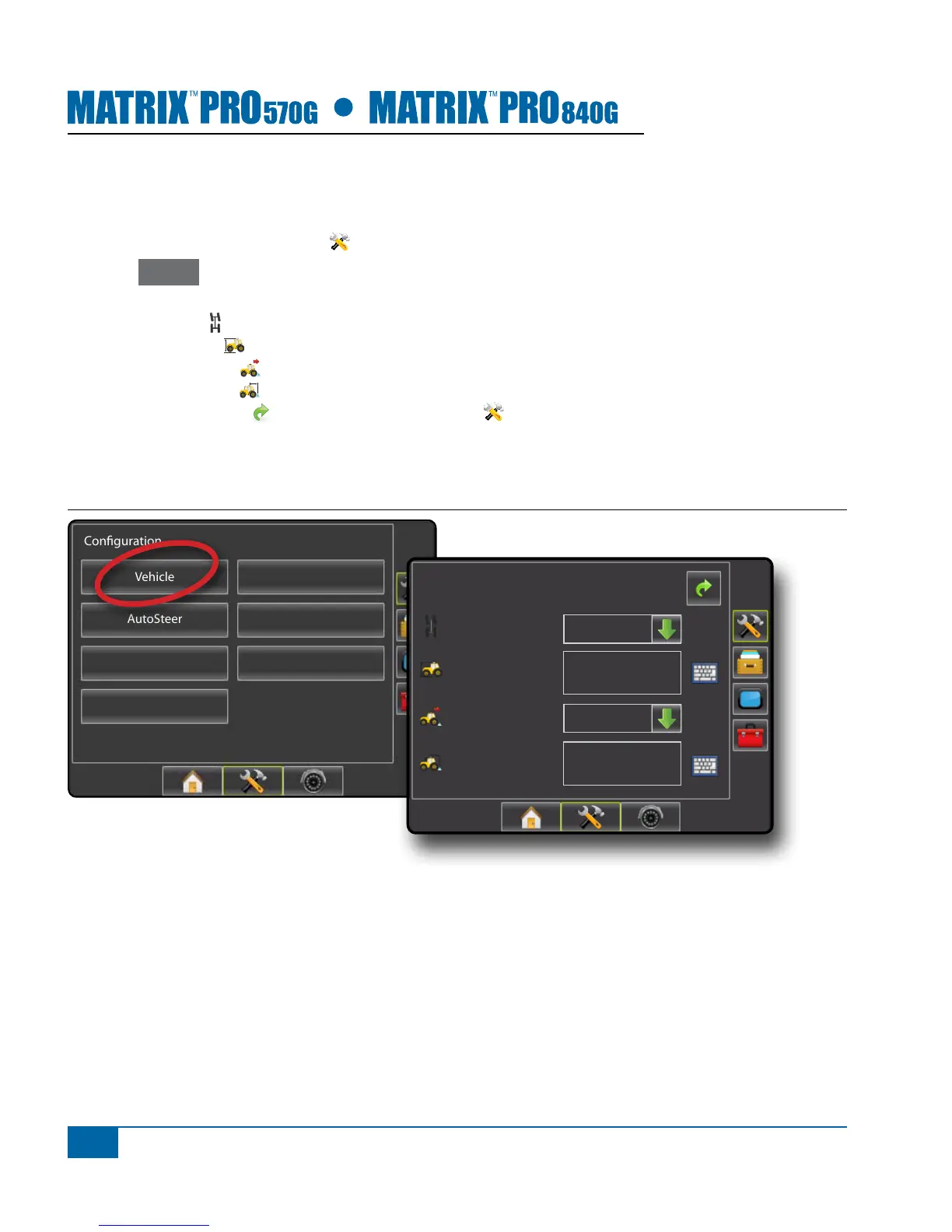
Vehicle Setup is used to congure Vehicle Type, Antenna Height, Direction to Boom and Distance to Boom.
1. Press CONFIGURATION side tab .
2. Press Vehicle .
3. Select from:
►Vehicle Type – used to select the type of vehicle steering that most closely represents your vehicle
►Antenna Height – used to enter the height of the antenna from the ground
►Direction to Boom – used to select whether the boom is located behind or in front of the GPS antenna
►Distance to Boom – used to enter the distance from the GPS antenna to the boom
4. Press RETURN arrow or CONFIGURATION side tab to return to the main Conguration screen.
NOTE: All settings under Vehicle Setup are required for autosteer and tilt sensor operation, as well as proper
BoomPilot operation.
Figure 1-10: Vehicle Setup Options
Conguration
Vehicle
Implement
AutoSteer
Tilt
Lightbar
GPS
Video
Cong-> Vehicle
12.50 ft
0.00 ft
Front Wheel
Backward
Vehicle Type
Ant Height
Dir to Boom
Dist to Boom


 To Next Page