12
www.teejet.com
#
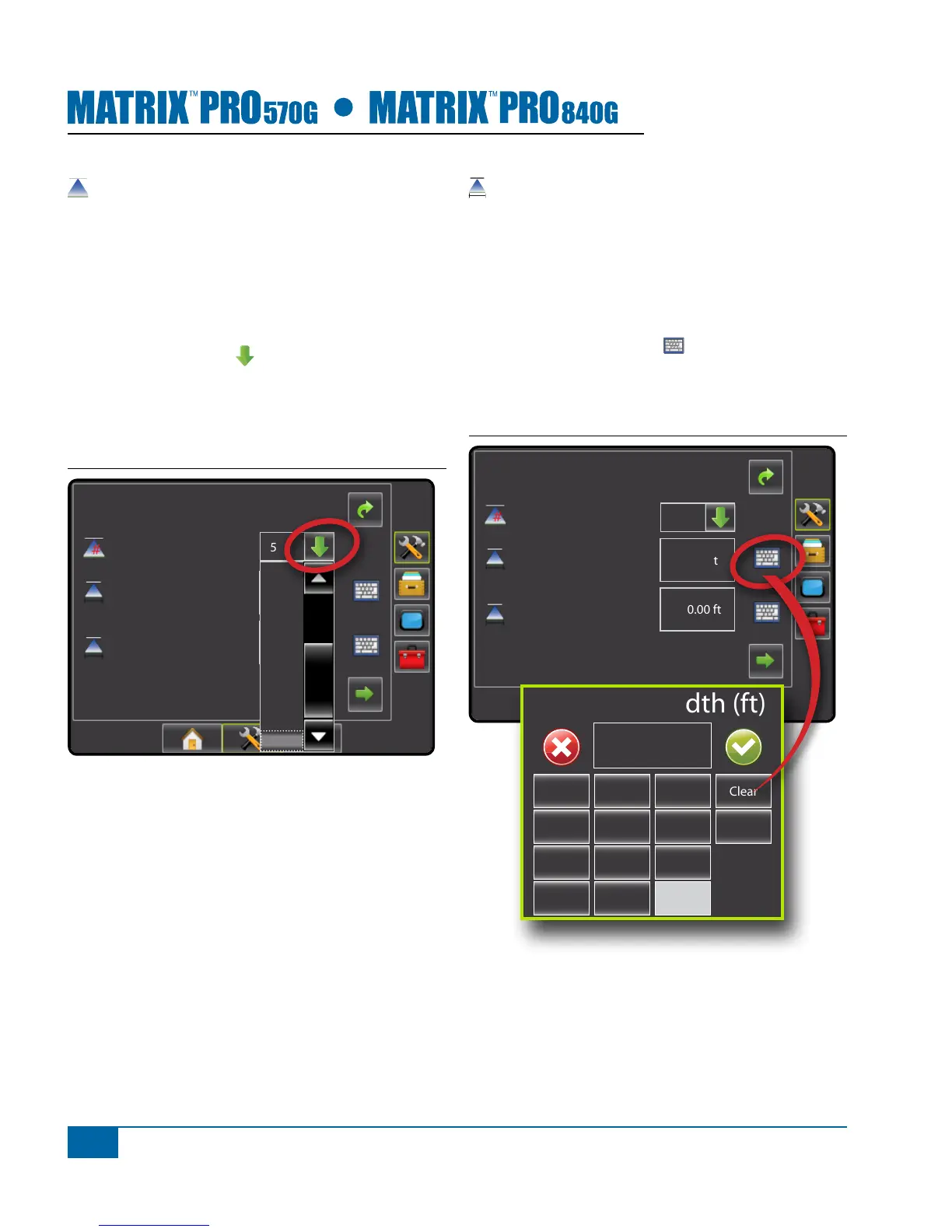
Number of Boom Sections
Number of Boom Sections establishes the number of
available boom sections. If a SmartCable or Section
Driver Module (SDM) is present, 1 to 6 or 1 to 15
section widths can be entered (depending on which
SmartCable or Section Driver Module (SDM) is
detected). Default is 1.
1. Press DOWN arrow to access the list of
options.
2. Select the number of boom sections on the
implement:
Figure 1-16: Number of Boom Sections
Cong->Implement
Num Sections
Spray Width
Guidance Width
75.00 ft
75.00 ft
15
7
8
9
10
11
12
13
14
15
Guidance Width
Guidance Width establishes the width between the
guidelines. Range is 34.0 - 2952.7 inches / 0.9 - 75.0
meters. Default is 60 feet / 18.29 meters.
NOTE: This setting is required for auto steering
operation.
1. Press the KEYPAD icon .
2. Use the entry screen to establish the guidance
width.
Figure 1-17: Guidance Width
Cong->Implement
Num Sections
Spray Width
Guidance Width
60.00 ft
180.00 ft
15
Guidance Width (ft)
1 2 3
Clear
4 5 6 <--
7 8 9
0 .
+/-


 To Next Page