13
Setup Instructions for BoomPilot
®
98-05243 R0
Spray Width
Spray Width establishes the width of each implement
section. Range is 0.0 - 2952.7 inches / 0.0 - 75.0
meters. Default per section is 144.0 inches / 3.66
meters. When facing forward, boom sections are
ordered from left to right along the boom.
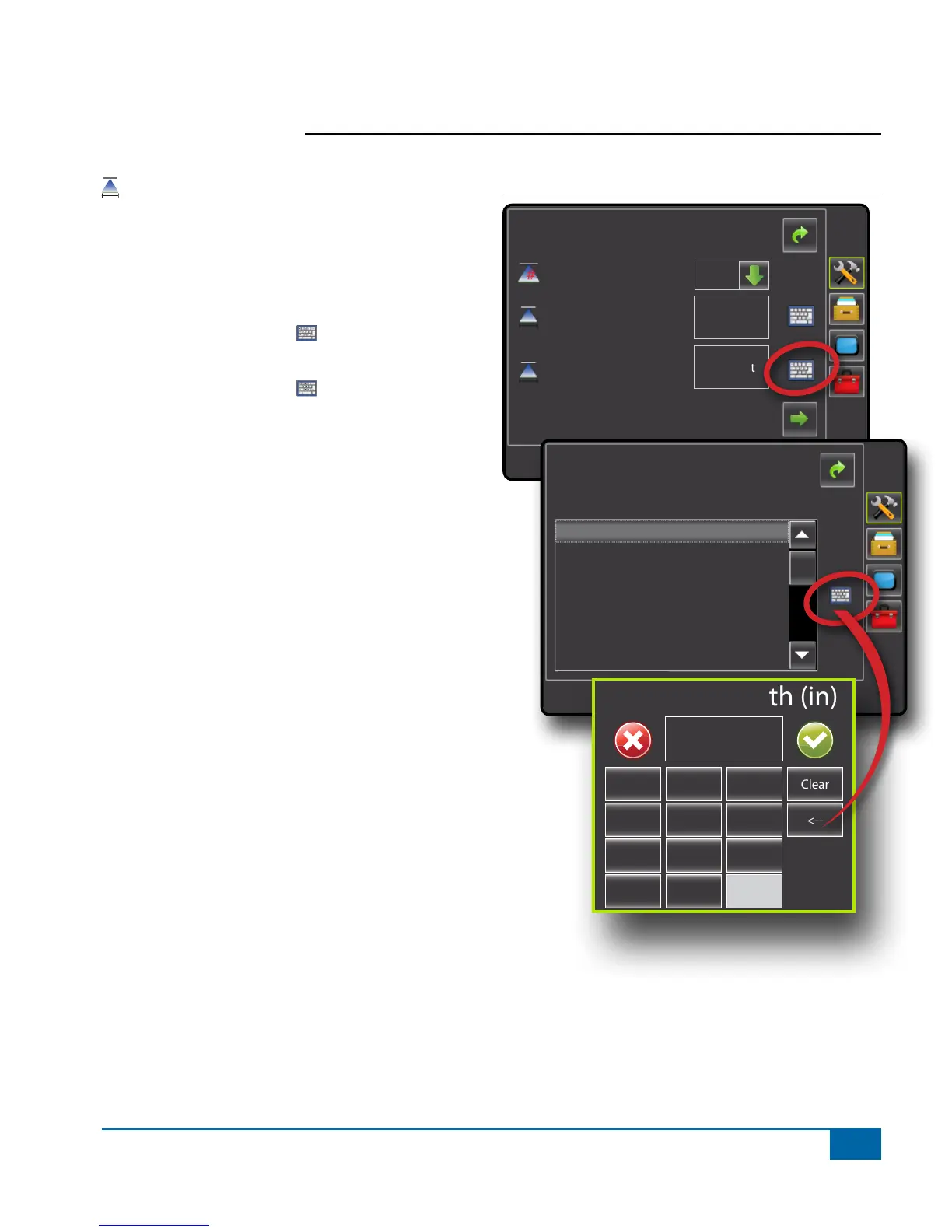
1. Press the KEYPAD icon .
2. Highlight the section to be established.
3. Press the KEYPAD icon .
4. Use the entry screen to establish the spray width.
5. Repeat steps 2 to 4 until all sections have been
established.
NOTE: When entering a boom section width, the total
of all sections must be greater than 34 inches /
0.9 meters.
NOTE: Individual boom sections can be set to different
widths.
Figure 1-18: Spray Width
Cong->Implement
Num Sections
Spray Width
Guidance Width
60.00 ft
180.00 ft
15
Config->Implement->Section Widths
Spray Width" 75.00 ft
Section 1 - 144.00 in
Section 2 - 144.00 in
Section 3 - 144.00 in
Section 4 - 144.00 in
Section 5 - 144.00 in
Section 6 - 144.00 in
Section 7 - 144.00 in
Section 1 Width (in)
1 2 3
Clear
4 5 6 <--
7 8 9
0 .
+/-


 To Next Page