11
Setup Instructions for BoomPilot
®
98-05243 R0
BoomPilot - SmartCable or SDM
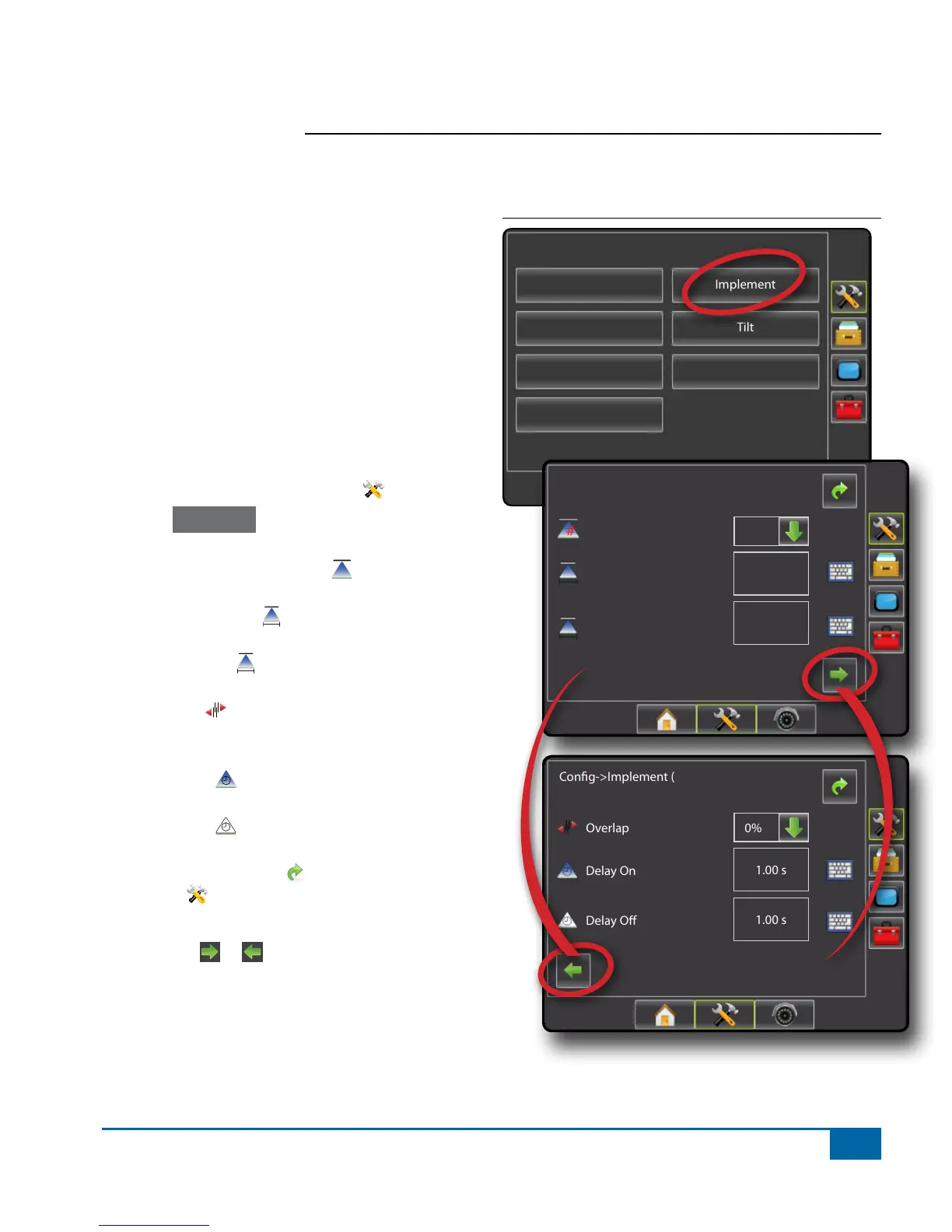
BoomPilot setup is used to establish number of
boom sections, guidance width, spray width, overlap
percentage, implement delay on time and implement
delay off time.
Note: If a SmartCable or Section Driver Module
(SDM) is not present the configurations for
Number of Boom Sections, Overlap, Delay
On and Delay Off will not be available - only
Guidance Width and Spray Width can be
entered. Please refer to Single Boom Setup to
view setup steps.
1. Press CONFIGURATION side tab .
2. Press Implement .
3. Select from:
►Number of Boom Sections
#
– used to select
the number of available boom sections
►Guidance Width – used to enter the width
between the guidelines
►Spray Width – used to enter the width of
each implement section
►Overlap – used to select the amount of
overlap allowed when the boom sections are
turned on and off
►Delay On – used to enter the timing for the
boom section valves to switch on
►Delay Off – used to enter the timing for the
boom section valves to switch off
4. Press RETURN arrow or CONFIGURATION
side tab to return to the main Conguration
screen.
NOTE: Press or to switch between Implement
setup screens.
NOTE: BoomPilot settings are only visible and
necessary if a SmartCable or SDM is installed.
If neither is present, see Single Boom Setup
section below.
Figure 1-15: Implement Setup Options with SmartCable
or SDM
Conguration
Vehicle
Implement
AutoSteer
Tilt
Lightbar
GPS
Video
Cong->Implement
Num Sections
Spray Width
Guidance Width
60.00 ft
12.00 ft
1
Cong->Implement (2)
Overlap
Delay O
Delay On
1.00 s
1.00 s
50%


 To Next Page