3.1.4 Underside Panel
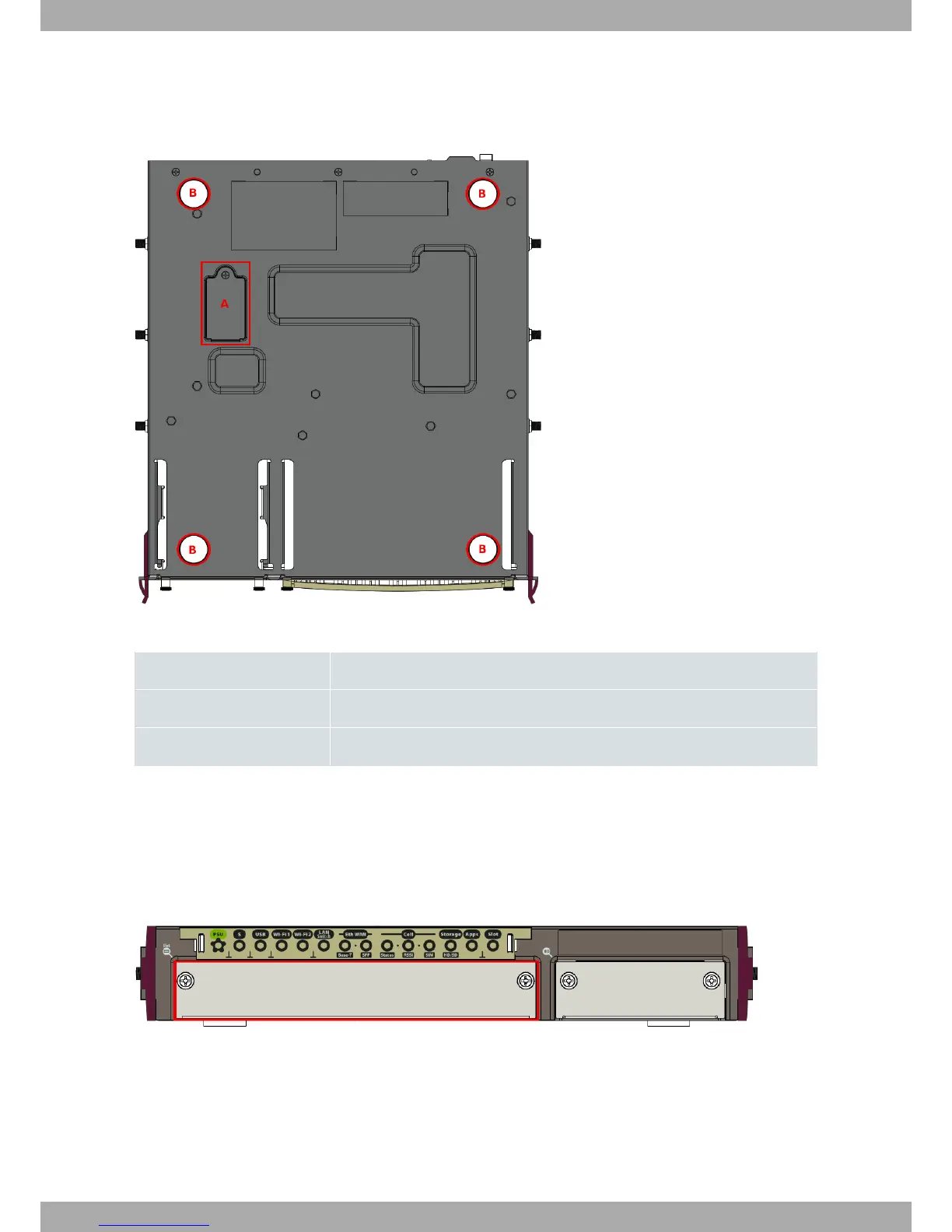
The following elements are located on the underside panel:
Fig. 5: Underside panel
Underside PANEL ELEMENTS TABLE
Item Description
A Internal 3G module SIM tray. Access from the bottom of the router.
B Adhesive rubber feet (these are not required for rack mounting).
3.2 Expansion slot
The Teldat iM8 router has an expansion slot. This means you can increase its features and interfaces by inserting
different cards or boards.
This slot is located on the router's front panel, as shown in the following figure:
Fig. 6: Expansion slot
To correctly insert cards, please follow these steps:
(1) Switch off the device and remove the data cables as described under Disconnecting on page 13.
(2) Remove the device from the workplace and place it in a stable, safe location where it can be easily accessed
and handled.
(3) Unscrew the front panel screws to remove the expansion card tray.
3 Components and Power Supply Teldat S.A.
8 Teldat Router iM8


 To Next Page