Chapter 3 Components and Power Supply
The following chapter provides detailed information on the chassis of the Teldat iM8 router and its components. This
information includes:
• Components.
• Information on assembly.
• Installing and uninstalling modules.
• Power supply.
• RST button.
• Data connection.
• SIM card installation.
• Hard disk installation.
3.1 Components
3.1.1 Front Panel
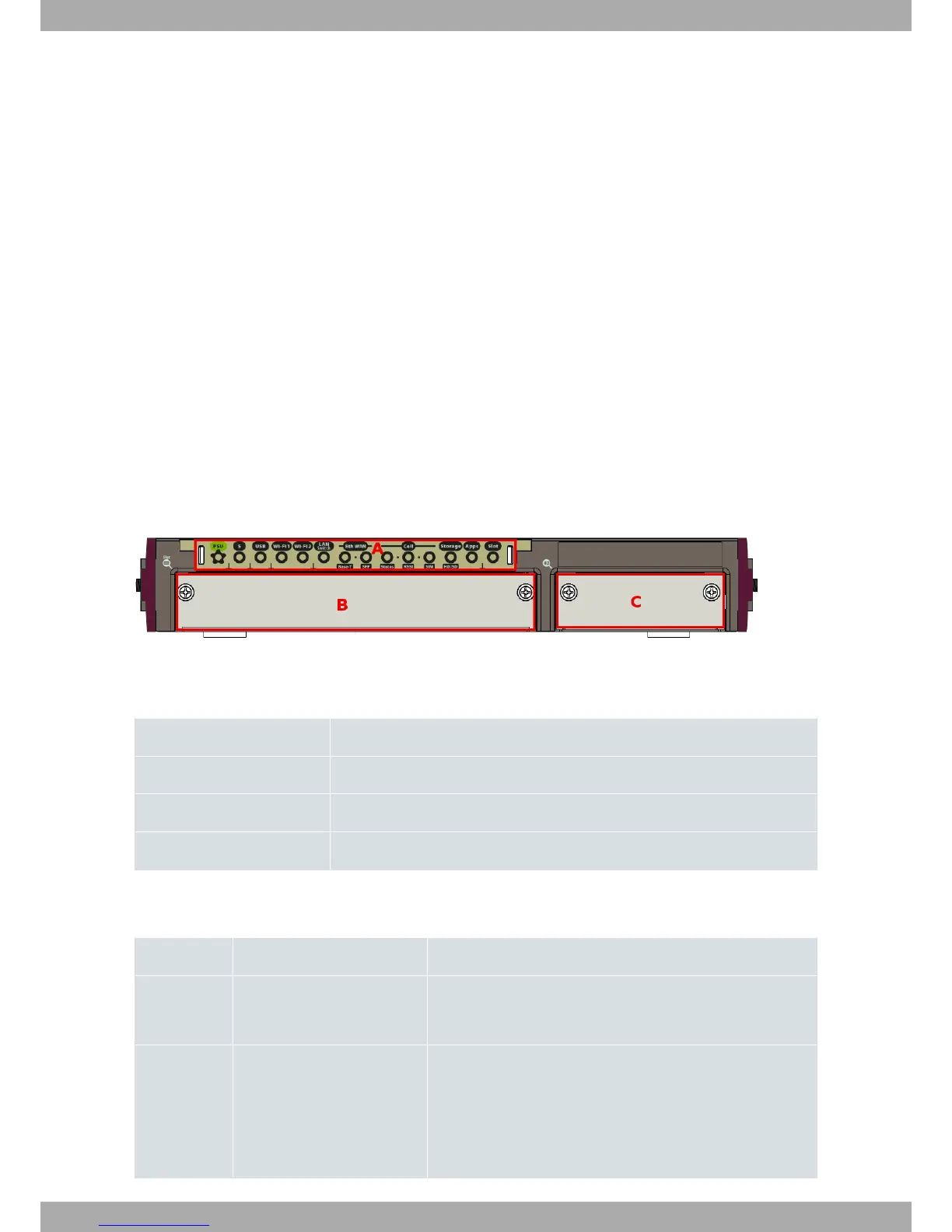
The following figure shows the front panel.
Fig. 1: Front Panel
The front panel elements are as follows:
FRONT PANEL ELEMENTS TABLE
Item Description
A LEDs panel.
B Slot for expansion card.
C Slot for hard disk.
The LEDs panel provides information on the status of the components (if they are active or not) and on network
activity.
LEDs table
LED Definition Status Indication
PSU Power / Switch On-Off Off -> no power through PSU.
On -> powered through PSU.
S General Status /
Default Configuration Process
Off -> system off.
Red -> Error, component operating incorrectly.
Green -> System initialized and operating.
Amber (blink) -> Default configuration.
3 Components and Power Supply Teldat S.A.
4 Teldat Router iM8


 To Next Page