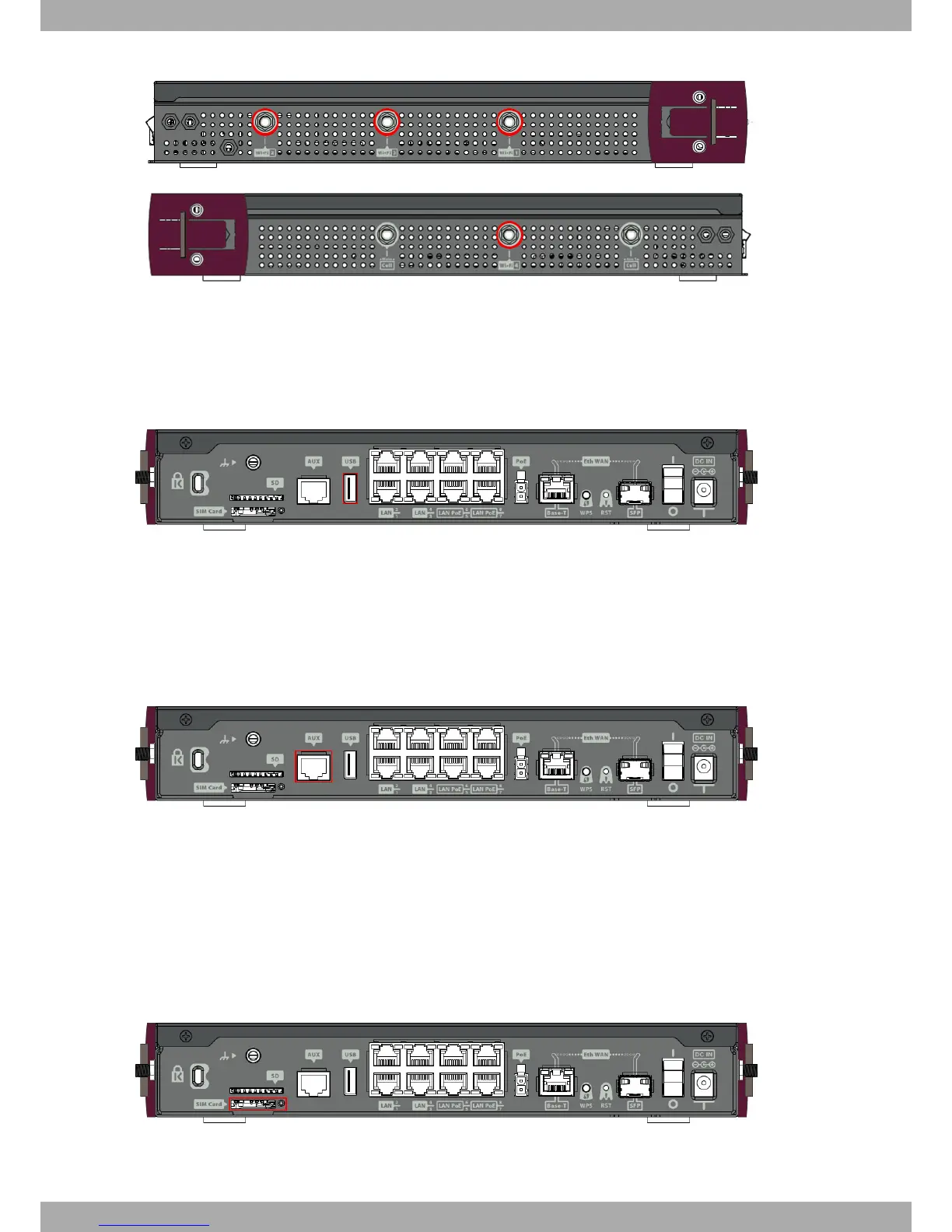
Fig. 25: Wi-Fi Antennas
3.7.5 Connecting a 3G USB device (USB connector)
The Teldat iM8 router has a USB HOST 2.0 Type A connector interface. It allows 3G USB modems to be connected.
The interface can be activated by purchasing the corresponding software license.
Fig. 26: 3G USB Connector
3.7.6 Connecting for Configuration
The Teldat iM8 has a RJ45 female connector on the front panel (labeled "Aux") that provides access to the device's
local console
For further information, please see Connecting to the device on page 29.
Fig. 27: Aux. Connector
3.8 Installing the SIM card
The Teldat iM8 is equipped with a Wireless WAN interface that may need a SIM card to operate. Certain services
(CDMA) provided by some carriers in several countries do not require SIM cards.
The Teldat iM8 is equipped with two SIM trays.
One is located on the rear panel of the router, as shown in the following figure.
Fig. 28: External module SIM tray
To insert the SIM card in the external SIM tray, first place the device so you can see the rear panel and then carry
Teldat S.A.
3 Components and Power Supply
Teldat Router iM8 19


 To Next Page