Chapter 3 Components and Power Supply
The following chapter provides detailed information on the chassis of the M10-Smart router and its components. This
information includes:
• Components.
• Information on assembly.
• Power supply.
• RST button.
• Data connection.
• SIM card installation.
3.1 Components
3.1.1 Front panel
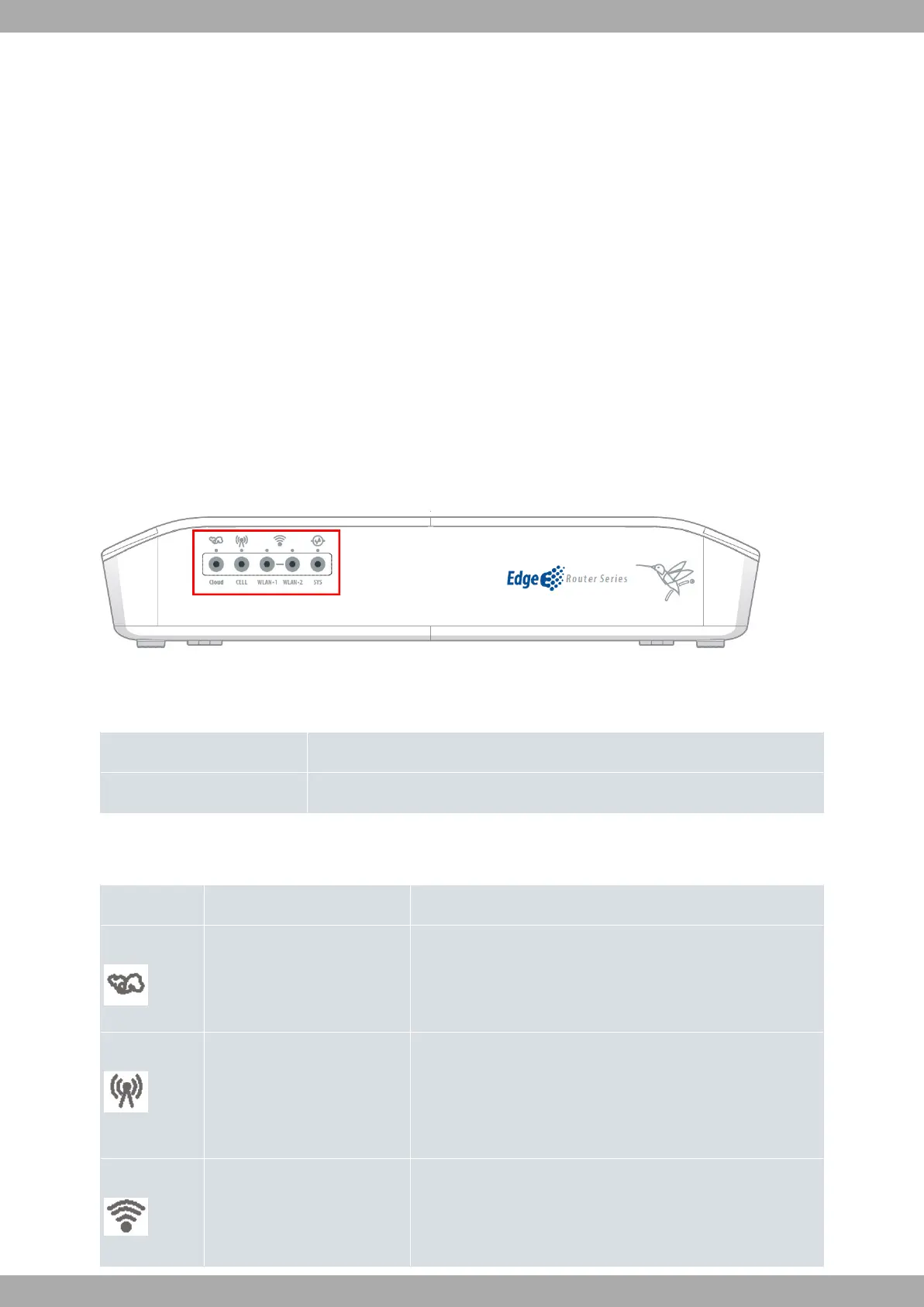
The following figure shows the front panel.
Fig. 2: Front Panel of the M10-Smart
The front panel components are as follows:
Front panel components
Item Description
A LED panel.
The LED panel provides information on the status of the components (indicating whether they are active or not) and
on network activity.
LEDs
LED Definition Status Indication
Cloud Cloud Information Off -> No connection, or connection disabled (shutdown).
Green -> Enabled, but no associated STAs.
Blinking -> Connected. Connection data activity.
Cell Status Off -> No connection, or connection disabled (shutdown, SIM er-
ror, not registered).
Green -> Registered.
Blinking -> Connected. Connection data activity.
WLAN-1 Access Point 2.4 GHz radio Off -> No connection, or connection disabled (shutdown).
Green -> Enabled, but no associated STAs.
Blinking -> Connected. Connection data activity.
Teldat S.A.
3 Components and Power Supply
M10-Smart 5


 To Next Page