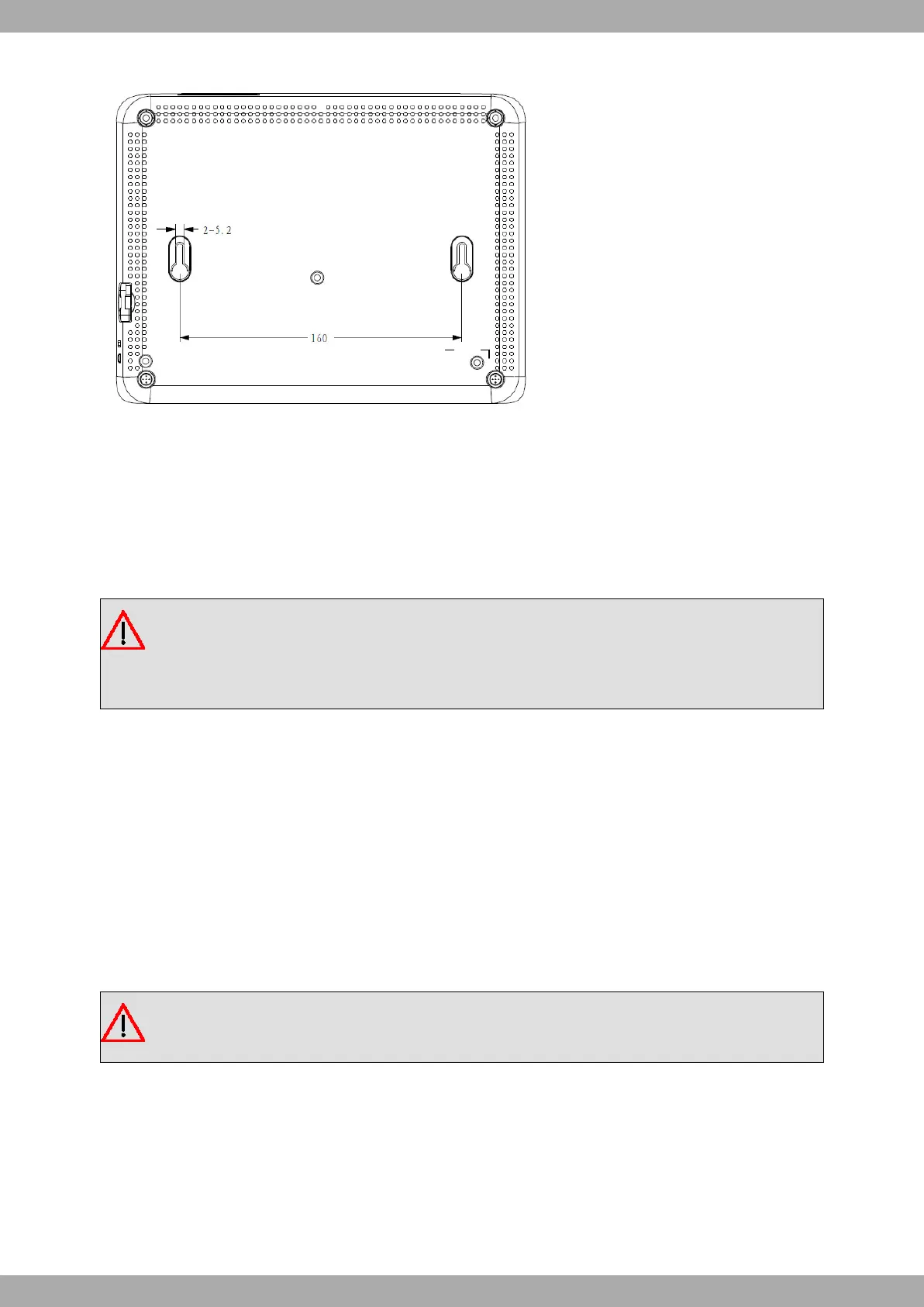
To mount the router on a wall or another surface, follow these steps:
Procedure
Step 1. Align the two screws horizontally on a wall (or any other vertical surface) and install them 16.0 cm (6.3
inches) apart.
The screws should protrude 0.6 cm (0.25 inch) from the wall surface.
Warning
If you are installing the screws into drywall, use hollow-wall anchors (8 mm – 5/16 inch) to secure the
screws. If the screws are not properly anchored, the strain of the cables connected to the router's back
panel could pull the router from the wall.
Step 2. Hang the router on the screws.
3.4 Plug-in modules
The M10-Smart does not have plug-in modules.
Reserved for future use.
3.5 Power source
The M10-Smart router is powered through an external AC/DC power adapter.
Warning
The equipment must be used with the power supply provided by the manufacturer.
To power the router, plug the power supply into the mains supply and the DC connector.
Teldat S.A.
3 Components and Power Supply
M10-Smart 11


 To Next Page