STATUS BAR ICONS 9
6.3 Entering and editing text
When your phone is in edit mode, the default input method is sentence case (the first character of
a sentence is automatically capitalized).
Press the key to cycle through Abc, ABC, abc and 123 input methods.
For normal text input, press a number key (2-9) repeatedly until the desired character is displayed.
If the character you want is entered by the same key as the previous character, press that key after
the previous character is no longer highlighted.
To enter a space, press the 0 key.
To move the cursor left or right one step at a time, press the left or right navigation key. Press the
up and down navigation keys to move the cursor to the previous and next lines respectively.
To delete the already entered characters or symbols, press to delete anything before the cursor
one at a time. Press and hold to continuously delete the entered text.
To quickly enter a common punctuation mark or symbol in Abc/ABC/abc input mode, press the
1 key one or more times to cycle through a list until the desired punctuation mark or symbol is
highlighted.
To enter a symbol (including punctuation mark), press the key to display the symbol table, press
the navigation keys to highlight the desired symbol, and press OK.
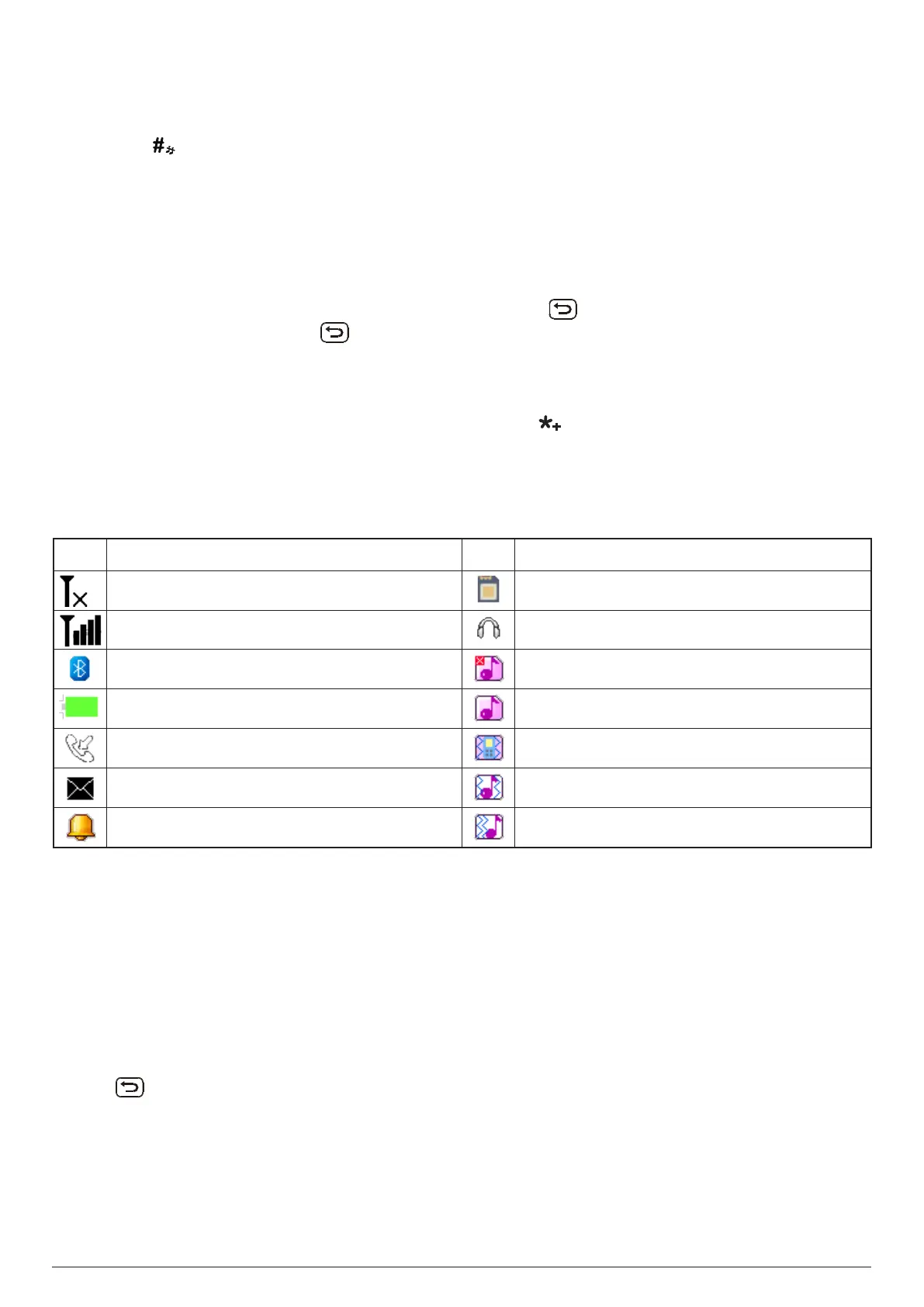
7. STATUS BAR ICONS
ICON STATUS ICON STATUS
No signal or no SIM card inserted MicroSD card inserted
Cellular network signal strength (full) Headset connected
Bluetooth
®
active Silent mode
Battery (full charge) Ring only mode
Missed call(s) Vibrate only mode
Unread message(s) Vibrate and ring mode
Alarm set and on Vibrate then ring mode
8. USING THE PHONE BOOK
8.1 Contact list
The Phonebook app stores your contact list. Your contact list is where you save contact information
for the people you know, including their names, phone numbers and photos. Contacts can be saved
on the SIM card or phone memory.
To open the contact list, use either of the following methods:
- Press from the home screen.
- Go to Menu > Phonebook.



 To Next Page