6
1.4 Status bar
The Status bar appears at
the top of your Home screen
and includes icons indicating
your tablet’sstatus and new
notification alerts.
Icon Status Icon Status
Wi-Fi
®
active Battery (fully charged)
Network (Full signal) New message
5G data service Silent mode
Airplane mode Do Not Disturb mode
Alarm set New Gmail message
Battery (charging) Screen Recorder
Location
1.5 Split screen mode
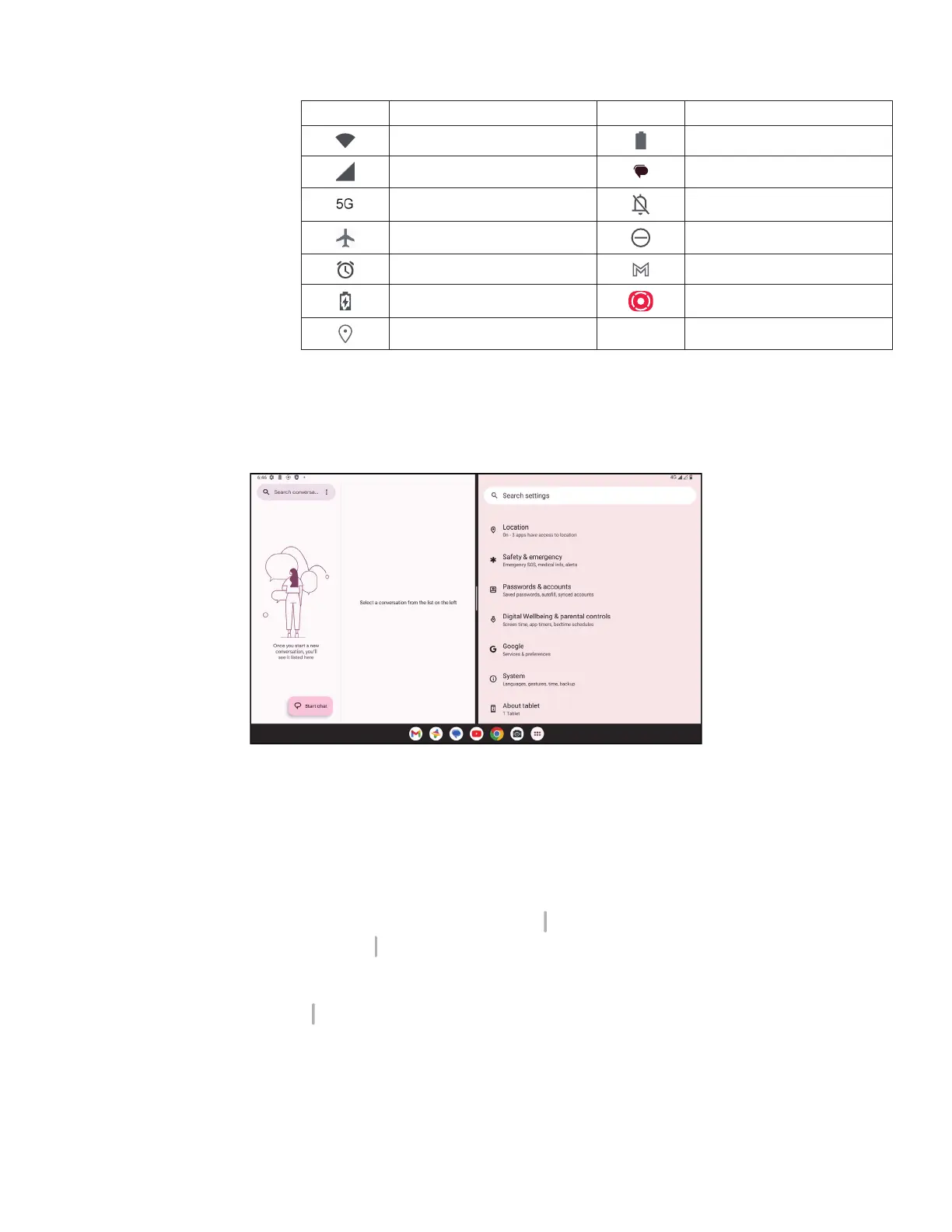
You can set split screen mode to show two different interfaces on the tablet at the same time.
Using split screen mode
Hold the app your want to access, then tap Split right or Split left. Choose another app to use split screen.
Note: If there is nothing in recently used app interface, you can not use split screen mode.
Settings split screen mode
In split screen mode, you can adjust the split screen size by sliding in the middle of two screens.
Or exchange two screens’ place by tapping
twice.
Exiting split screen mode
In split screen mode, you can slide to the edge of the screen.


 To Next Page