11
3.9 Backup & Factory Reset
• To transfer data from your device to another one, go to Settings > System > Backup > Back up to Google Drive,
then you need set your backup account.
• To wipe all data in your device, go to Settings > System > Reset options > Erase all data (factory reset) > Erase
all data > Erase all data. Then the tablet will restart.
4 Applications ..............................................................................
4.1 Contacts
Contacts enables quick and easy access to the contact you want to reach.
To access this function, touch Contacts
from the Apps menu.
You can view and create contacts on your tablet and synchronize them with your Gmail contacts or other
applications on the web or on your tablet.
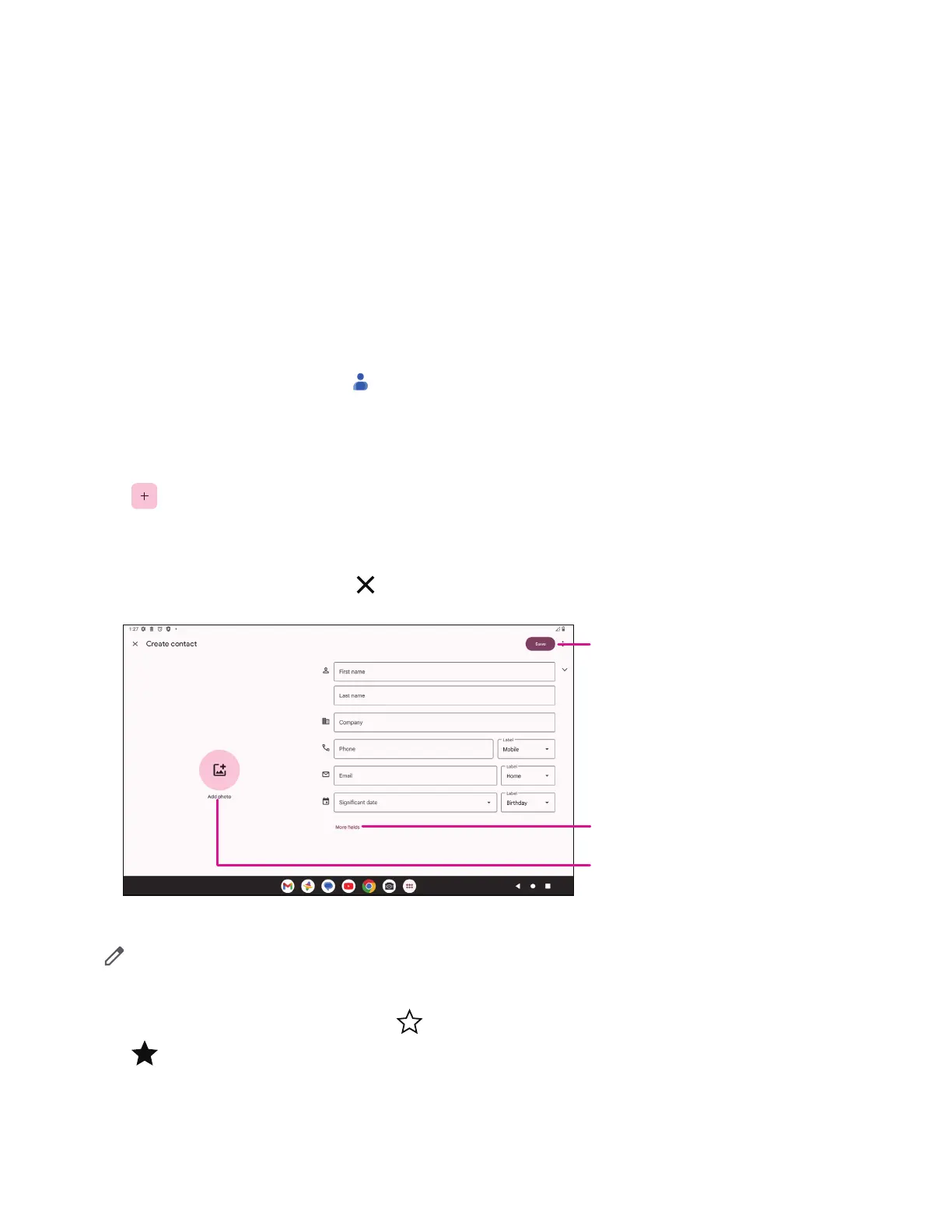
Adding acontact
• Touch in the contact list to create anew contact.
• Enter the contact’sname and other contact information.
• When finished, touch Save.
• To exit without saving, you can touch
and then touch Discard.
When finished, touch Save
Touch to open available labels
Select apicture or take aphoto for the
contact
Editing your contacts
Touch in the contact details screen to edit. When finished, touch Save.
Add to/remove from Favorites
(1)
• Touch acontact to view details then touch to add the contact to favorites.
• Touch
again to remove acontact from favorites.


 To Next Page