16
4.5 Camera
Accessing the camera
From the Home screen, touch Camera.
Taking apicture
• Position the object or landscape in the viewfinder, and touch the screen to focus if necessary.
• Touch
to take the picture which will be automatically saved.
• To take burst shots, touch and hold
.
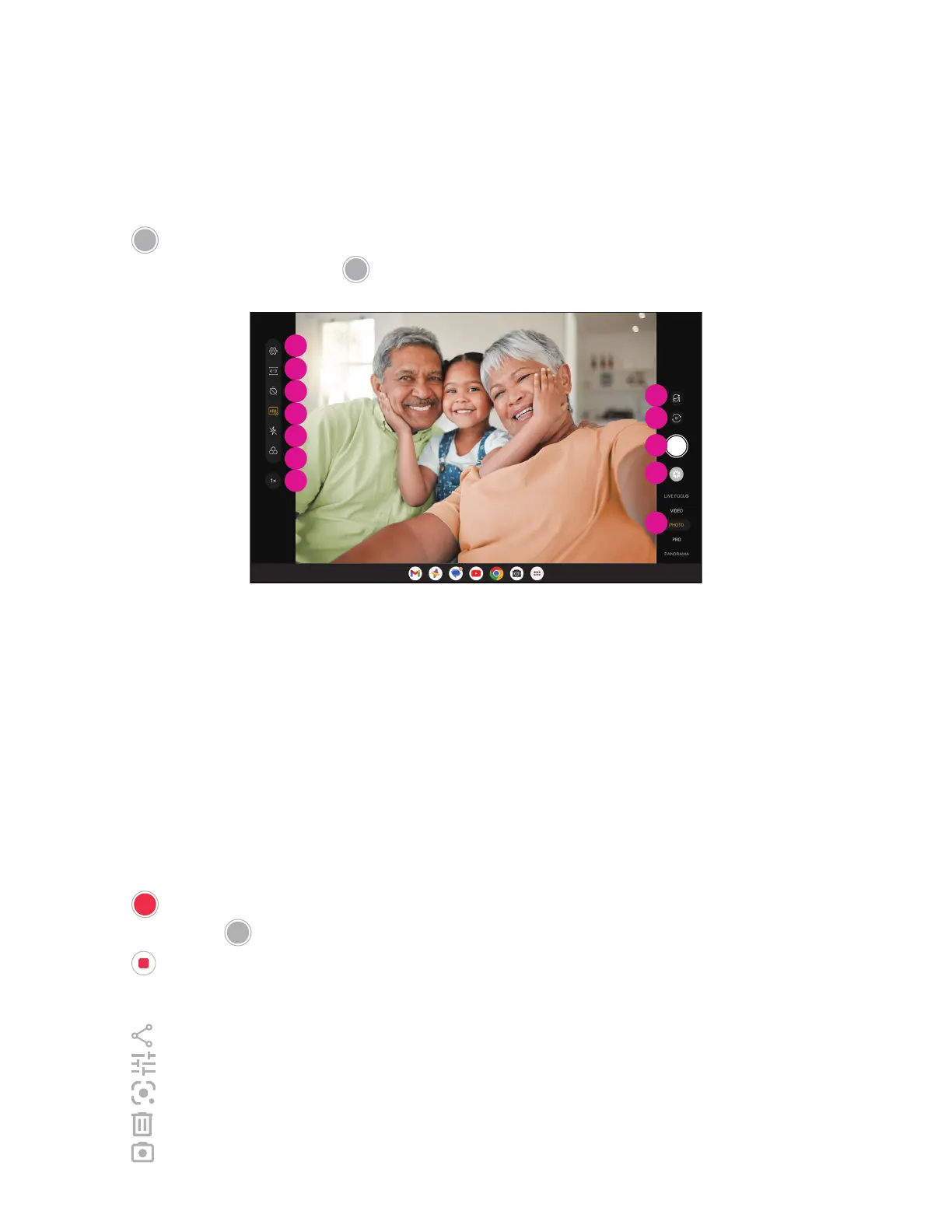
1
2
3
6
4
7
5
8
9
10
11
12
1 Access more options
2 Select shot size
3 Set countdown seconds
4 Choose HDR mode
5 Select flash mode to select flash mode: Off,
Auto, On, or Always
6 Select afilter
7 Adjust shooting distance
8 Select abeauty mode
9 Switch between front/back camera
0 Take aphoto
qa View photos or videos you have taken
qs Select afilter shooting mode: LIVE FOCUS,
VIDEO PHOTO, PRO, PANORAMA
Making avideo
• Touch VIDEO to enter the Video mode.
• Touch
in the center of the screen to start video recording.
• You can also touch
to take apicture during video recording.
• Touch
to stop recording. The video will be automatically saved.
Viewing, Editing, & Sharing
• Touch then choose away like Messages to share the photo or video.
• Touch
to edit.
• Touch
to search what you see with Google Lens.
• Touch
to delete.
• Touch
to go back to Camera mode.


 To Next Page