10 LCD64 - Operation Manual
English
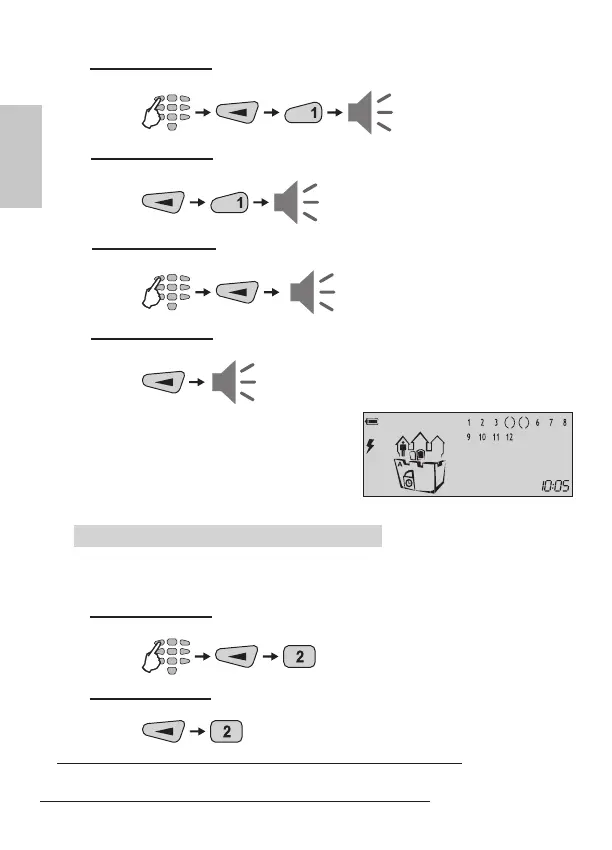
B ARMING VARIANT for “Stay ARMING” of Partition A
(with choosing the type of the ARMING Mode - default setting):
C ARMING VARIANT for “Stay ARMING” of Partition A (quick ARMING without
user code, but with choosing the ARMING Mode type - default setting):
D ARMING VARIANT for “Stay ARMING” of Partition A (without choosing the
type of the ARMING Mode - programmed from the installer):
E ARMING VARIANT for “Stay ARMING” of Partition A (quick ARMING without
user code and ARMING Mode type - programmed from the installer):
At the end of the “Stay ARM” procedure, re-
gardless of the used arming variant, the icons
of “Partition A”, “door” and “clock” are ON.
The icon “man” is ON in the Partition A. The
number(s) of the bypassed zone(s) are missing,
only the brackets around them are visible.
“Instant ARM” Mode for Partition A
Instant arming means the user is allowed to stay in certain zone(s) after arming the
system, but the entrance zone is secured. The difference with the stay arming is that
intrusion into the entrance zone immediately generates an alarm.
B ARMING VARIANT for “Instant ARMING” of Partition A
(with choosing the type of the ARMING Mode - default setting):
C ARMING VARIANT for “Instant ARMING” of Partition A (quick ARMING without
user code, but with choosing the ARMING Mode type - default setting):
* To the user code are assigned rights to operate with Partition A, otherwise the
system will reject the operation.
exit
time
exit
time
exit
time
exit
time
code
*
code*
code*



 To Next Page