LCD64 - Operation Manual 13
English
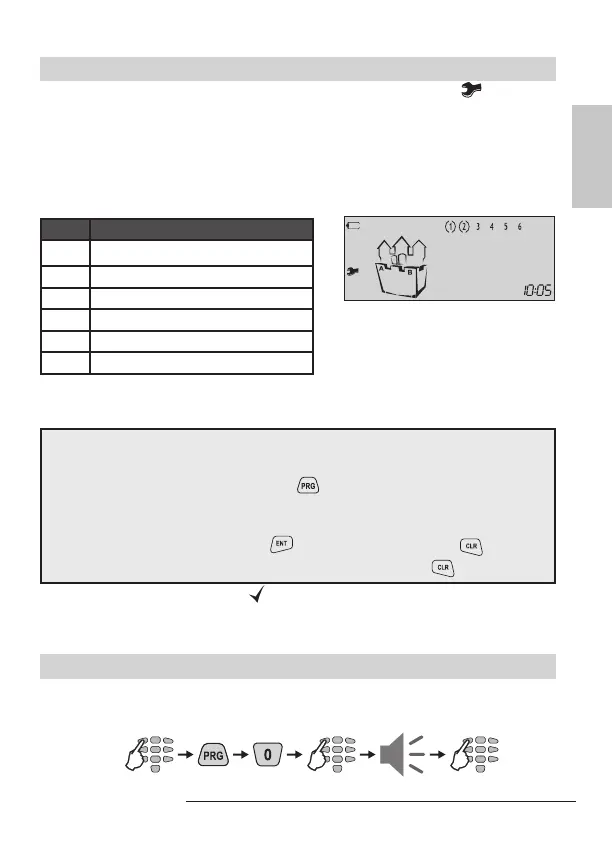
The technical troubles in the system are indicated with blinking icon .
To review the technical troubles in a system the user has just to press the TRBL
button. Each number in the LCD upper right corner correspond to a certain system
trouble. The “( )” icon surrounding a number indicates the respective trouble occur-
rence. The system will automatically exit the technical trouble review mode after 30
seconds. The technical trouble sound signalization will stop, but the icon “wrench”
will proceed blinking until the technical trouble is eliminated.
Every surrounded in brackets digit on the display indicates one technical trouble:
LCD
(1) No 220 V power supply
(2) Battery charge level is low
(3) Fuse blown
(4) No telephone line
(5) No communication available
(6) Active TAMPER within the system
User’s Programming Menu
General rules for programming parameters in the User’s Menu
Enter a valid user code → 4 or 6 digits
Single press the PRG button →
Enter an address number → (1 digit)
Change the parameter value
Conrm the change with →
button / or reject it with → button
Exit from the User Programming Menu → press several times
button
The blinking LEDs “Ready” and “
” icon show that the system is in programming
mode.
Note: Certain users may not be permitted to program the system.
Changing Own User Code
The user is required to enter his current personal code before changing it.
Sequence of operations for changing user code:
Example: Two technical troubles
in the system - No power supply
of the control panel and low bat-
tery charge.
4 or 6 digits
new code
repeat
code
new code



 To Next Page