LCD64 - Operation Manual 9
English
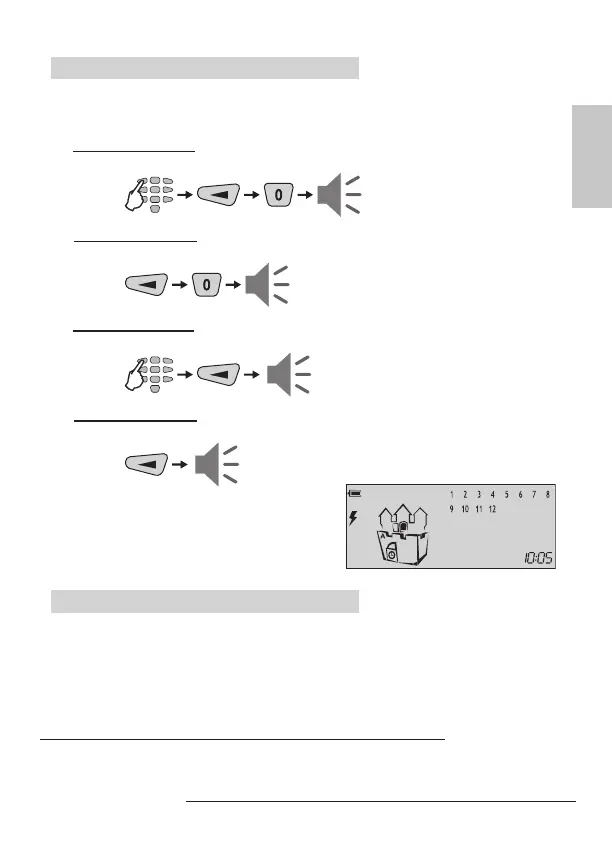
“Full ARM” Mode for Partition A
Full arming means all zones are secured. Anyone coming into the entrance zone
is required to enter a valid code*. Otherwise an alarm will be generated after the
entrance time is over.
B ARMING VARIANT for “Full ARMING” of Partition A
(with choosing the type of the ARMING Mode - default setting):
C ARMING VARIANT for “Full ARMING” of Partition A (quick ARMING without
user code, but with choosing the ARMING Mode type - default setting):
D ARMING VARIANT for “Full ARMING” of Partition A (without choosing the type
of the ARMING Mode - programmed from the installer):
E ARMING VARIANT for “Full ARMING” of Partition A (quick ARMING without
user code and ARMING Mode type - programmed from the installer):
At the end of the “Full ARM” procedure, re-
gardless of the used arming variant, the icons
of “Partition A”, “door” and “clock” are ON.
“Stay ARM” Mode for Partition A
Stay arming means the user is allowed to stay in certain bypassed zone(s) after arm-
ing the system, but the entrance zone is secured. Anyone coming into the entrance
zone is required to enter a valid code*. Otherwise an alarm will be generated after
the entrance time is over.
The zone bypassing is described on page 14 (user) and 19 (manager).
Note: Certain users may not be permitted to arm the system in “Stay ARM” mode.
* To the user code are assigned rights to operate with Partition A, otherwise the
system will reject the operation.
code
*
exit
time
code
*
exit
time
exit
time
exit
time



 To Next Page