LCD64 - Operation Manual 17
English
Changing of User Codes
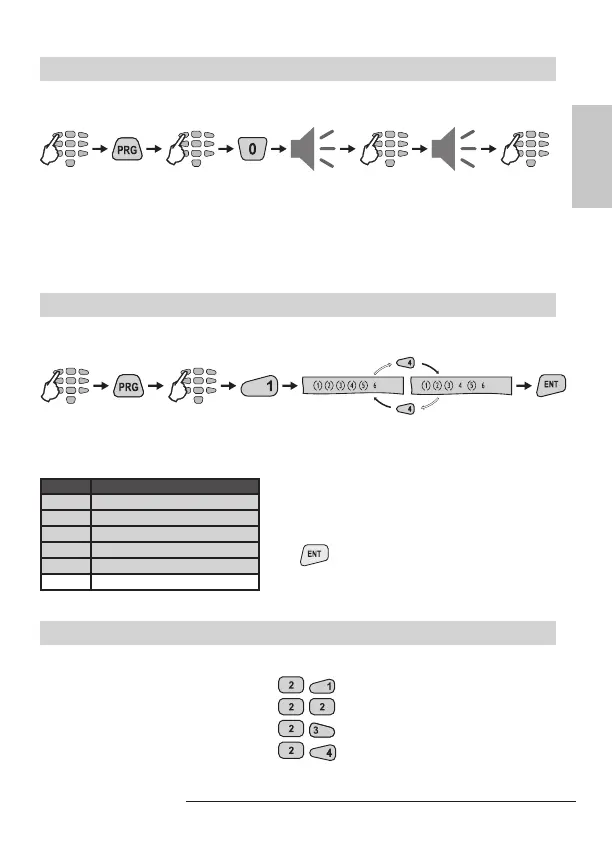
To change a user code the Manager is required to enter his personal code rst.
User code change button sequence:
Numbers (3), (4), (5) and (6) are ON to indicate the number of code digits left to be
entered. Note: If 6-digit codes are used in the system, then numbers (1), (2), (3),
(4), (5) and (6) are ON. If the new code is repeated correctly the system will conrm
it with a sound signal.
Changing of User Rights
To change the User rights the Manager is required to enter his personal code rst.
User rights change button sequence:
code
The display indicates the respective operations the user is allowed to execute. The
numbers in brackets indicate the permitted operations.
* Default settings for User’s rights.
Changing of Manager Codes
code
new codenew code
4 or 6
digits
repeat
user
default settings
programming
LCD User’s rights
(1) DISARM*
(2) Stay ARM*
(3) Bypass*
(4) Programming*
(5) Working with Partition A*
6 Working with Partition B
Pressing a numeric button alternatively
switches over the state of the respective
user’s right from disabled to enabled. The se-
lected programming is conrmed by pressing
the
button.
Note: Disabling all user rights will automatical-
ly erase the programmed code combination!
Addresses for Manager codes:
- Changing the Chief Manager code
- Changing the Manager code No1
- Changing the Manager code No2
- Changing the Manager code No3
Up to 4 different manager codes
can be programmed in the СА62
control panel, i.e. there can be up to
4 Managers in the system - 1 Chief
Manager and 3 sub-managers.
The changing of the different Man-
ager codes can be done at different
addresses in the system.



 To Next Page