LCD64 - Operation Manual 11
English
D ARMING VARIANT for “Instant ARMING” of Partition A (without choosing the
type of the ARMING Mode - programmed from the installer):
E ARMING VARIANT for “Instant ARMING” of Partition A (quick ARMING without
user code and ARMING Mode type - programmed from the installer):
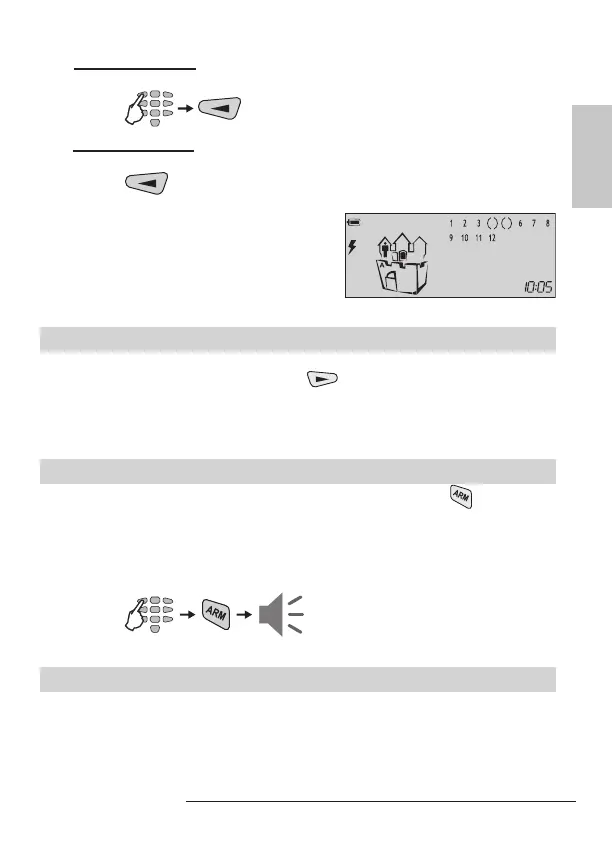
At the end of the “Instant ARM” procedure, re-
gardless of the used arming variant, the icons
of “Partition A” and “door” are ON. The icon
“man” is ON in the Partition A. The number(s)
of the bypassed zone(s) are missing, only the
brackets around them are visible.
Arming of Partition B
ARMING of the Partition В in the system is done in the same way, as shown above
for the Partition A, but the user presses the
button. The user must have a valid
code for Partition B!
When the system is used to protect two independent sites, it is possible also to arm
Partition A in one ARMING Mode and Partition B in another.
Arming Both Partitions A and B
For ARMING both Partitions A and B together, the user can use the button, when
this function is programmed from the Installer.
Note: With the ARM Button the user can arm the system only in “Full ARM” Mode.
The user must have a valid code with rights to operate in both Partition A and B.
ARMING Both Partitions A and B in “Full ARM” Mode (programmed from the installer):
Going into the entrance zone the user must introduce his personal code. A continu-
ous sound signal indicates intrusion in the entry zone and entry time starts running.
Note: Certain users may not be permitted to disarm the system.
code
*
exit
time
code



 To Next Page