14 LCD64 - Operation Manual
English
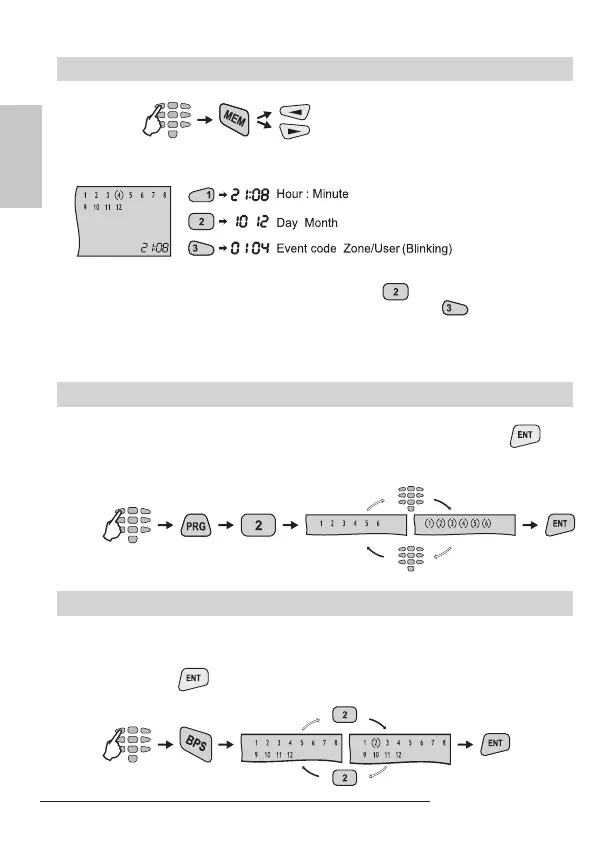
Memory LOG Review from User
To review the memory LOG le the user has to enter a valid code:
To view the code, the time and the date of the event use the following buttons:
Example: There has been an alarm event in the 4
th
zone at 21:08h - this is the rst
information displayed on the LCD screen. Press the
button to see the day and
month of happening of the event - December, 10
th
. Press the button - the rst
two digits are the event code number (check it in the Appendix: Table of events on
page 36), the next two digits (blinking) are showing the zone / user number respec-
tively.
To turn the chime mode on or off the user is required a personal code. Pressing any
numeric key switches alternatively the chime mode on and off. Pressing
con-
rms the selection. By default the chime is disabled.
Turning the chime ON and OFF key sequence:
To execute bypass operation the user is required a personal code. Pressing a nu-
meric key bypasses the respective zone. The zone number is surrounded by the “(-)”
icon. Pressing the same key once again restores the zone bypass. The “(-)” icon is
removed. Pressing
conrms the selection.
Bypassing key sequence (zone 2 in the example):
code
- previous event,
- following event
code
the chime is
the chime is
code



 To Next Page