12 LCD64 - Operation Manual
English
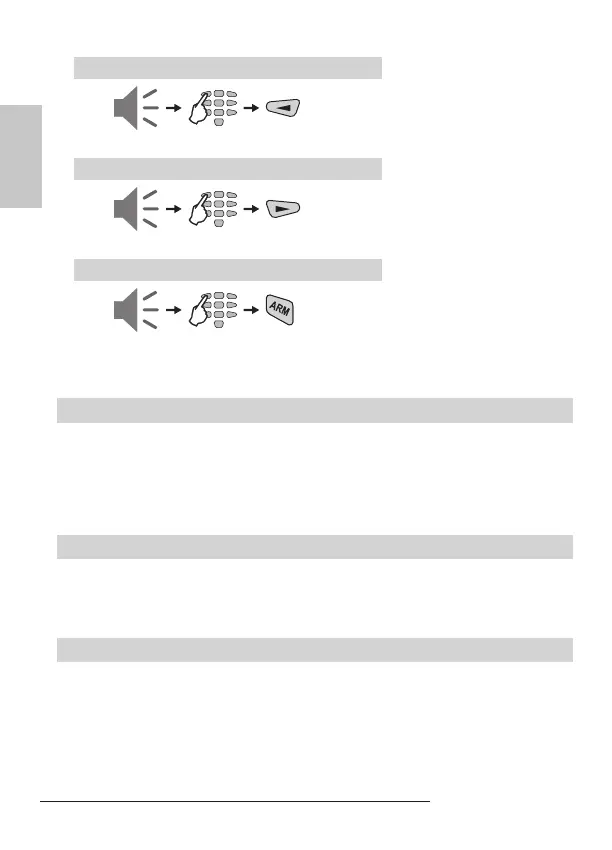
Disarming of Partition A
Disarming of Partition B
Disarming Both Partitions A and B
Stopping the alarm
The alarm is stopped by entering a valid personal code with assigned rights to oper-
ate with both Partitions in the system.
-
Panic Buttons
Use the panic buttons to send alarm signals to the control panel without sounding
the siren - press and hold the panic combinations for 2 seconds:
• PANIC Alarm - 1 + 3; • MEDICAL Alarm - 4 + 6; • FIRE Alarm - 7 + 9.
Ambush code is a personal code that disarms the system, but still sends alarm sig-
nal to a Central monitoring station. Its purpose is to indicate that the user is forced to
disarm the system against his will.
The ambush code is produced from a personal code by increasing the last number
by one. If the last number is 9, it is replaced by 0 in the ambush code.
Example: Personal code: 4615 → Ambush code: 4616
Personal code: 4619 → Ambush code: 4610
entry
time
entry
time
entry
time
code
code
code
Note: To the user code are assigned
rights to operate with Partition A, other-
wise the system will reject the operation!
Note: To the user code are assigned
rights to operate with Partition B, other-
wise the system will reject the operation!
Note: To the user code are assigned
rights to operate with both Partitions A
and B, otherwise the system will DISARM
only that Partition for which the User code
are assigned rights!



 To Next Page