LCD64 - Operation Manual 15
English
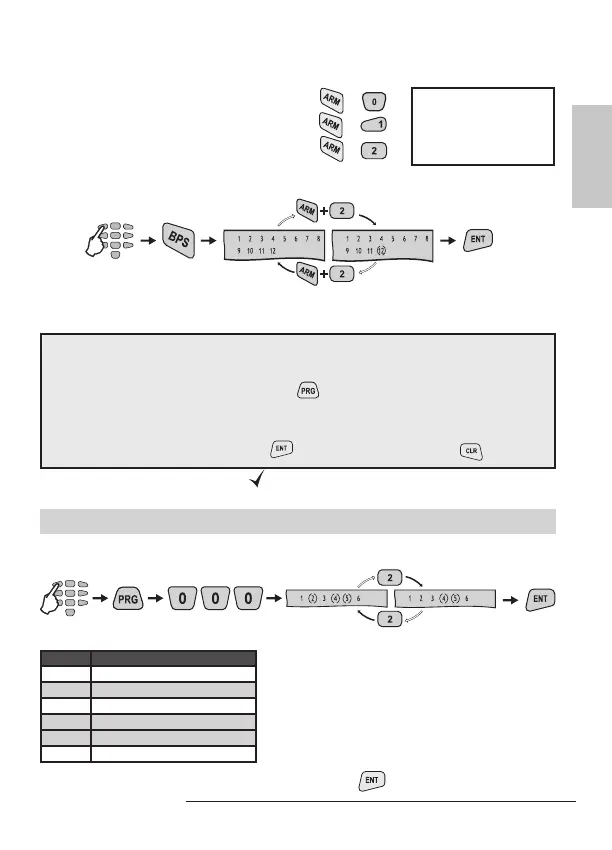
• To bypass Zone 10 use button combination
+ .
• To bypass Zone 11 use button combination
+ .
• To bypass Zone 12 use button combination
+ .
Bypassing zone button sequence (zone 12 in the example):
Manager’s Programming Menu
General rules for programming parameters in the Manager’s Menu
Enter a valid user code → 4 or 6 digits
Single press the PRG button →
Enter an address number → (3 digits)
Change the parameter value
Conrm the change with →
button / or reject it with → button
The blinking LEDs “Ready” and “
” icon show that the system is in programming
mode.
Changing User Rights for Remote Access
To change the user rights for remote access, the manager is required to enter his
personal code rst.
code
* Default settings.
code
The display indicates the respective opera-
tions the user is allowed to execute. The num-
bers in brackets indicate the permitted opera-
tions. Pressing a numeric button alternatively
switches over the state of the respective re-
mote access right from disabled to enabled.
The selected programming is conrmed by
pressing the
button.
default settings
ARM parameter
LCD Remote access rights
1 Remote DISARM
(2) Remote ARM*
3 Remote Code Access
(4) Remote Programming*
(5) Remote LOG Review*
6 Remote Bypass
Note: Certain users
may not be permit-
ted to bypass zones
in the system.



 To Next Page