16 LCD64 - Operation Manual
English
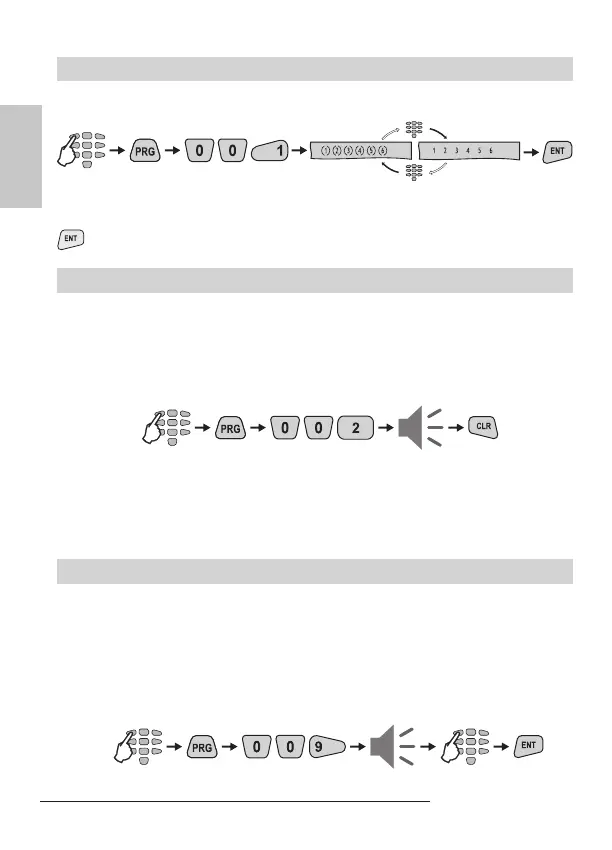
To enable / disable the Engineer code right to access the Engineer programming
menu, the Manager is required to enter a valid code rst:
code
Pressing any numeric button alternatively changes the state of the parameter from
enabled to disabled and vice versa. The selected state is conrmed by pressing the
button. By default the Engineer is allowed to enter the Engineer Menu.
Sending of “Comm. Manual test” Message
At this address the Manager can send a “Communication Manual Test” message to
a central monitoring station or test message with the voice dialer VD60 (just in case
there is integrated voice dialer VD60 to the CA62 control panel). The application
of this function is to test the communication part in the system from the manager,
without need of sending the Engineer to the site.
To send a “Comm. Test” message, the manager is required to enter his code:
The communicator will start transmitting test messages through the digital com-
municator to the central station rst (if there are entered telephone numbers) and
then through VD60 (if it is available in the system and there are entered telephone
numbers).
UDL Access Block
At this address the Manager enters a permissible number of valid access codes for
UDL (ARM / DISARM / BYPASS / PC ID) for a 24 hour period. Enter a number from
00 up to 99 (the default settings is ).
With reaching the permissible number of valid access codes, the system will be
blocked - there would be no UDL communication. The UDL communication will be
restored at 00:00h system time.
To enter a permissible number of codes, the manager is required to enter his per-
sonal code rst:
default setting
Engineer access
code
exit from
the menu
code
digit



 To Next Page