EasyManua.ls Logo

Teletype 28 - Page 65

Teletype 28
176 pages
Print Icon
To Next Page IconTo Next Page
To Previous Page IconTo Previous Page
Loading...
ISS
8,
SECTION
573-118-700TC
2. 55 Typing
Mechanism
(continued}
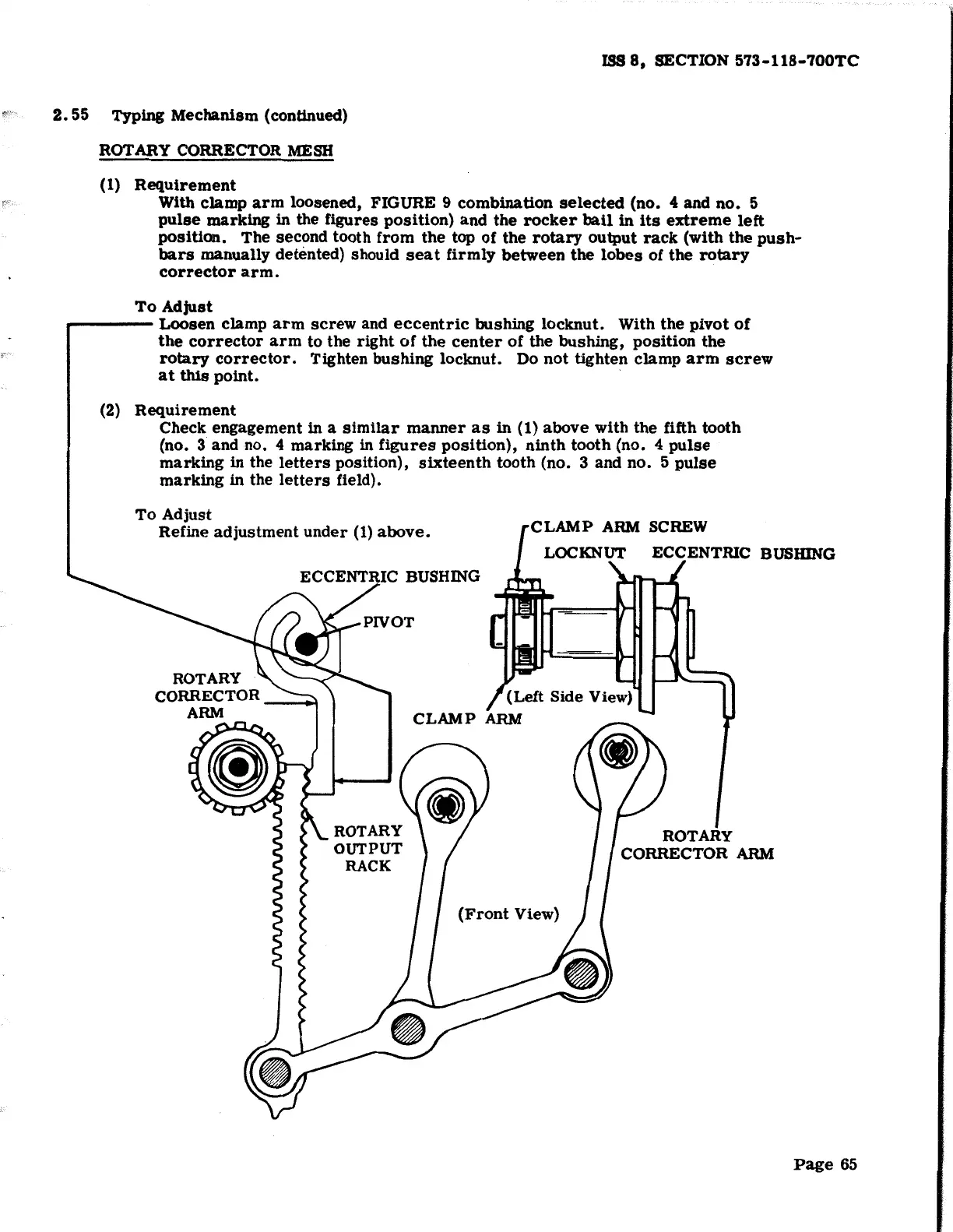
ROTARY CORRECTOR
MESH
(1)
Requirement
With
clamp
arm
loosened, FIGURE 9
combination
selected
(no. 4 and
no.
5
pulse
marking
in the figures
position)
and
the
rocker
bail
in
its
extreme
left
position.
The second tooth
from
the
top
of
the
rotary
output
rack
(with
the
push-
bars
manually
dett~nted)
should
seat
firmly
between
the
lobes
of
the
rotary
corrector
arm.
To
Adjust
a-----
Loosen
clamp
arm
screw
and
eccentric
bushing
locknut.
With
the
pivot
of
the
corrector
arm
to
the
right
of
the
center
of
the
bushing,
position
the
rotary
corrector.
Tighten
bushing
locknut.
Do
not
tighten
clamp
arm
screw
at
this
point.
(2)
Requirement
Check engagement in a
similar
manner
as
in
(1)
above
with
the fifth
tooth
(no. 3 and no. 4 marking in
figures
position),
ninth
tooth
(no. 4
pulse
marking
in the
letters
position),
sixteenth
tooth (no. 3
and
no.
5
pulse
marking
in the
letters
field).
To
Adjust
Refine
adjustment
under
(1)
above.
CLAMP
ARM
SCREW
LOCKNUT ECCENTRIC BUSIUNG
(Left Side View)
,
CLAMP
ARM
(Front
View}
ROTARY
CORRECTOR
ARM
Page
65

Other manuals for Teletype 28

Related product manuals