16
INSTALLATION OPTIONS
Your telephone base is ready for tabletop use. If you want to mount your telephone
on a wall, follow the steps below to connect the telephone base with a standard
dual-stud telephone wall mounting plate. You may need a professional to install the
wall mounting plate.
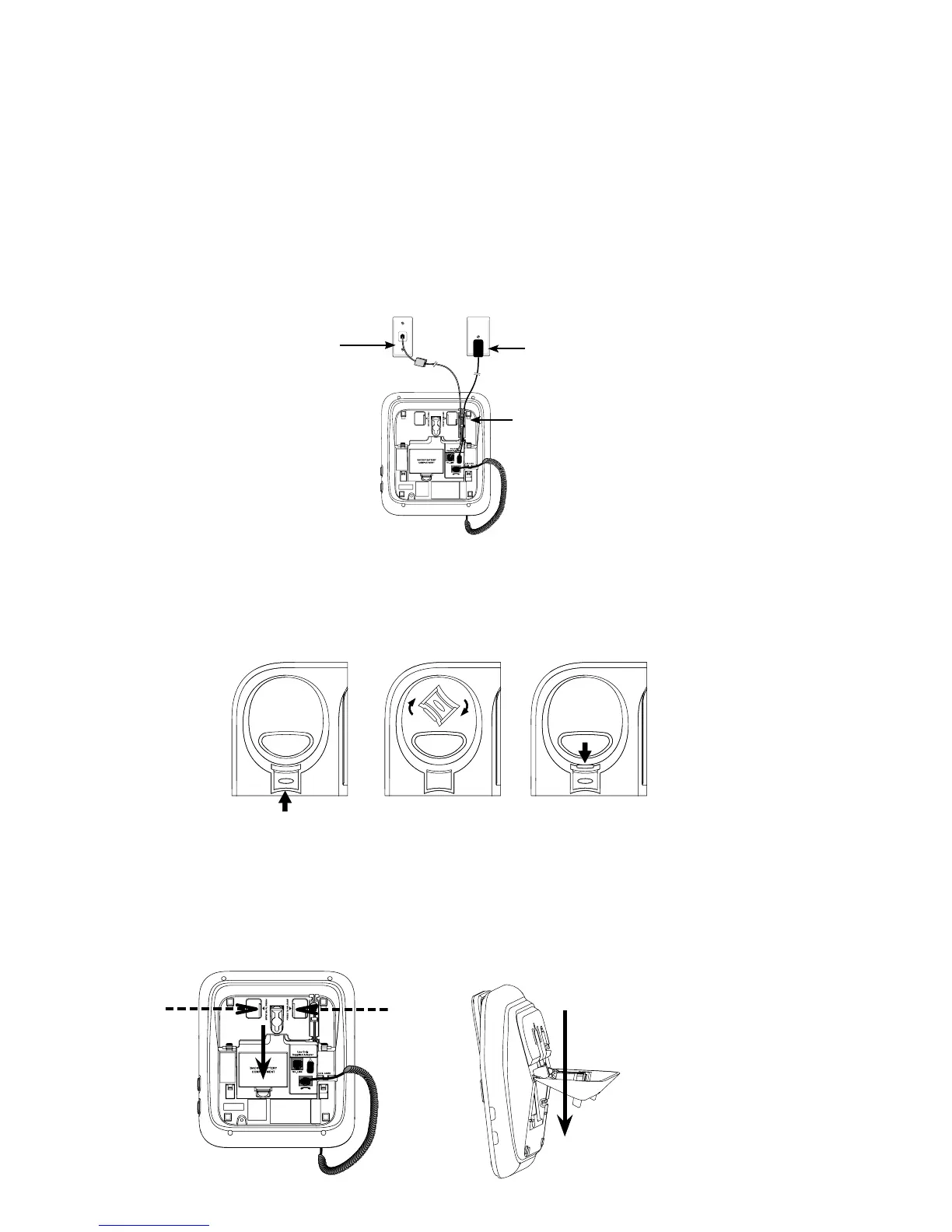
Tabletop to wall mount installation
Unplug the power adaptor from the mains socket. Unplug the telephone line
power adaptor cord from the slot on the wall mount bracket and unplug them
from the telephone base.
Lift the handset and place it aside. Hold down the switch hook on the telephone
base, then slide the handset tab upwards to remove it from the slot. Rotate the
handset tab 180 degrees. Push the handset tab down into the slot so it locks into
position.
Grasp and squeeze the tabs as the arrows indicated to open the hinged bracket.
Route the telephone line cord and the power adaptor cord through the hole of the
wall mount bracket. Plug one end of the telephone line cord into the telephone
1.
2.
3.
Unplug
Unplug
Remove



 To Next Page