14 15
Set date and time manually
1. Press and scroll using to
CLOCK/
ALARM
. Press . Display shows
DATE &
TIME
, then press .
2. Enter the date using the format DD-MM e.g.
04-08 for 4th August.
3. Press
and enter the time using the 24
hour format HH-MM, e.g. 14-45 for 2.45pm.
4. Press to confirm or to return to
standby.
Your Telstra Colombo is now ready for use.
Getting started
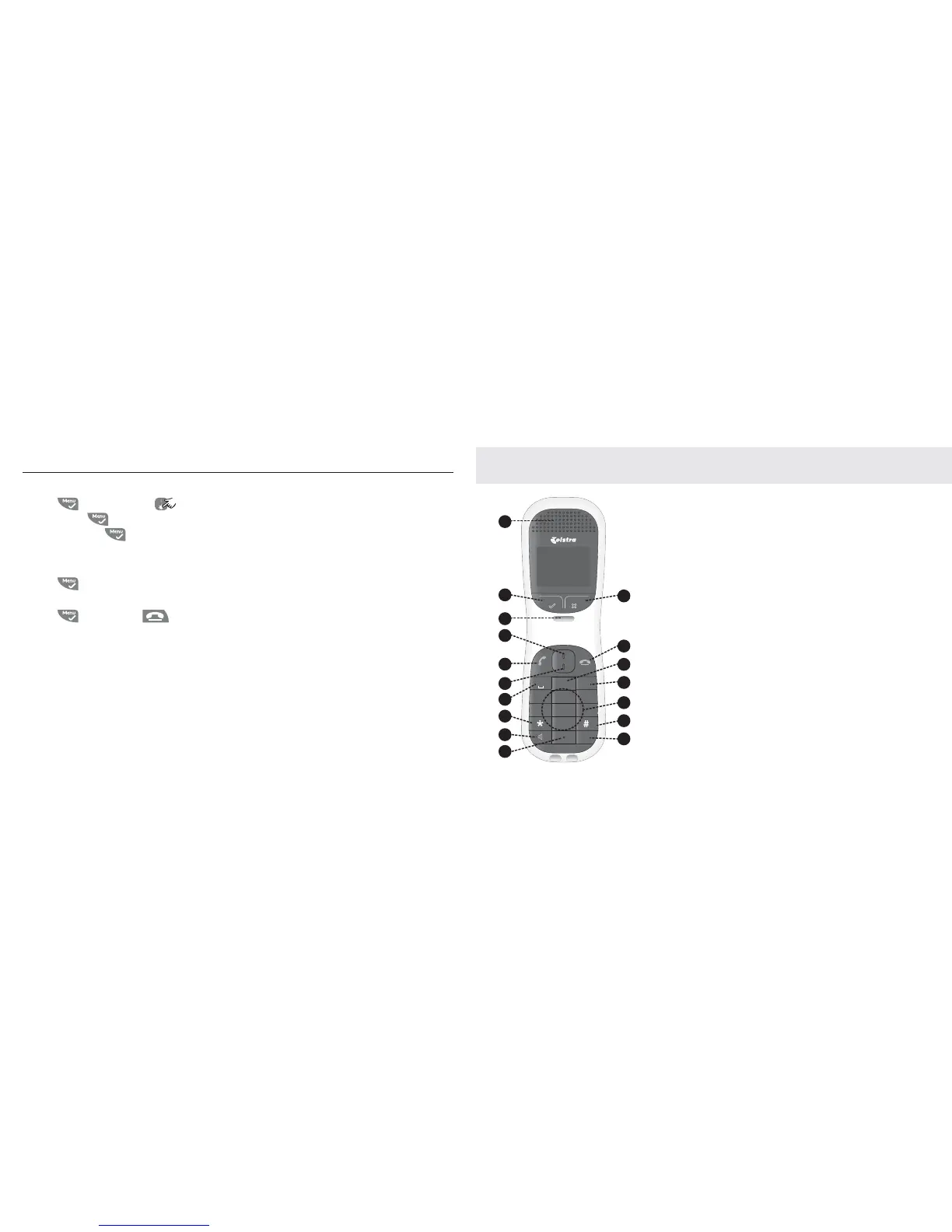
Getting to know your phone
Overview of your handset
1. Earpiece
2. Menu/tick
Enter the main menu from
standby mode. Select the
function displayed on the
handset screen.
3. Handset hook
Engages with base when
wall mounting.
4. Navigation button UP
Enter the Calls List from
standby mode. Scroll
through menu options in
on-screen menu. Increase
the volume when on a call.
5. Talk/Recall
Answer an incoming call.
Initiate an outgoing call.
Access Recall whilst on a
call.
6. Navigation button
DOWN
Enter the Phonebook from
standby mode. Scroll
through menu options in
on-screen menu. Decrease
the volume when on a call.
7. Star button
Long press to lock and
unlock keypad in standby
mode.
7OX_ <ONSKV
<OMKVV
3X^
+,- ./0
!
456123 789
"# $
>?@:;<= ABCD
!
!
"
#



 To Next Page