65
SWRevison: 6
KernVer: 10
KernVar: 49
MdlID: 8884443332221110”
7 Debug mode
FM3602/FM3612 is able to transmit its current state when connected to PC using USB
cable. It is used to detect errors and provide information to possible solutions when operating as
unexpected. Download Terminal from:
http://avl1.teltonika.lt/Downloads/Software/Terminal.zip.
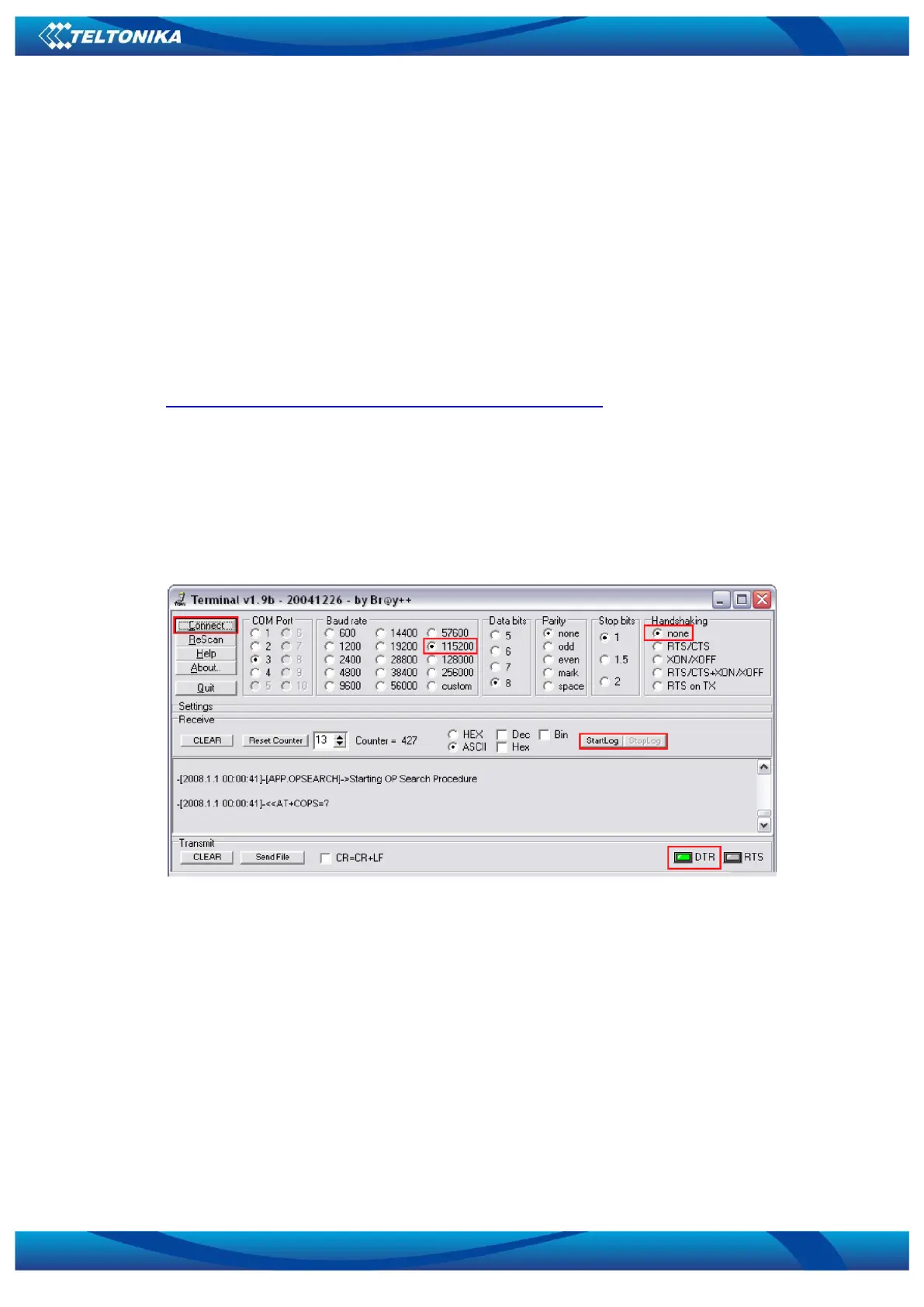
After launching terminal choose baud rate 115200 and hardware control – none. Select
COM port which is assigned to “Virtual COM Port”. Click on ‘Start Log’ button and save a new file.
Then click ‘Connect’ to start receiving messages from FM36X2.
Also you can log NMEA data directly. To get NMEA data, simply enter the following
command into the command field: .log_nmea:1$0a.
Figure 53. Terminal window for logging
8 Parameter List
8.1 Parameters value types
S8 – Signed Char
S8[n] – String of n Char
U8 – Unsigned Char
U16 – Unsigned Short
S32 – Signed Integer
U32 – Unsigned Integer
U64 – Unsigned Long Long Integer



 To Next Page