5 Working Operation of the machine
54 TL80
5.2 Operation - Loader
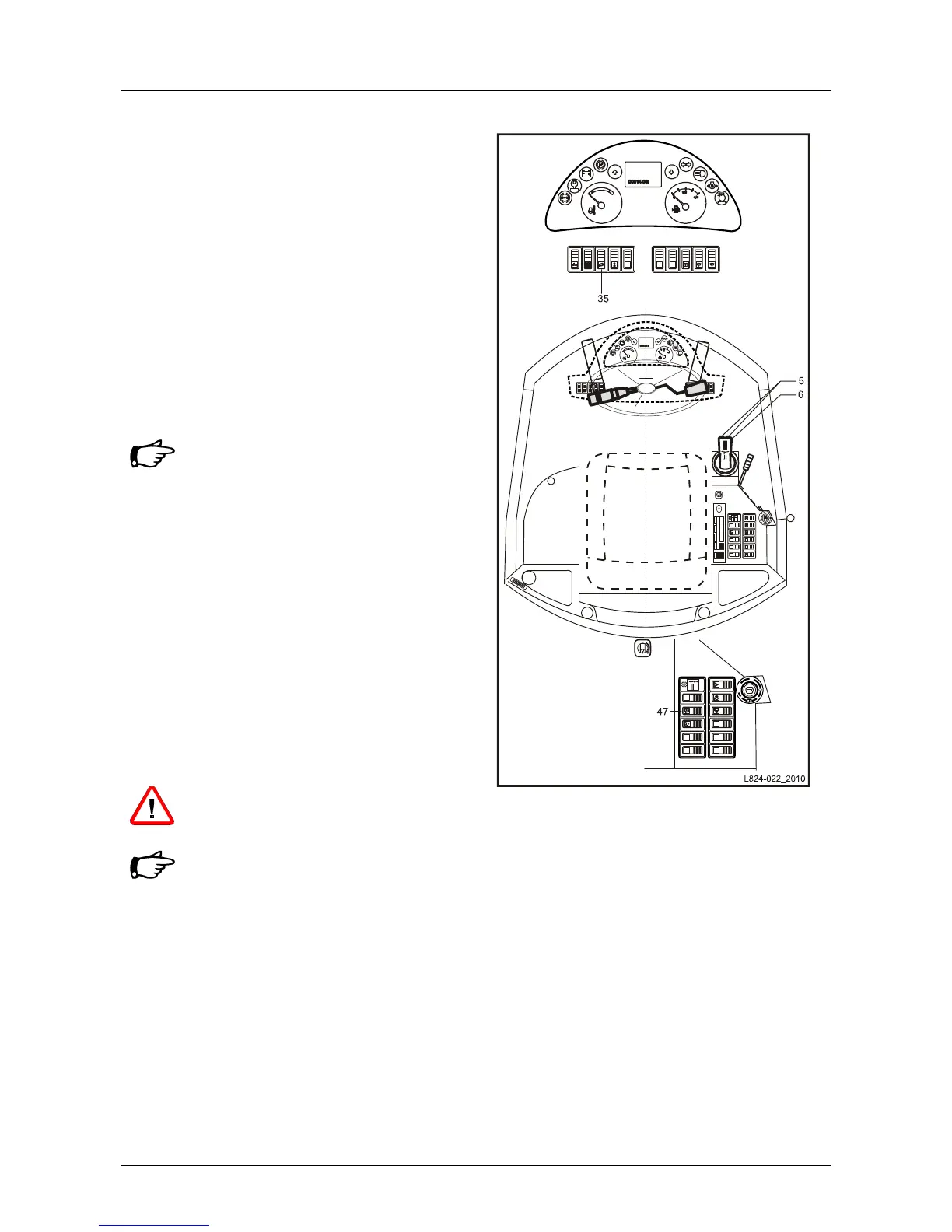
• Switch on the work equipment (22/35).
Operation - Bucket
• Operate joystick (22/6).
Operation - Additional control circuit
• By pressing the "additional control circuit"
preselection button (22/47) once to the left or
on the symbol, the "impulse addition" function is
activated and can be engaged via the knob
switch (22/5) (e.g. open/close multi-purpose
bucket) on the coordinate lever.
• By pressing the "additional control circuit"
preselection button (22/47) to the right or
deactivating the starter preheat switch (22/50),
the additional control circuit is deactivated.
The additional control circuit must
always be switched off unless
additional equipment is operated.
Continuous operation - Additional control
circuit
• By pressing the "additional control circuit"
preselection button (22/47) twice to the left or
on the symbol, the "continuous operation"
function is preselected.
• The direction of the continuous operation can
be selected and activated or deactivated via the
knob switch (22/5) on the coordinate lever.
• By pressing the "additional control circuit"
preselection button (22/47) once to the right or
deactivating the starter preheat switch (22/50),
the "continuous operation" function is
deactivated.
Observe the working direction of the
attachment device. (e.g. rotating
direction of broom).
The additional control circuit must
always be switched off unless
additional equipment is operated.
Fig. 22 Operation


 To Next Page