2.2 Quick Setup
2.2.1 Onboard Power Supply Operation
The EVM can be supplied power through multiple options. Single-supply operation uses onboard LDOs to
generate the voltages required for operating various sections of the EVM (PHY, MSP430, FO transceiver, and so
forth).
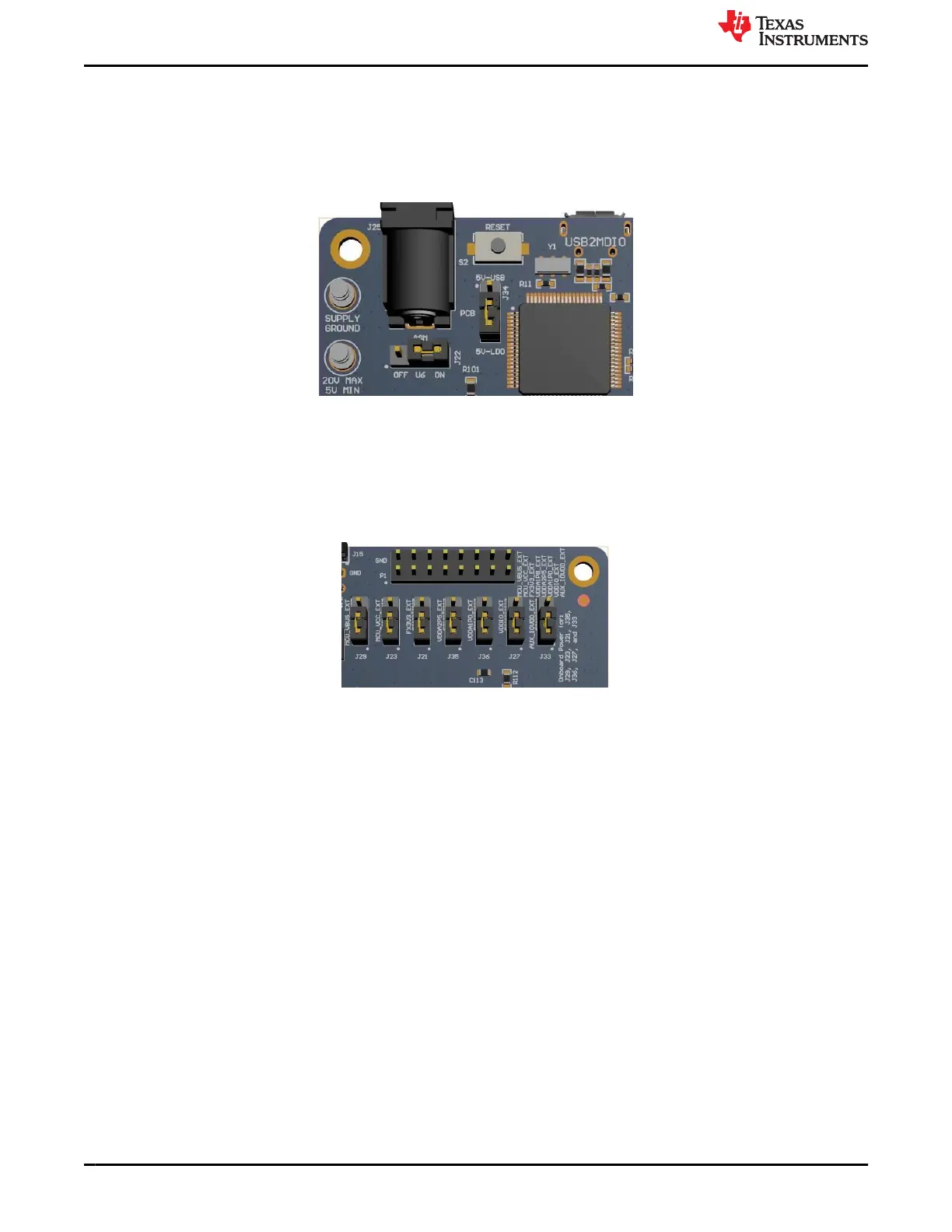
Figure 2-3. Onboard Power Supply Connection
The EVM can be supplied power by either a J25 barrel jack connector, power-supply turrets, or a USB
• For Barrel Jack and Turret, connect the jumper in the ON position to J22 and the jumper on 5V-LDO to J34.
• For USB power, connect the Jumper on 5V-USB position to J34. J22 is don’t care.
2.2.2 External Power Supply Operation
Figure 2-4. Jumper Placements for Onboard Power
The jumpers shown in Figure 2-4 can be used to choose whether a particular voltage rail is supplied through
onboard LDOs or an external power supply. If an external power supply is desired on a voltage rail, then change
the respective jumper from position 1-2 (LDO) to 2-3 (External). Then, connect the appropriate voltage on the
corresponding pin to the P1 connector. For example, if the VDDA2P5 is to be supplied from an external supply,
then change jumper position of J35 from 1-2 to 2-3. Then connect the 2.5-V external supply on pins 9-10 on the
P1 connector. Note that pin 9 is supply and pin 10 is ground.
2.2.3 Software
The onboard MSP430 comes pre-programmed and ready to use. When using this EVM for the first time on a
Windows 7 (or above) PC, MSP430 drivers and USB2MDIO software utility has to be installed. The USB2MDIO
software can be used for accessing registers.
2.2.3.1 MSP430 Driver
Install the latest MSP430 drive from this website: http://software-dl.ti.com/msp430/msp430_public_sw/mcu/
msp430/MSP430_FET_Drivers/latest/index_FDS.html.
Introduction www.ti.com
6 DP83869 Evaluation Module SNLU237A – SEPTEMBER 2018 – REVISED JANUARY 2024
Submit Document Feedback
Copyright © 2024 Texas Instruments Incorporated







 To Next Page