2 Getting Started
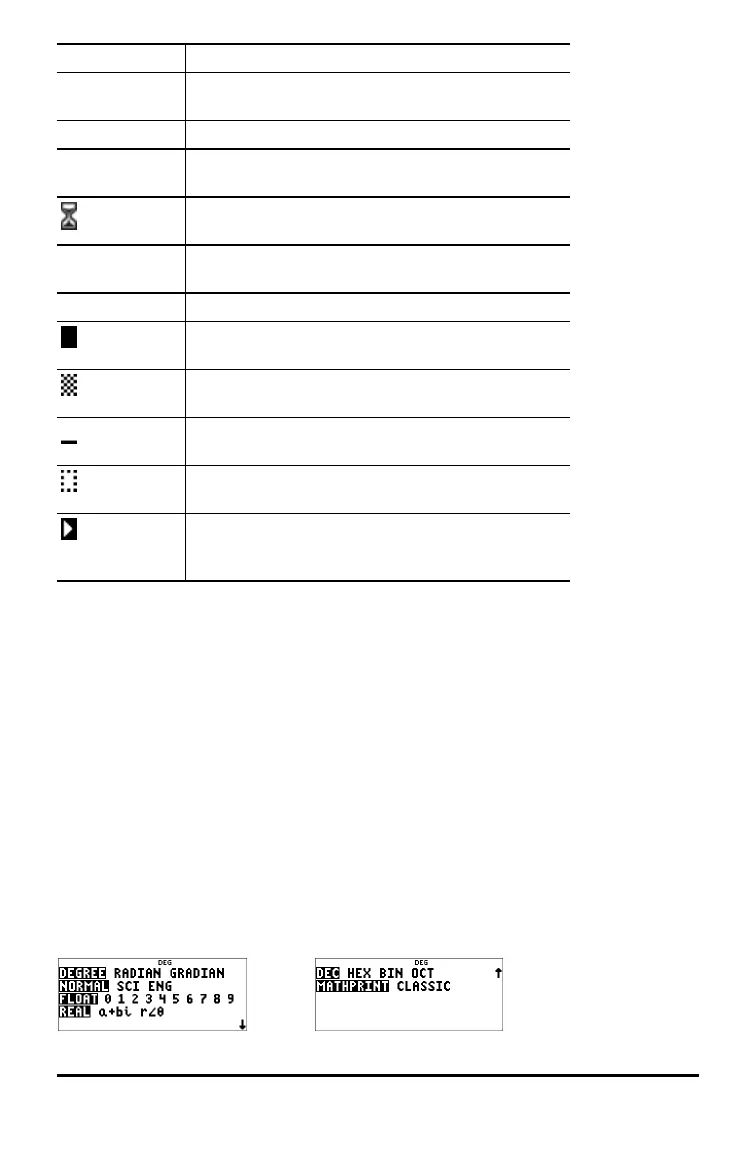
Indicator Definition
DEG, RAD,
GRAD
Angle mode (degrees, radians, or gradians). (See
Mode section.)
L1, L2, L3 Displays above the lists in data editor.
H, B, O Indicates HEX, BIN, or OCT number-base mode. No
indicator displayed for default DEC mode.
The calculator is performing an operation. Use &
to break the calculation.
5 6 An entry is stored in memory before and/or after
the visible screen area. Press # and $ to scroll.
´
Indicates that the multi-tap key is active.
Normal cursor. Shows where the next item you
type will appear. Replaces any current character.
Entry-limit cursor. No additional characters can be
entered.
Insert cursor. A character is inserted in front of the
cursor location.
Placeholder box for empty MathPrint™ template.
Use the arrow keys to move into the box.
MathPrint™ cursor. Continue entering in the
current MathPrint™ template, or press " to exit
the template.
2nd Functions
%
Most keys can perform more than one function. The primary function is indicated on
the key and the secondary function is displayed above it. Press % to enable the
secondary function of a given key. Notice that 2ND appears as an indicator on the
screen. To cancel before pressing the next key, press % again. For example, % b
25 < calculates the square root of 25 and returns the result, 5.
Modes
q
Use q to choose modes. Press $ # ! " to choose a mode, and < to select it.
Press - or % s to return to the Home screen and perform your work using the
chosen mode settings.
Default settings are highlighted in these sample screens.










 To Next Page