Remote Control Panel Features (Rev. 04/03)
27
3. Press the Enter key to load the new setpoint into the microprocessor. The display will briefly show [Lod] and
then the new setpoint will reappear in the display.
IMPORTANT: The Enter key must be pressed or the setpoint will not be changed. The display will return to the Stan-
dard Display and the setpoint will return to the old setpoint in about 10 seconds if the Enter key is not pressed.
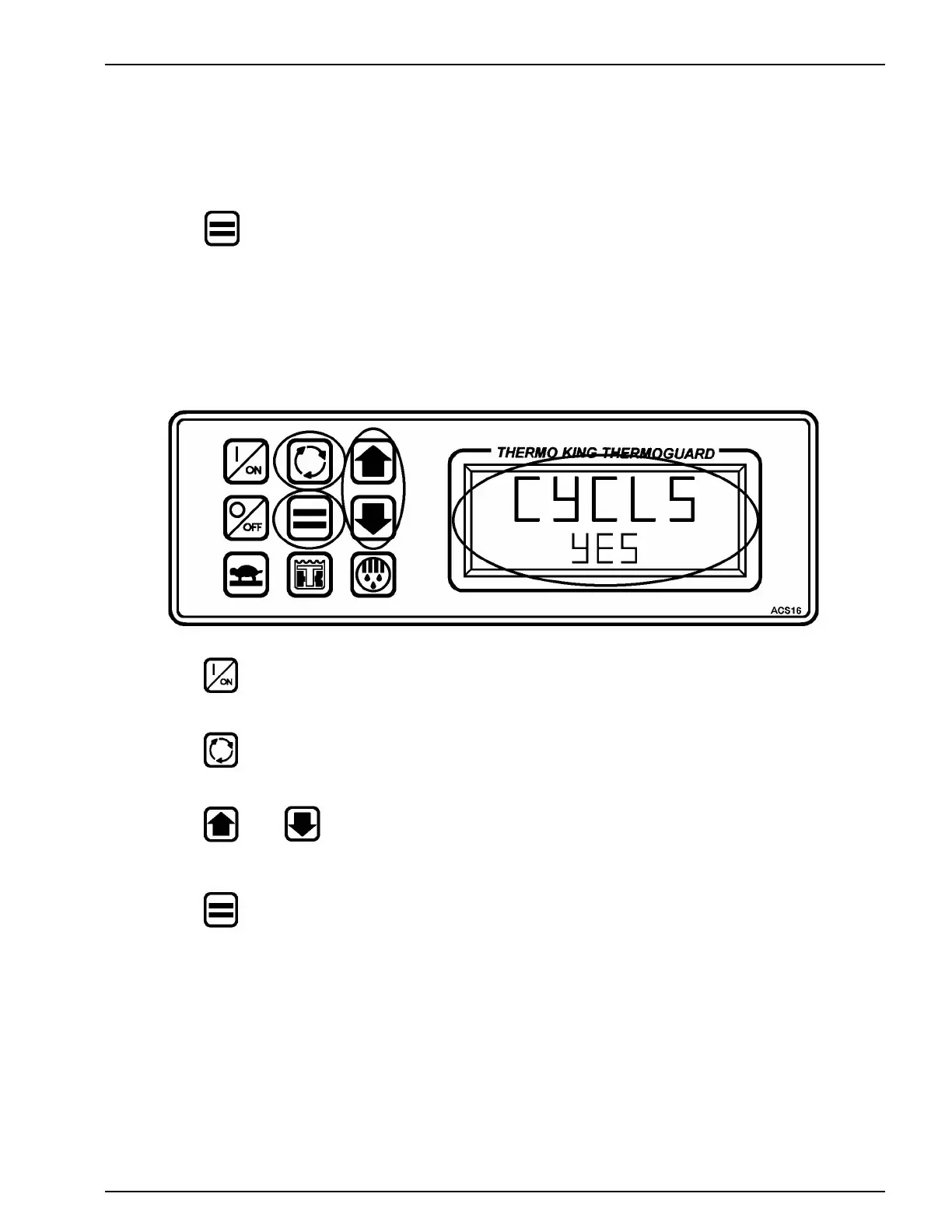
SELECTING CYCLE-SENTRY or CONTINUOUS MODE
1. Press the ON key to turn the unit ON.
2. Press the Select key to display [CYCLS] and [YES] or [no].
3. Press the or Arrow keys to select the desired mode [YES] = CYCLE SENTRY mode
[no] = Continuous mode.
4. Press the Enter key to load the new operating mode selection into the microprocessor.
IMPORTANT: The Enter key must be pressed or the setpoint will not be changed. The display will return to the Stan-
dard Display and the setpoint will return to the old setpoint in about 10 seconds if the Enter key is not pressed.



 To Next Page