Page 21 of 29 Revision 3.3 Feb 2021
ProReact EN Analogue Installation Manual
Document Ref. PACC-MAN
Commissioning
Normal Operation
10. Select the alarm temperature chosen for the application. See “Theory
of Operation” section for choosing an alarm temperature.
11. Select whether the pre-alarm function should be enabled. If no
prealarm is required, select “No” and continue to step 13.
12. Select the desired pre-alarm temperature based upon the chosen
alarm temperature. See “Theory of Operation” section for choosing a pre-
alarm temperature.
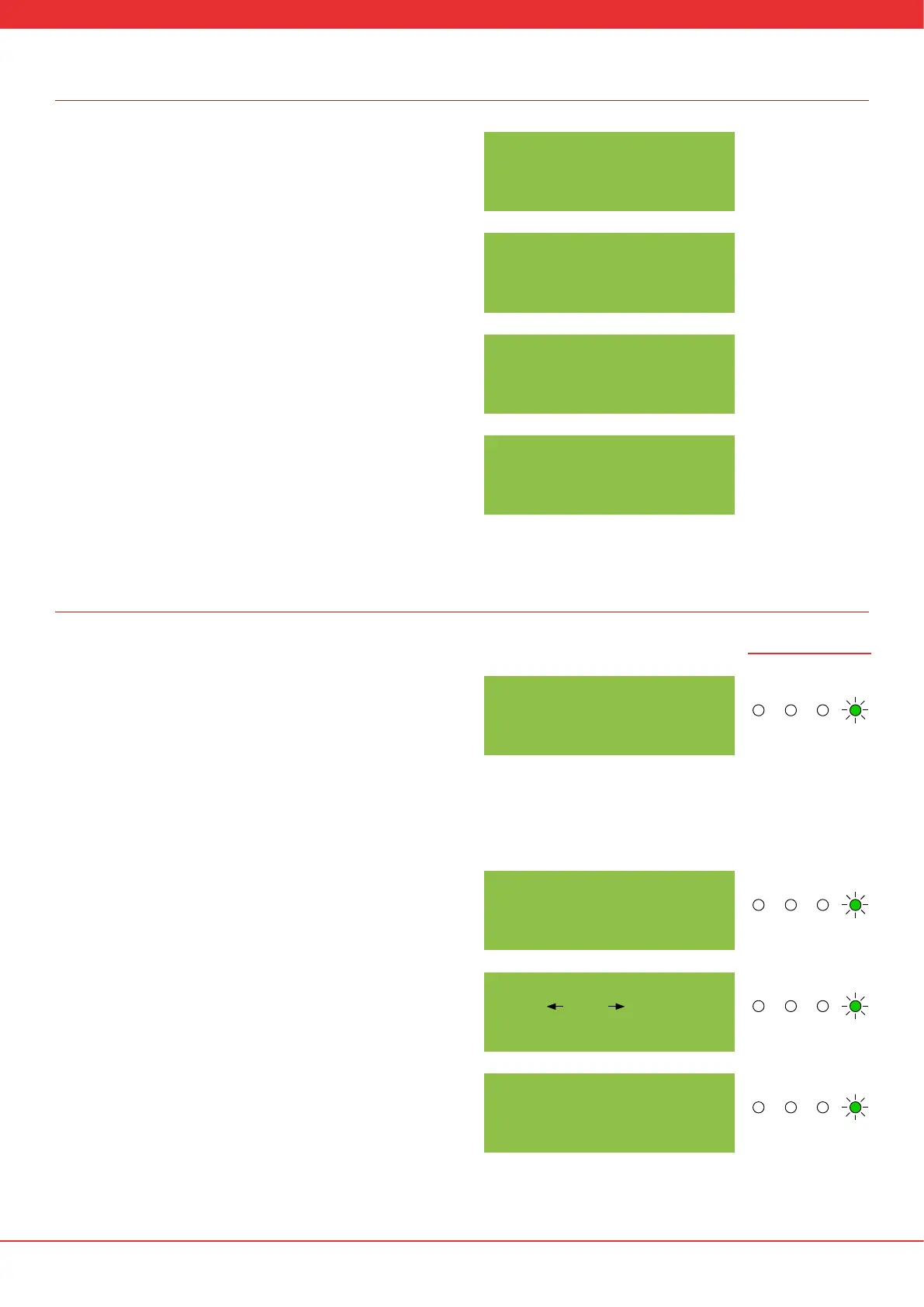
13. Once the desired settings have been chosen, the screen will show the
diagnostic information. The top line “Curr:” shows the current measured
resistance of the sensor cable. The bottom line shows the measured
average ambient temperature of the sensor cable (in this case 13.4°C) and
the alarm threshold resistance (in this case 88.6MΩ).
14. Ensure the measured average ambient temperature of the sensor
cable (in this case 13.4°C) closely matches (within +/- 2.5°C) the actual
average ambient temperature of the sensor cable. Use an accurate,
calibrated temperature measuring device (e.g. thermocouple probe)
to determine the actual ambient temperature of the sensor cable
before adjusting the measured ambient temperature. Ensure the sensor
cable has had sucient time to stabilise to the surrounding ambient
temperature before making any adjustments. The measured ambient
temperature can be adjusted in the following steps.
15. Press SELECT to show the normal operation menu options. The rst
menu option allows adjustment of the measured average ambient
temperature. Press SET to go into the sub-menu (see step 16) or SELECT
to go to the next option (see step 17).
16. If ‘Adjust Amb Temp’ is selected the screen will display as shown
right. Press SELECT to adjust the ambient temperature higher or SET to
adjust the ambient temperature lower. Once the ambient temperature
is correct, do not press any buttons for 10s. The control unit will save the
current setting and return to the diagnostics screen (see step 13).
17. The control unit stores the most recent three alarm conditions. Press
SET on the ‘Alarm Log?’ option to cycle through the last three logs.
Otherwise skip to step 19.
A LA R M TEM P:
64
O
C
curr: 200MΩ
1 3.4
O
C A:88.6MΩ
PREALARM TEMP:
54
O
C
curr: 200MΩ
1 3.4
O
C A:88.6MΩ
ALARM LOG?
1 3.4
O
C A:88.6MΩ
PREALARM ENABLE:
YES
ADJUST AMB TEMP?
1 3.4
O
C A:88.6MΩ
l UP AMB DOWN l
1 5.4
O
C A:88.6MΩ
LED Illustrations
Alarm Fault Power
Pre
Alarm
Alarm Fault Power
Pre
Alarm
Alarm Fault Power
Pre
Alarm
Alarm Fault Power
Pre
Alarm
Alarm Fault Power
Pre
Alarm
Alarm Fault Power
Pre
Alarm
Alarm Fault Power
Pre
Alarm
Alarm Fault Power
Pre
Alarm
Alarm Fault Power
Pre
Alarm
Alarm Fault Power
Pre
Alarm
Alarm Fault Power
Pre
Alarm
Alarm Fault Power
Pre
Alarm


 To Next Page