Product overview
9
1.2 Part names
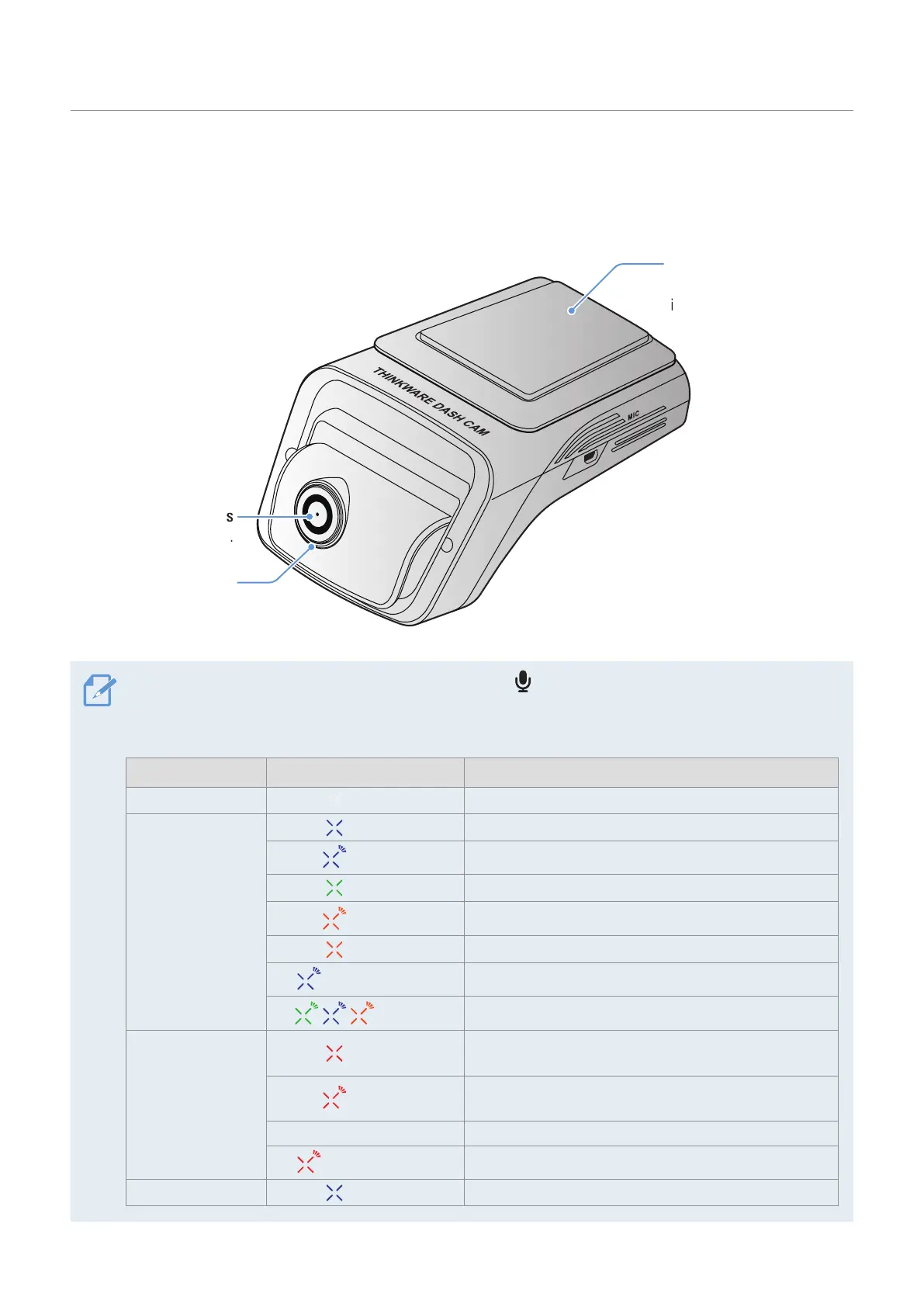
1.2.1 Front camera (main unit) - front view
Rear camera lens
Records the rear view.
Security LED
Indicates that video is
being recorded.
Adhesive mount
Used to fix the rear camera
in the vehicle.
• To reset the product, press and hold the voice recording ( ) and manual recording (REC) buttons
simultaneously until you hear beeps.
• Refer to the following table to check the status of the product using the LED indicators.
LED LED STATUS Operation description
Front Security LED
(light on)
The product is turned on.
Connection LED
(light on)
Bluetooth connected
(flickers)
Bluetooth pairing
(light on)
Wi-Fi connected
(flickers)
Internet Mode pairing (not connected)
(light on)
Internet Mode connected
(flickers quickly)
SOS recording
(flickers)
Bluetooth/Wi-Fi reset
REC LED
(light on)
Continuous Recording/Parking Recording
(Time Lapse)
(flickers)
Manual recording/Event recording/Parking recording
(Motion Detection)
OFF Parking recording (Energy Saving)
(flickers quickly)
SOS recording
GPS LED
(light on)
GPS activated


 To Next Page