Using Advanced Driver Assistance Systems (ADAS)
30
4.4 The urban forward collision warning system (uFCWS)
When the vehicle drives at 30 km/h or lower, the uFCWS will detect forward collision danger via the real-
time video image and warn the driver.
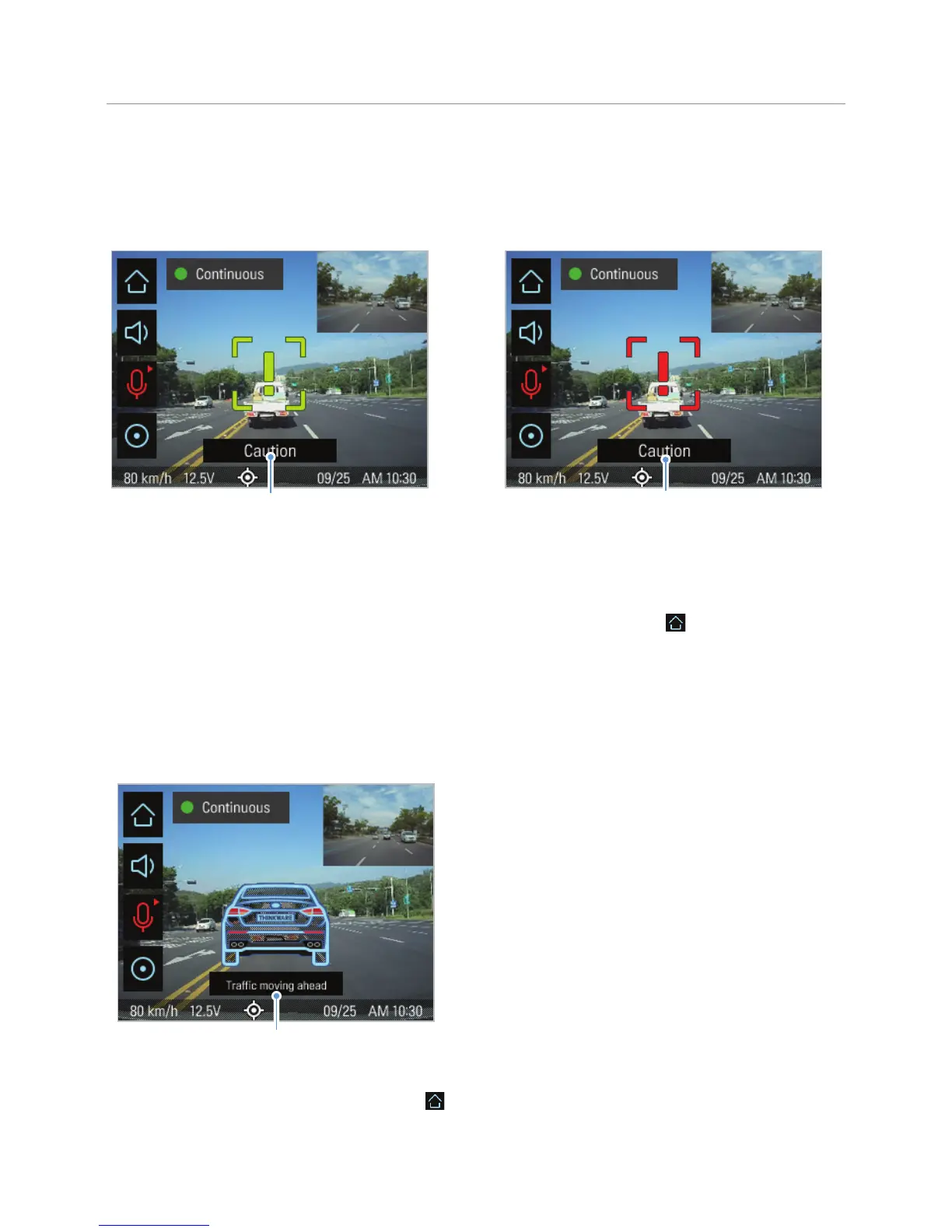
Preliminary low speed forward collision warning:
Displayed when a preliminary low speed collision
hazard is detected.
Secondary low speed forward collision warning:
Displayed when the distance to the vehicle ahead
decreases after a preliminary low speed collision
warning.
To deactivate the uFCWS or change the warning sensitivity, tap the Home button ( ) on the Live view
screen
>
Settings
>
Road Safety Settings, and then tap the button next to FCWS (Low Speed) to switch the
sensitivity option (Low / Mid / High) or OFF to turn off the warning.
4.5 The front vehicle departure warning (FVDW)
The FVDW will detect the departure of the vehicle in front via the real-time video image and notify the driver.
An alarm is output 4 seconds after the vehicle ahead
has departed.
When the vehicle is stopped in traffic, this feature will
detect the departure of the vehicle in front and notify
the driver.
To deactivate the FVDW, tap the Home button (
) on the Live view screen
>
Settings
>
Road Safety
Settings, and then tap the button next to FVDW (Front Vehicle Departure Warning) to switch the setting to
OFF.



 To Next Page