7.6 Transposing
With this function you can adjust the pitch of the keyboard in semitone steps (12 at
max.) up or down.
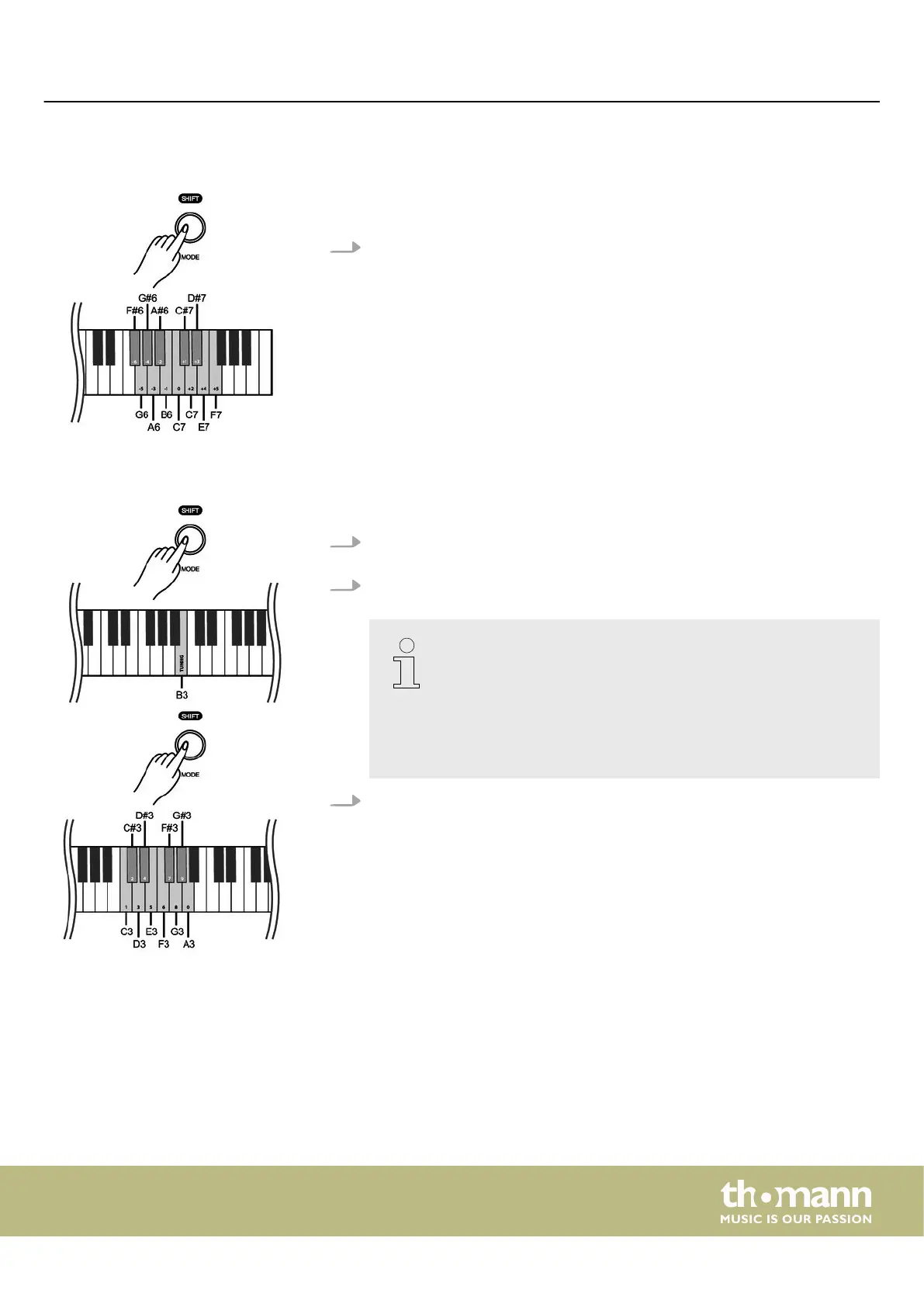
Hold down [SHIFT] and press the piano keys [F#6] … [F7] to adjust the pitch of
the keyboard up or down in 12 semitones.
7.7 Tuning
With this function you can ne tune the pitch of the entire keyboard.
1. Press and hold [SHIFT] and press the piano key [B3] to activate the tuning func‐
tion.
2. Press and hold [SHIFT] and use the piano keys [C3]…[A3] to adjust the tuning in
a range of a semitone (= 100 cent). To do this, enter a four-digit value.
– If you want to change the tuning with the piano keys [C3] to [A3],
always enter it in four-digit format. For example, to set the fre‐
quency to ‘452.3 Hz’ , hold down [SHIFT] and press the piano keys
[D#3], [E3], [C#3] and [D3] in succession..
– To restore the standard pitch (= 440.0 Hz), hold down [SHIFT]
and press the piano keys [D#3], [D#3], [A3] and [A3] in succes‐
sion.
3. Release [SHIFT] to conrm the adjustment.
Switching on / o and basic operation
DP-28 Plus
17



 To Next Page