7.17.3 Damper noise
This function simulates the damper noise eects taking place in an acoustic piano
when dampers are lifted and lowered.
On delivery, the damper noise is activated by default.
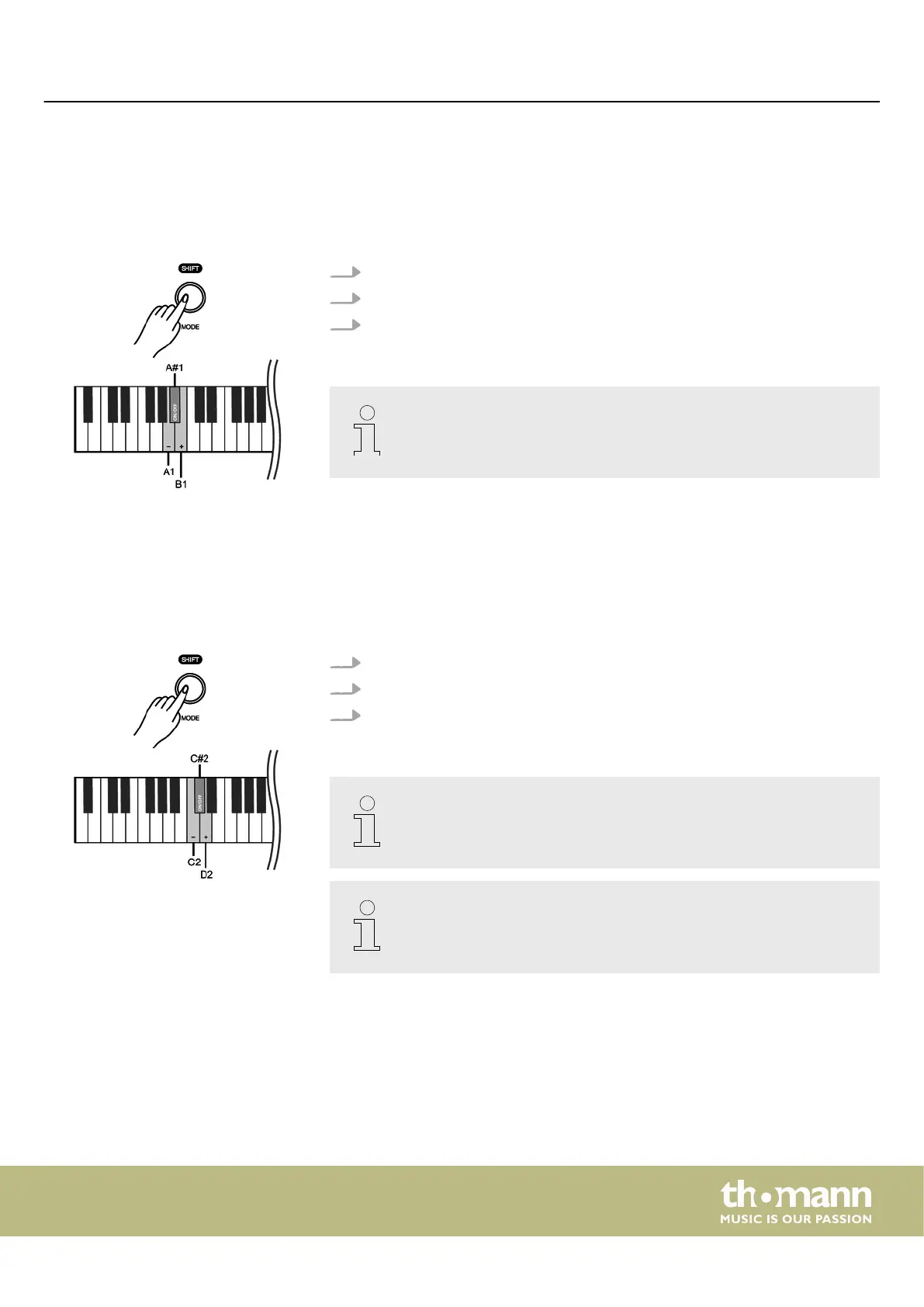
1. Hold down [SHIFT] and press piano key [A1] or [B1] to adjust the damper noise.
2. Hold down [SHIFT] and press piano key [A#1] to disable the damper noise.
3. Hold down [SHIFT] and press piano key [A#1] again to enable the damper noise
again.
This setting is only available for sounds no. 1 … no. 4.
7.17.4 Hammer noise
This function simulates the hammer noise eects taking place in an acoustic piano
when striking the strings.
On delivery, the hammer noise is activated by default.
1. Hold down [SHIFT] and press piano key [C2] or [D2] to adjust the hammer noise.
2. Hold down [SHIFT] and press piano key [C#2] to disable the hammer noise.
3. Hold down [SHIFT] and press piano key [C#2] again to enable the hammer
noise again.
This setting is only available for sounds no. 1 … no. 4.
Many of the functions can be easily controlled from a mobile device using
suitable apps (e.g. PianoToolBox), which can be downloaded from the App
Store® or Google Play.
Switching on / o and basic operation
DP-28 Plus
27



 To Next Page