7.17 Further setting options
7.17.1 String resonance
This function simulates the resonance eects taking place in an acoustic piano.
On delivery, the string resonance is activated by default.
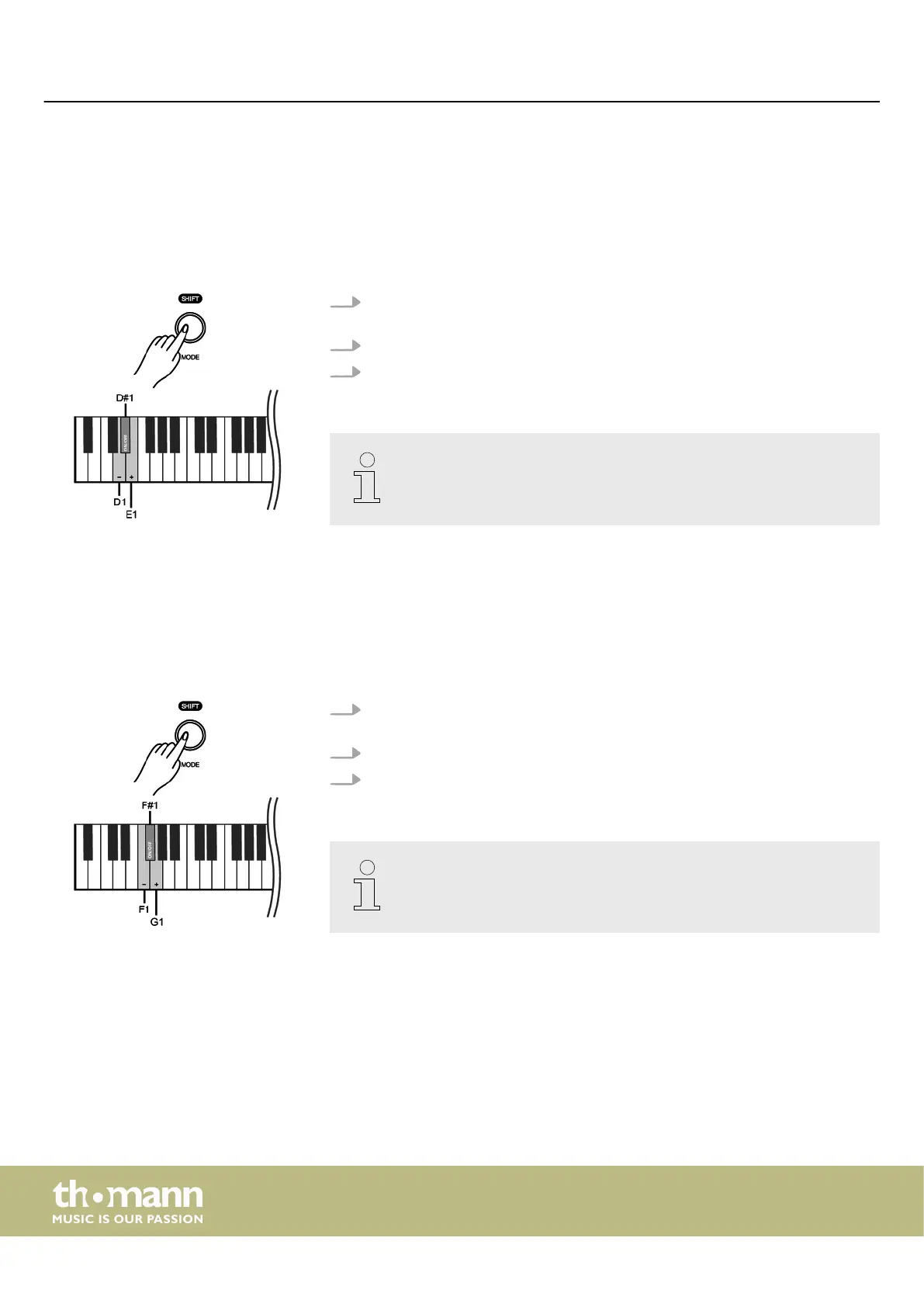
1. Hold down [SHIFT] and press piano key [D1] or [E1] to adjust the string reso‐
nance.
2. Hold down [SHIFT] and press piano key [D#1] to disable the string resonance.
3. Hold down [SHIFT] and press piano key [D#1] again to enable the string reso‐
nance again.
This setting is only available for sounds no. 1 … no. 4.
7.17.2 Damper resonance
This function simulates the damper resonance eects with lifted dampers taking
place in an acoustic piano.
On delivery, the damper resonance is activated by default.
1. Hold down [SHIFT] and press piano key [F1] or [G1] to adjust the damper reso‐
nance.
2. Hold down [SHIFT] and press piano key [F#1] to disable the damper resonance.
3. Hold down [SHIFT] and press piano key [F#1] again to enable the damper reso‐
nance again.
This setting is only available for sounds no. 1 … no. 4.
Switching on / o and basic operation
digital piano
26



 To Next Page