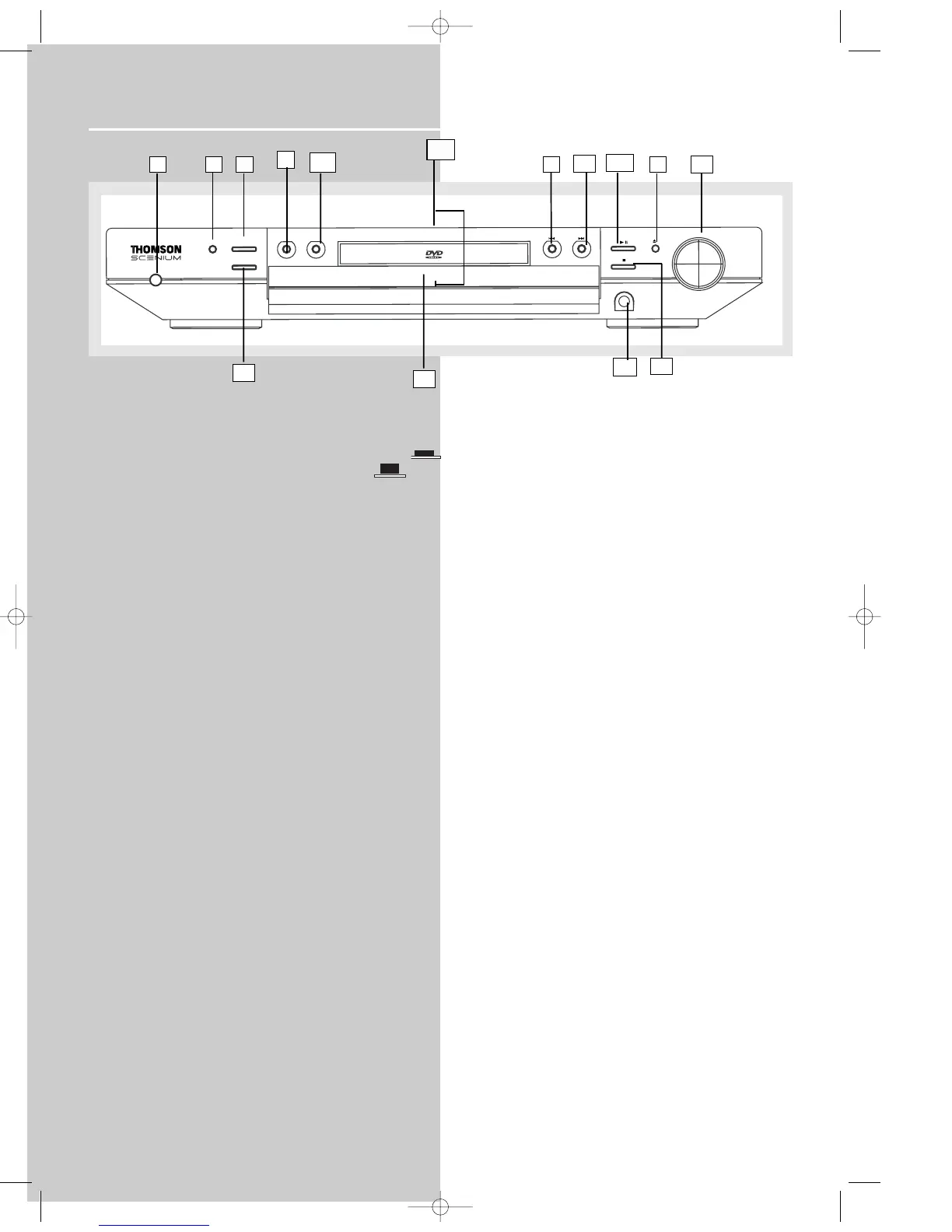
Receiver Controls
1. POWER / ECO
• To turn the unit on (set the POWER/ECO swtich to the ON
position) / off. (set the POWER/ECO swtich to the OFF posi-
tion) When the system is turned on, the unit will go to Standby
mode (red led will lit), then press the SOURCE button on the
unit to power the unit up in the last mode used.
• When the unit is in standby mode, press the Source button to
power on the unit.
2. Source Buttons
• To select input source. For example, DVD/CD, VCR, etc.
3. SURROUND
• Press repeatedly to select the surround sound setting or
Digital Sound Processor (DSP) mode you want. Refer to
“Advanced Sound Control” on page 16.)
4. PRESET - / SKIP REVERSE
• To move back to the beginning/previous preset memory
location in tuner mode.
• To skip to the beginning/previous track in CD mode and the
beginning/previous chapter in DVD mode (only while playing).
5. PRESET + / SKIP FORWARD
• To go to the next preset memory location in tuner mode.
• To skip to the next track in CD mode and the next chapter in
DVD mode (only while playing).
6. BAND / APP / RANDOM
• In Tuner mode, press to select between radio BANDS or press
and hold to enter AUTO PROGRAM mode.
• In DVD/CD mode, press to activate Random function.
7. BASS / TREBLE / TV OUTPUT
• To adjust BASS / TREBLE, press this button once to choose
either bass or treble, then press preset + and preset - to adjust
level. (Bass/ treble adjustment is not allowed for DTS source)
• Press and hold to swtich TV output mode (RGB SCART / S-
Video), default is RGB SCART.
8. OPEN / CLOSE
• Slightly touch to open / close the front panel.
9. EJECT
• Press to eject the disc.
10. VOLUME
Turn the knob to adjust volume level.
11. PLAY/PAUSE
To play and pause DVD/CD playback.
12. STOP
To stop DVD/CD playback.
13. REPEAT (RPT) / PROGRAM (PROG)
• Press to choose different play mode in DVD/CD playback.
• In CD mode : refer to CD / mp3 player section.
• In DVD mode: refer to DVD player section.
14. PHONES
Plug your headphones (not supplied) into it for your private
enjoyment. Speakers will be off when phones are inserted.
15. BLUE LED
• When RGB output is selected, the blue led will lit.
• When in protection mode, the blue led will blink continuously,
• During panel up/down and power up, the led will blink for a
few seconds.
1 6 2
4
14
13
11
9
12
7
5
8
10
3
15
10















 To Next Page