MONITOR
OUT
OUT
VIDEO
R
IN
SAT
VCR
OPTICAL
IN
OPTICAL
OUT
Pr
Pb
Y
L
AUDIO
OUT IN
IN
DVD ONLY
IN
OUT
S-VIDEO OUT
DVD ONLY
COMPONENT VIDEO
OUT (480P/480I)
L
R
TV
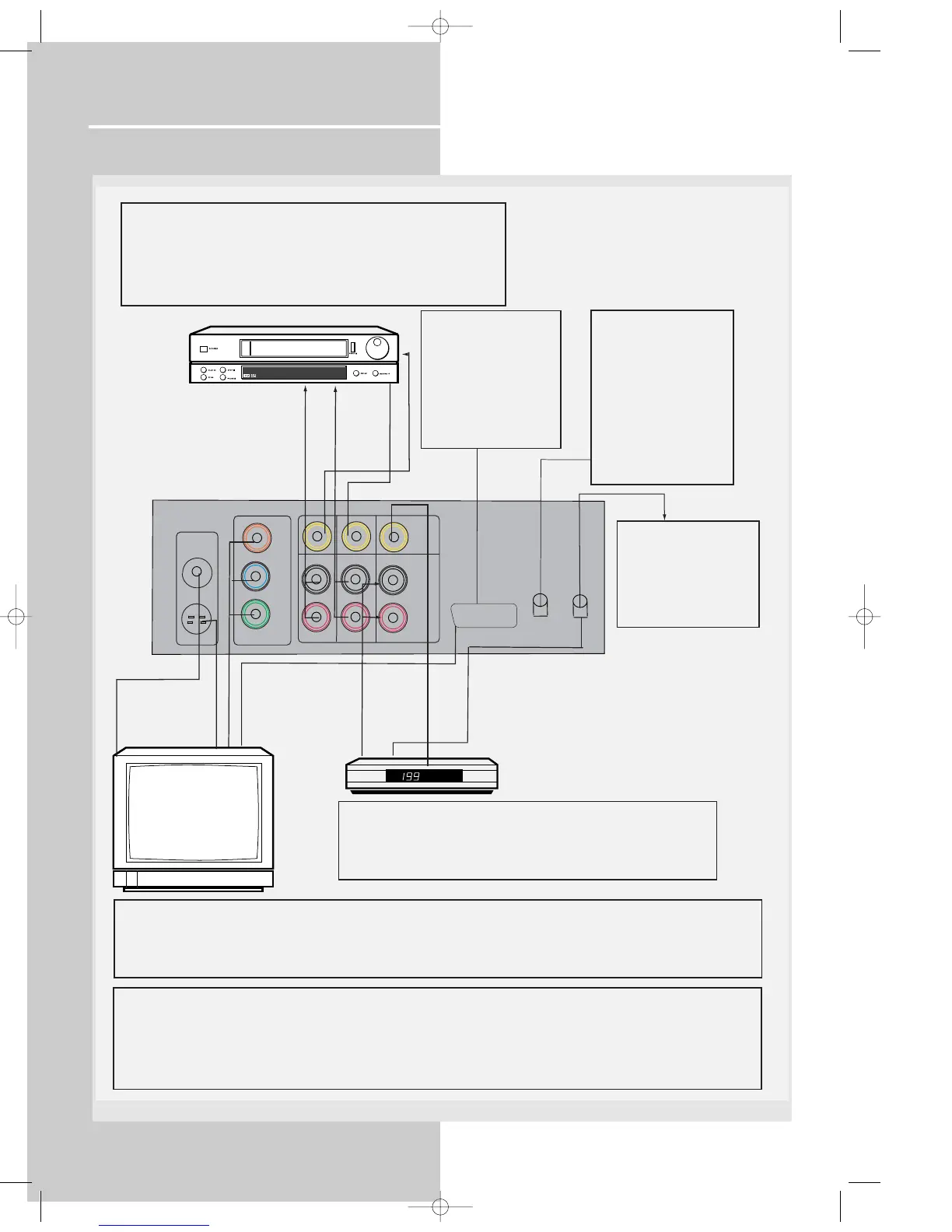
TO VIDEO IN (VCR)
TO AUDIO IN (VCR)
SAT
TO VIDEO OUT (VCR)
TO AUDIO OUT (VCR)
TO AUDIO OUT (SAT)
DIGITAL INPUT
Connect components
capable of outputing
Dolby Digital (e.g. SAT)
or standard PCM (CD)
format digital signals.
Read section on "Input
Signal Setting" under
"Advanced Sound
Control" carefully to
adjust the matching
input settings.
VCR
DIGITAL OUTPUT
Connect components
capable of recording
digital signals (e.g. MD,
CD recorder player)
equiped with a optical
input.
S-VIDEO
S-video provides a better connection for the video portion of the signal
than composite video (yellow color terminal). When connecting S-video
cable, a Composite video cable (yellow RCA connector) must also be
used. S-video will have video output for DVD playback only.
OPTICAL OUT (SAT)
VIDEO OUT (SAT)
ANALOG INPUT
Alternatively, if you have no VCR or SAT, you can connect any other
compatible components like TAPE player, TV to your DVD receiver via
the VCR/SAT input.
¥ VCR audio/video out will have output signal in SAT, DVD/CD and
TUNER modes. When VCR (source) is selected, there will be no
audio/video signal from VCR audio/video out.
VIDEO IN (TV)
S-VIDEO IN (TV)
COMPONENT IN (TV)
Component video output
Component video terminal provides the best connection for video. By seperating the color information (Pb/Pr) and the
luminance signal (Y), the image is improved comparing with S-video or composite video connection (result may vary on
different TV / monitor). If your TV is equipped with these terminals (e.g. Y/Pb/Pr, Y/Cb/Cr, Y/B-Y/R-Y), use an appropriate
video cable (75 Ohm) and connect to the system. Make sure to match the terminal color.
TV
TV SCART INPUT
Plug the SCART cable
provided into the TV
(RGB SCART) out
socket of your DVD
receiver and into the AV1
in socket (sometimes
also call AUX1 or EXT 1)
on your TV set.
To SCART AUDIO/VIDEO IN (TV)
SCART output
If no SCART socket is available on your TV set, check whether your TV has another Video socket (Components, S-Video or
composite) that you can use to connect your player using the corresponding socket. Do not forget to connect the Audio cable
to your TV set.
Note: If your TV set is equipped with compomet sockets and you choose for this connection, you must correctly configure
whether RGB or Component signal will be used. For more information about RGB switching, please refer to page 24.
DPL950-EN receiver new 5/7/03 10:35 AM Page 8















 To Next Page