Operating Your Receiver
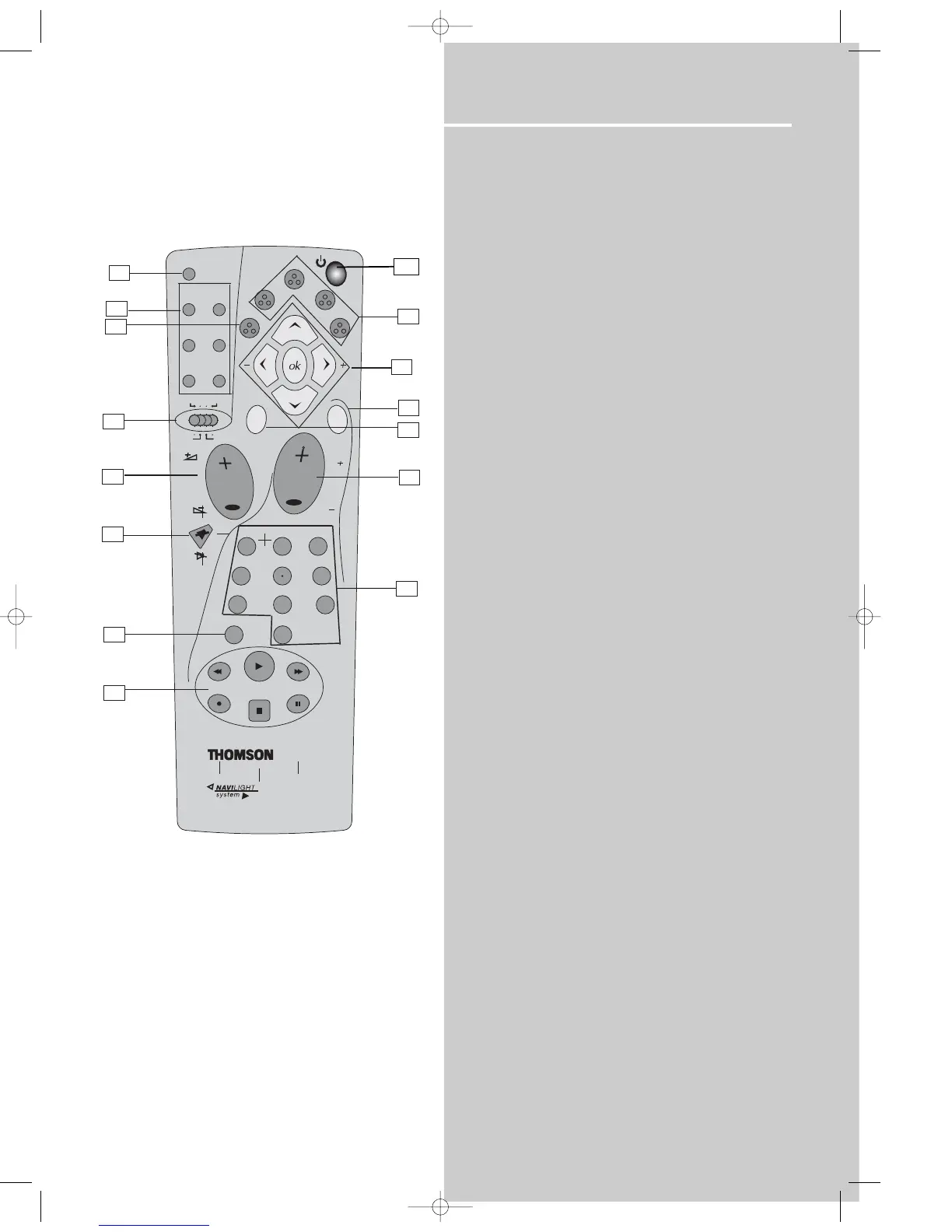
Your Remote Control
Please be sure you have inserted the batteries into the remote
control (see relevant section on page 3.)
1. OPEN/CLOSE
Open / close the front panel.
2. Digital
Select the way your SAT external audio/video devices are connect-
ed to the receiver (Analog or Optical) through the SAT audio input.
3. Source Buttons
To turn on and select various audio/ video sources and enable
related functions.
4. Source Selector
To select which unit/mode you want to control with your remote.
5. DVD/CD Modes / Speaker Settings
To select menu items in DVD/CD mode.
To select speaker settings in AV receiver mode.
• stereo - Selects stereo mode
Subtitle - Press to turn subtitles on/off. Press and hold to
access subtitle selection menu.
• theater modes - Selects among theater modes (DOLBY PL II
MOVIE, DOLBY PL II MUSIC, DOLBY PRO LOGIC EMULATION, 3
STEREO, ARENA, JAZZ CLUB, THEATER, STADIUM, DISCO,
STEREO)
info - shows on-screen banner.
• delay - In HiFi mode, press to select speaker delay settings
(between speakers and your favorite listening position).
title - In DVD mode, goes to Title on screen menu.
During VCD playback, press to toggle between PBC on / off.
• level - Adjusts volume of individual speakers. Press repeatedly
and the display will toggle among different channels (Left front
speaker, Right front speaker, Center speaker, Left rear speaker,
Right rear speaker and Subwoofer). Press the left and right
arrow buttons beside OK button for adjustment
angle - selects different screen display angles if available.
6. Adjustment Buttons
Use arrows to move around on menus, press OK to enter/confirm
selection.
Press OK to show Sleep, Dimmer or Night mode
• SLEEP Mode
• DIM Mode
• EQ Mode (Stereo)
• NIGHT Mode (Dolby Digital Only).
When the display shows the setup you want to change, press the
left and right arrow buttons beside OK button to make changes,
then press OK to finalize your choice.
7. RDS / menu
• In Tuner mode, press to show Radio Data System information if
available. (Frequency station, Station name, program type, clock
and radio text)
• In DVD mode, press for menu setup for DVD title.
8. pty
• In Tuner mode, press to activate search by program type.
9. Volume + / Volume -
To adjust the volume.
10. pr + / pr -
To select programmed stations in TUNER mode.
To skip to the next or previous chapter or track in DVD, CD & mp3
mode.
11. MUTE
To mute all audio outputs.
12. Number Buttons
• In Tuner mode, to select a preset station.
• In DVD/CD mode, to select a track to be played (Audio CD only).
13. memo / clear
• In Tuner mode:
- Press AM/FM
- Press memo / clear to enter preset program function to store
desired frequency in memory. The flashing word PROG. in red will
appear in display. Input your desired channel number while the
word is still flashing and the frequency will be stored. (For details,
refer to "Storing Radio Stations” under “Manual Preset” on page
38)
• In DVD/CD mode, press to clear program settings.
14. Operation Buttons
• TUNER, press AM/FM on the remote to enter tuner mode.
Press REVERSE and FORWARD keys to tune down or up the radio
frequency.
• DVD/CD, press DVD to enable PLAY, RECORD, STOP and PAUSE
keys. The remote control currently operates most Thomson, RCA
and GE products, but it can be programmed to operate devices
from other manufacturers
15. ON/OFF
•
• To turn the unit on/ off. When the system is turned on, the
unit will go to Standby mode.















 To Next Page