15
EN
EN
COLOUR VIDEO INTERCOM
D - USING THE PRODUCT
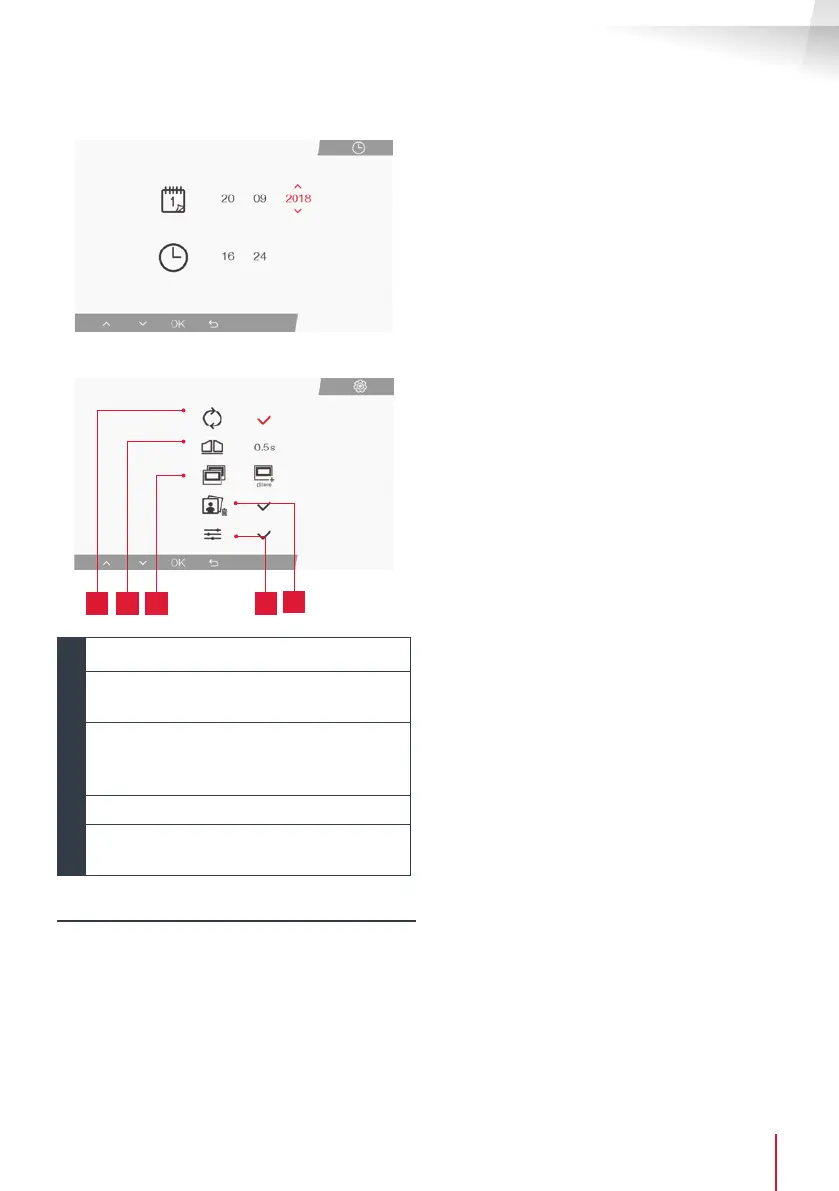
• Screen for managing date and time
• Screen for managing settings
1 2
4
3
5
1
Factory settings
2
Duration of dry contact activation for the
motor
3
Monitor status (“Master” by default),
only the additional monitor must be set to
“Slave”
4
Erase all photos
5
Additional settings for contrast, light
settings, etc.
2. USE OF RFID BADGES
The RFID badges enable both the electric strike
plates and the door controls to open. The function
is selected according to how long the RFID badge
is held under the scanner.
Ifscannedbriey,theelectricstrikeplateopens.If
held for a longer period (3 secs), the door control
opens



 To Next Page