27
K-Cube Brushed DC Servo Motor Driver
4.4.7 Menu Option - Teach Position
This mode is used to set the teach positions, used when the Joystick mode option is
set to Jog to positions mode - see Section 4.4.5.
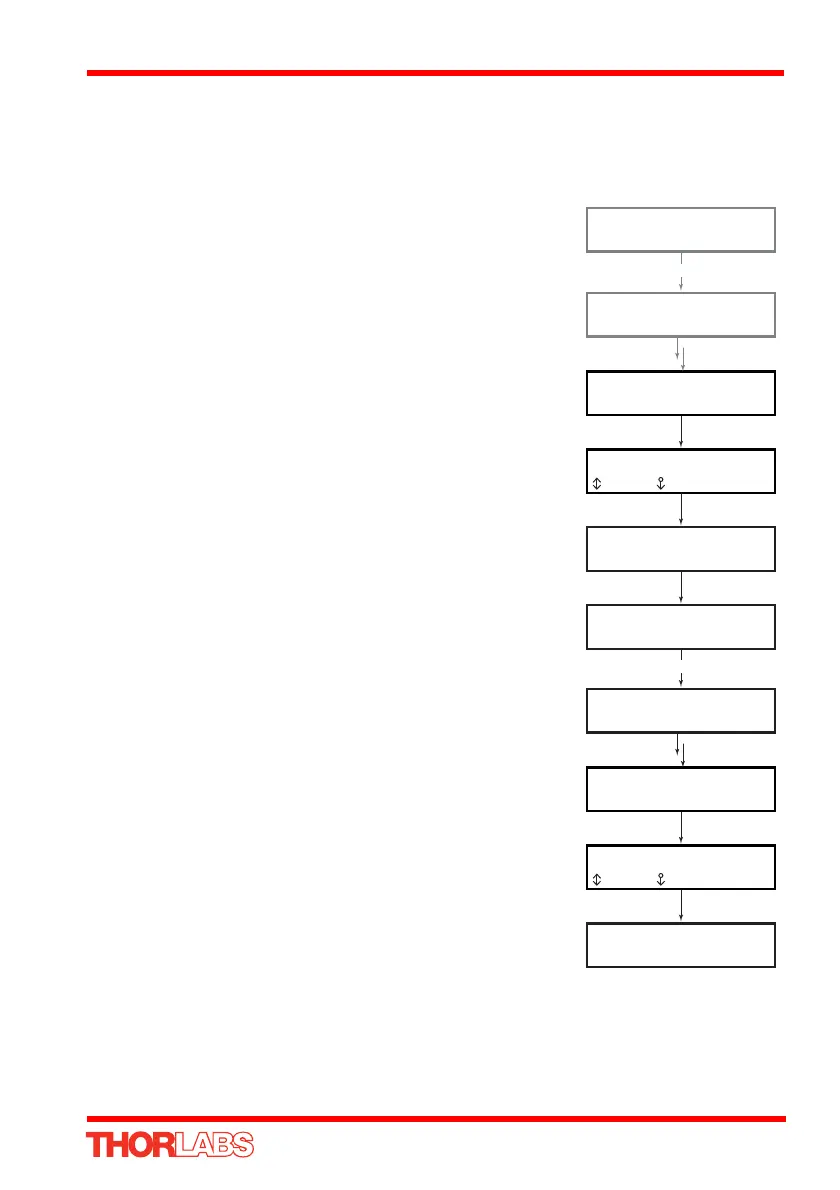
To set Teach Position 1...
Move the stage to the position to use as teach position 1.
Press the MENU button, then use the wheel to scroll
through the menu options.
Press the MENU button to enter the Teach position
option.
Use the wheel to select P1, then press the MENU button
to store the current position as teach position 1 and return
to the main display.
To set Teach Position 2...
Move the stage to the position to use as teach position 2.
Press the MENU button, then use the wheel to scroll
through the menu options.
Press the MENU button to enter the Teach position
option.
Use the wheel to select P2, then press the MENU button
to store the current position as teach position 2 and return
to the main display.
When Jog to position mode is selected in the Joystick
mode option (see Section 4.4.5.), a downwards
deflection of the wheel moves the stage to position 1, and
an upwards deflection moves to position 2.
At 10.0000 mm
Homed Stopped V
Menu options
Use wheel
Menu options
6 Teach position
P1 = 10.0000 mm
num store
MENU
At 10.0000 mm
Homed Stopped V
At 5.0000 mm
Homed Stopped V
At 5.0000 mm
Homed Stopped V
Menu options
Use wheel
Menu options
6 Teach position
P2 = 5.0000 mm
num store
MENU


 To Next Page