34 HA0363T Rev D Jan 2017
Chapter 5
5.5 Changing Motor Parameters
Moves are performed using a trapezoidal velocity profile (see Appendix E , Section
E.1.3.). The velocity settings relate to the maximum velocities at which a move is
performed, and the acceleration at which the motor speeds up from zero to maximum
velocity.
1) On the GUI panel, click the ‘Settings’ button (bottom right hand corner of the
display) to show the Settings panel.
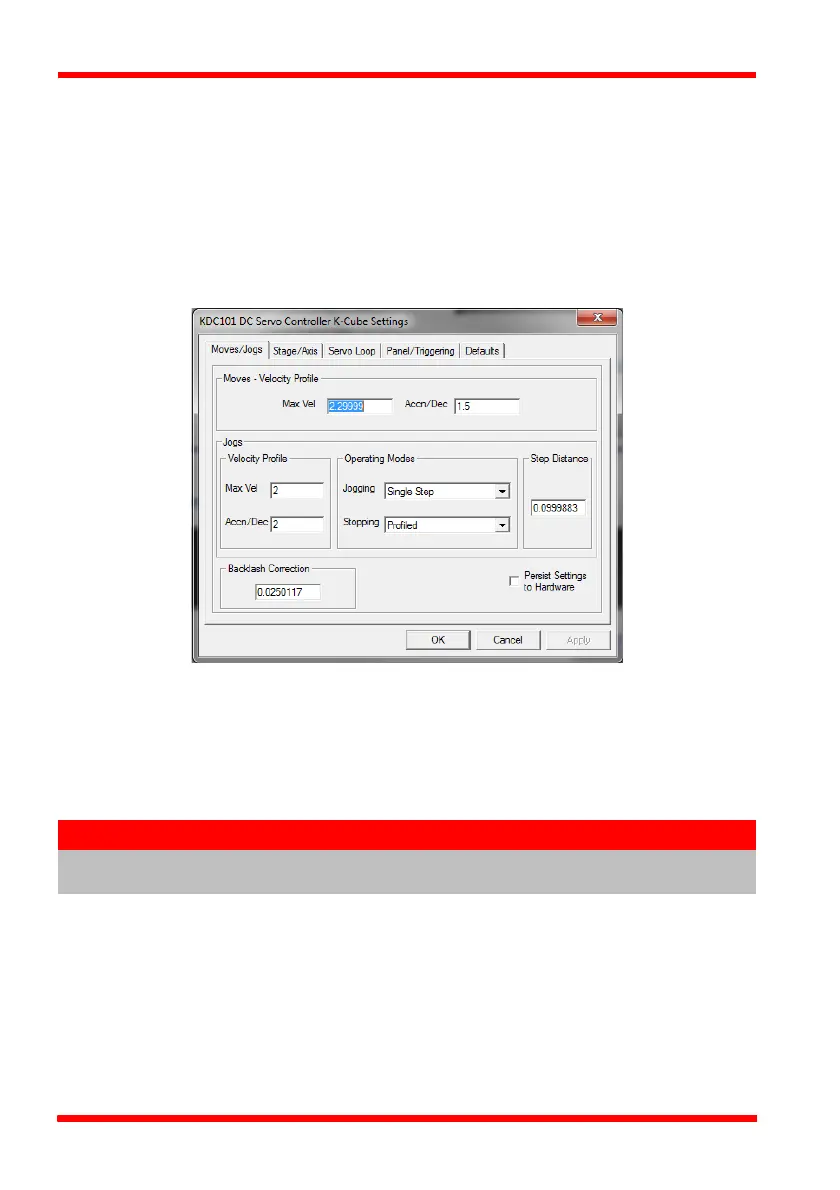
Fig. 5.5 Settings Panel - Move/Jogs Tab
2) Select the Move/Jogs tab as shown in Fig. 5.5.
3) In the ‘Moves’ field, enter parameter values as follows:
‘Max. Vel’ - ‘0.25’
‘Accn/Dec’ - ‘0.1’
4) Click ‘OK’ to save the settings and close the window.
5) Any further moves initiated will now be performed at a maximum velocity of
0.25mm per second, with an acceleration of 0.1mm/sec/sec.
Note
In current versions of software, the ‘Min Vel’ parameter is locked at zero
and cannot be adjusted.


 To Next Page