EasyManua.ls Logo

Thundercomm Qualcomm Robotics RB5 - Boot Configurations

Thundercomm Qualcomm Robotics RB5
52 pages
Print Icon
To Next Page IconTo Next Page
To Previous Page IconTo Previous Page
Loading...
Robotics RB5 Development Kit Hardware User Manual
Copyright© 2020 Thundercomm Technology Co., Ltd. All rights reserved.
39
8 Boot configurations
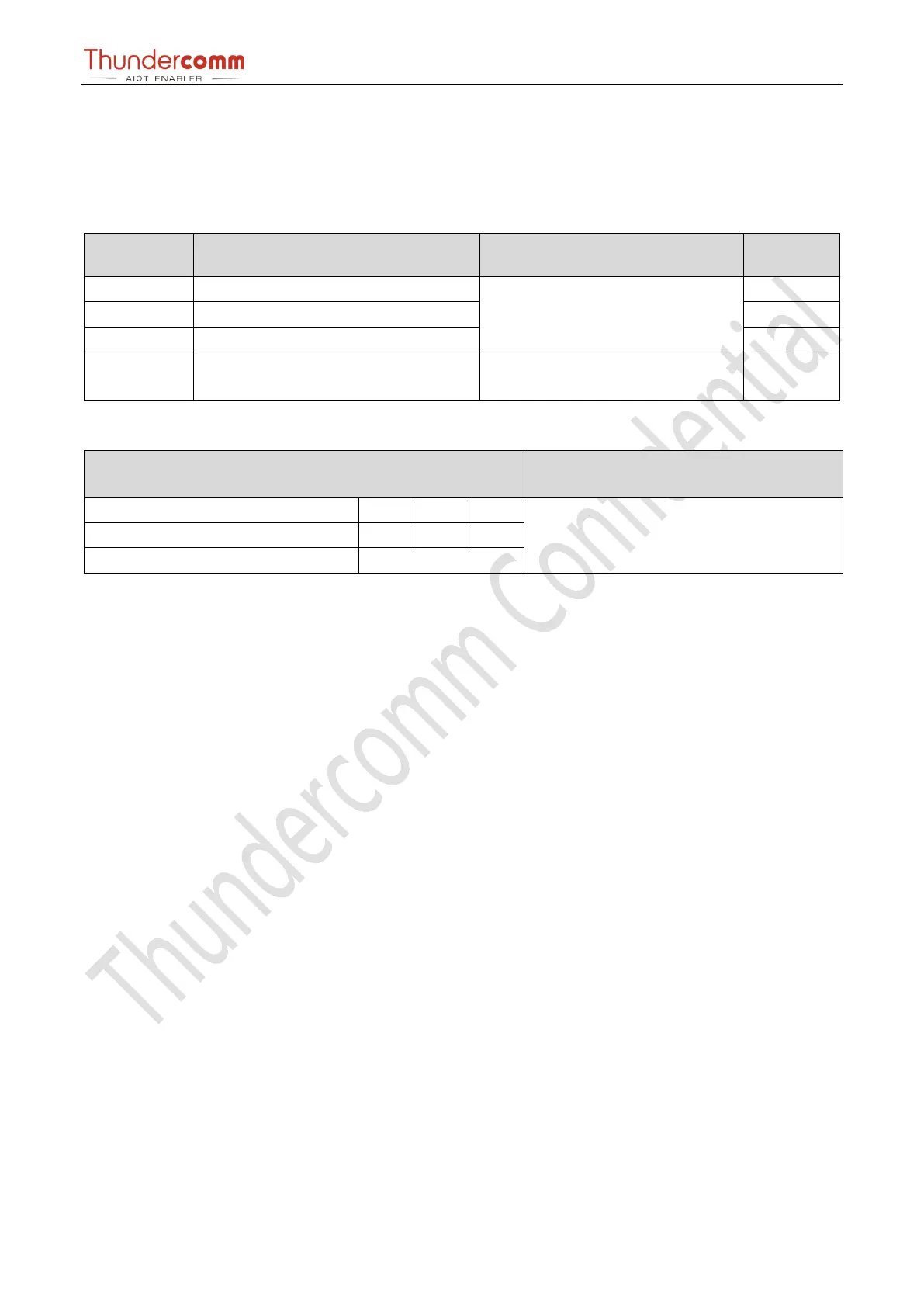
A DIP switch is located on the top of the development board (see Section 1.2.2, #17):
DIP_SW_1
Name
Details
Default
1
BOOT_CONFIG_1 [GPIO_27]
Selects external boot devices
OFF
2
BOOT_CONFIG_2 [GPIO_47]
OFF
3
BOOT_CONFIG_3 [GPIO_76]
OFF
4
BOOT_CONFIG_0 [GPIO_128]
ON Disables WDOG
OFF Enables WDOG
OFF
GPIO details:
GPIO
Boot device
FAST_BOOT GPIO bit (3:0)
76
47
27
Default:
UFS0 SDC2 USB0 EDL(USB0)
0000
0
0
0
Other
Reserved

Table of Contents

Related product manuals