Rev E TR-220 90 008 088-1
2-30
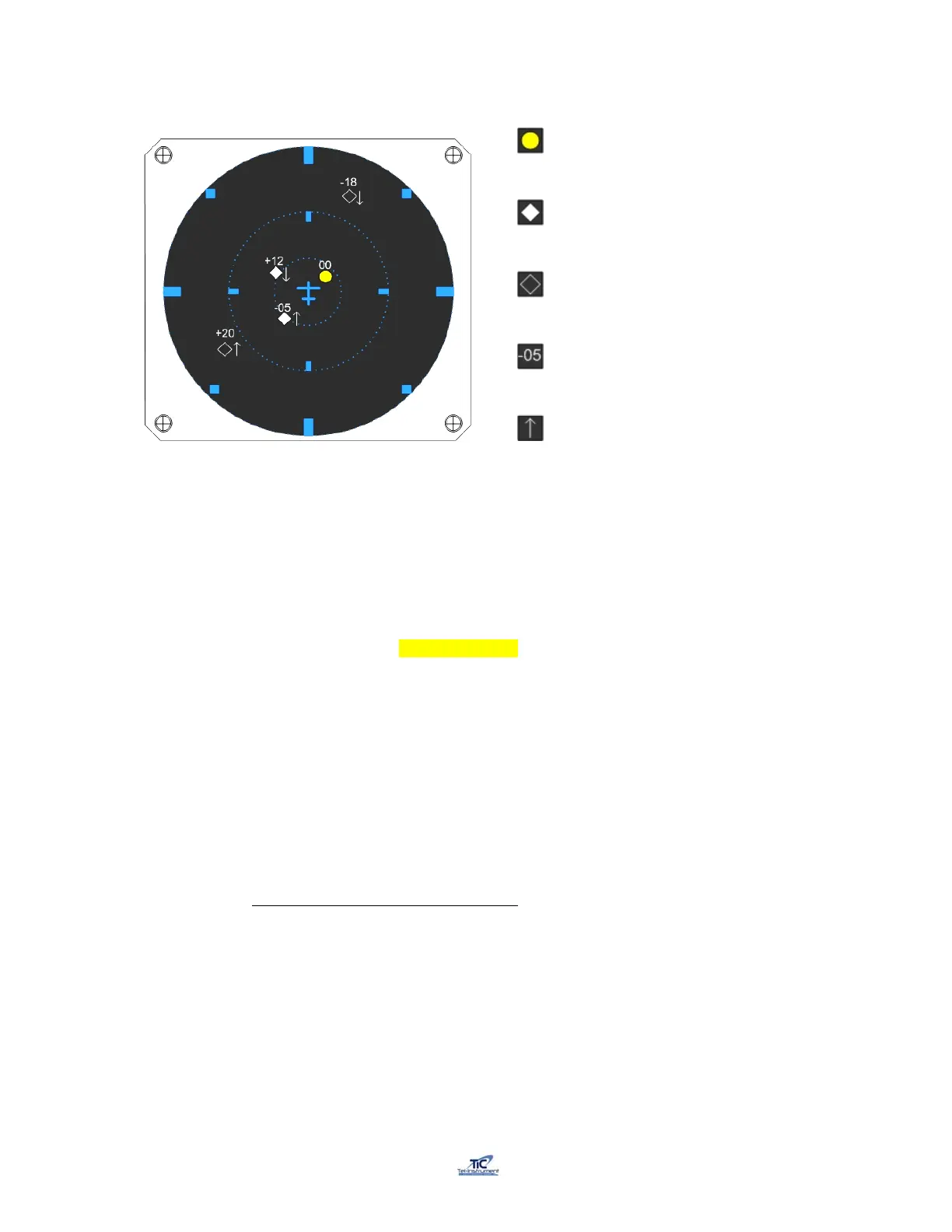
Typical TCAS I Display
Figure 2-10
The perimeter of the WARNING AREA is approximately 15-35 seconds from entering the
COLLISION AREA (not depicted).
When an aircraft enters the CAUTION AREA, a “TA” (Traffic Advisory) is issued. This
would consist of an audible and visual warning in the cockpit.
When an intruder enters the COLLISION AREA, the TCAS will issue a “RA” (Resolution
Advisory). “RA’s” consist of audible and visual warnings and possible instructions to avoid
a collision.
A TCAS display will vary dependent on the manufacturer. Typically, a TCAS I system, as
shown in figure 2-10, will display Traffic Advisories. A TCAS II System will be
incorporated with a Vertical Speed Indicator (VSI), which will issue a RA, the pilots VSI
will display a course of action to avoid a collision with an aircraft located in the
COLLISION AREA.
2.15.2 TCAS Scenario Selection and Setup
1. To TR-220 must have the correct values entered to properly program an intruder
to converge with the UUT aircraft. If the intruder scenario is incorrectly
programmed, the operator may not receive the anticipated results.
2. Turn the Test Set “ON” and turn the UUT FUNCTION switch to SETUP.
3. Access the TCAS Scenario menu. The TR-220 has 10 preprogrammed intruder
scenarios in its memory (see table 2-3). All TCAS Scenarios can be modified
A Solid Amber Circle indicates a TA (Traffic
Alert), signifying a possible collision threat to
your aircraft. Accompanied by a audible warning
of “Traffic, Traffic”
A solid white diamond signifies a proximate
traffic. Aircraft that are within 4nmi and ± 1200
feet altitude.
An open white diamond signifies other traffic
within the selected range.
Numbers represent the intruder aircrafts relative
altitude ± 100 ft levels from your aircraft.
The arrows indicate if the intruder aircraft is
ascending or descending from your relative
position.



 To Next Page