1
25
Printing Progress
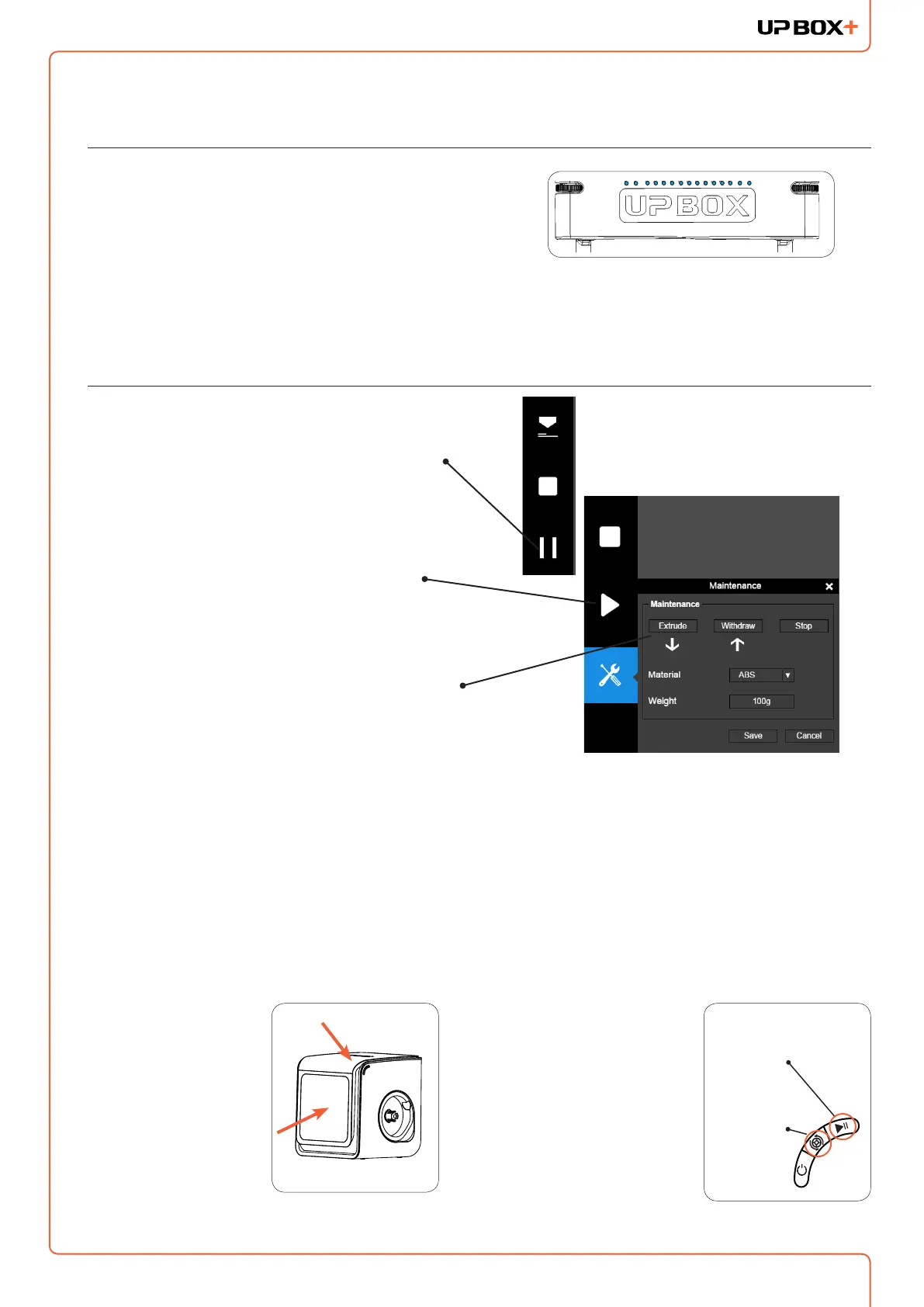
Printing progress is shown in the LED progress bar
on top of the UP BOX+ letters.
Pausing a Print Job
An on-going print job can be paused by clicking
the "Pause" button on the left hand side menu.
Click the "Resume Print" to resume the paused
print job. Once the print job is paused, the other
buttons on the maintenance interface will be
enabled.
You can change lament using the "Withdraw"
and "Extrude" buttons. At this point user could
even change materials.
Pause a Print Job without using the UP Stuidio Software
During printing when the
front door is opened,
printing will be paused
automatically. After
closing the front door
the print job will not be
resumed until the user
double press the pause
button.
Alternatively, during
printing, double press the
Pause/Stop button, the
print job will be paused.
It is possible to use the
Extrude/Withdraw button
to change lament during
the pause. Double press
the pause/stop button
again to resume the print
job.
Extrude/Withdraw
Button
Pause/
Stop Button



 To Next Page