3. Answer the intercom incoming calling
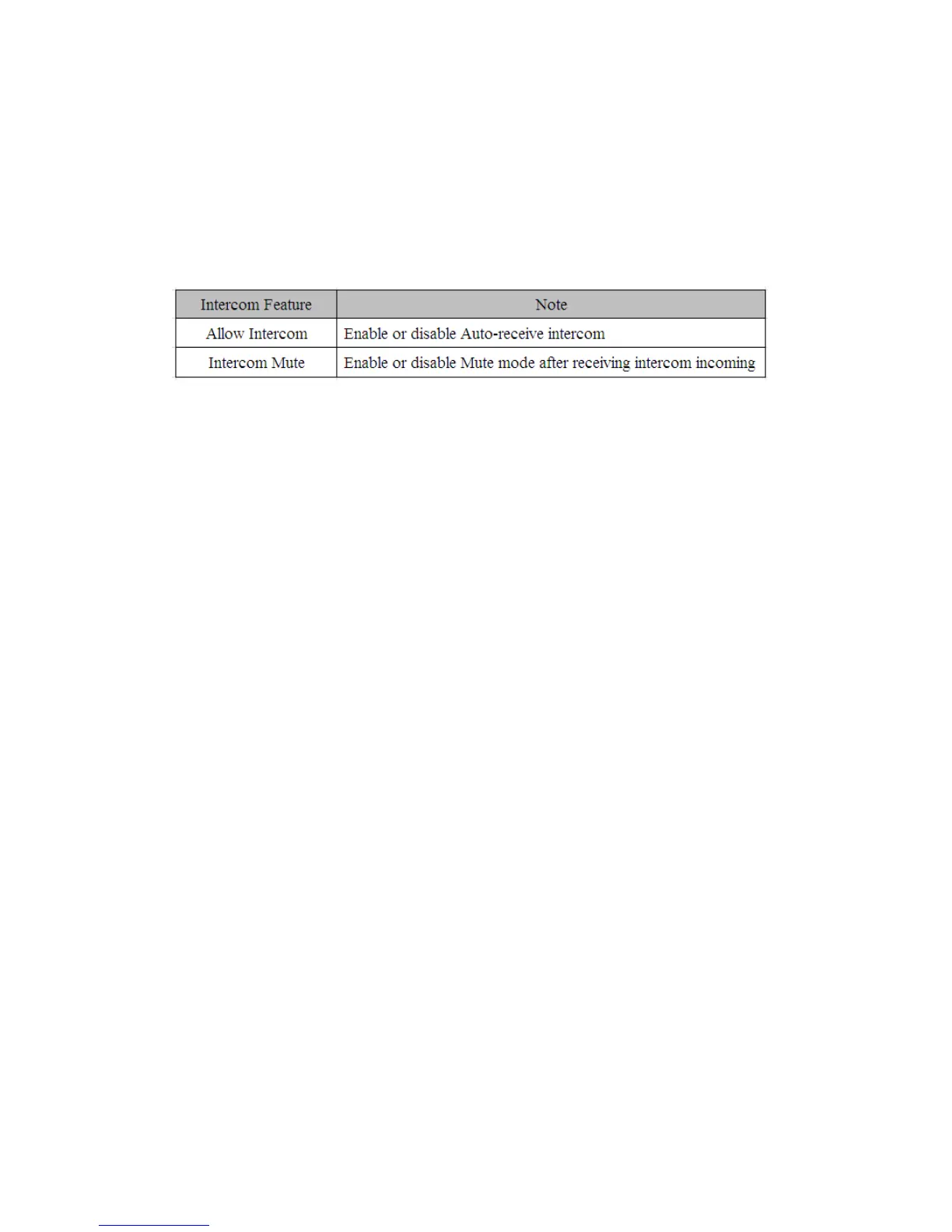
4. In default situation, the IP phone tiptel3240 will answer the intercom incoming calling
automatically and make a noise. You can set the phone to enable silent mode when
picking up the intercom call so that the other will not hear you 。
The features of intercom:
3.16.HotDesking
In some working place, the people are always walking around. HotDesking feature will make
the staffs login his account on any computer in the company. In some public places, the
working people is not fixed, anyone can use HotDesking for logging his account, and setting
the phones to the familiar mode. Such as the remote function of the computer.
3.16.1.Set the HotDesking Key
To configure HotDesking via Phone interface:
PATH: Press Menu-->Features-->Programmable keys-->Soft Keys-->HotDesking--> Press
Down key to set label--> Save soft key;
3.16.2.HotDesking Feature
1. After setting the HotDesking on Soft-key, back to the idle screen:
2. Pressing the HotDesking, and enter the HotDesking screen:
3. If you press clear on the screen, the phone will begin to clear the information stored on
the phone:
4. After clear the setting, the phone will enter the account setting screen:
5. After entering the account information, back to the home screen, and begin to use the
new account.



 To Next Page