TR7 GNSS System User Manual
15
www.titanposition.com
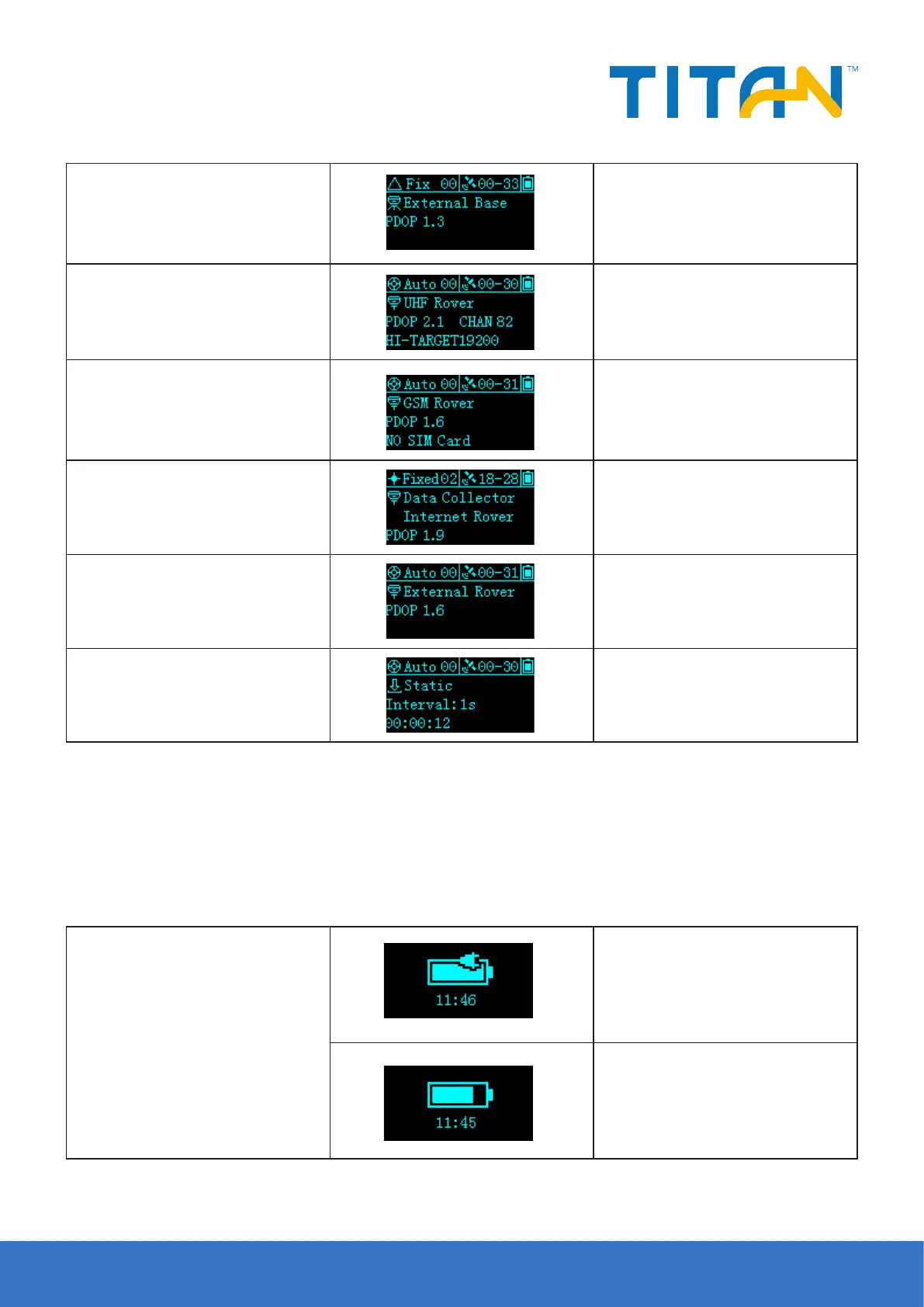
External Base
Display current receiver operating
mode, satellite information, solution
status, PDOP
UHF Rover
Display current receiver operating
mode, satellite information, solution
status, PDOP, radio protocol
GSM Rover
Display current receiver operating
mode, satellite information, solution
status, PDOP, networking status
Data Collector
Internet Rover
Display current receiver operating
mode, satellite information, solution
status, PDOP
External Rover
Display current receiver operating
mode, satellite information, solution
status, PDOP
Static
Display working mode, satellite
information, solution status, static
acquisition duration and sampling
interval
2.2.5 Sleep Interface
If there is no operation for more than 60s, the display will enter the sleep interface. After 5 minutes of standby,
the display is turned o. Double-click the power button or click the display to re-open the display and display
the status interface.
Table 2.4 Description of the standby interface
Standby interface
When the small ve-core power supply
(such as the external radio base station
mode) displays the external power
supply icon and local time (if the star
is not locked, only the external power
supply icon and ---:--)
When using a lithium battery, display
battery power and local time (such as
unlocked star display --:--)


 To Next Page