TR7 GNSS System User Manual
35
www.titanposition.com
4.1 SIM card installation
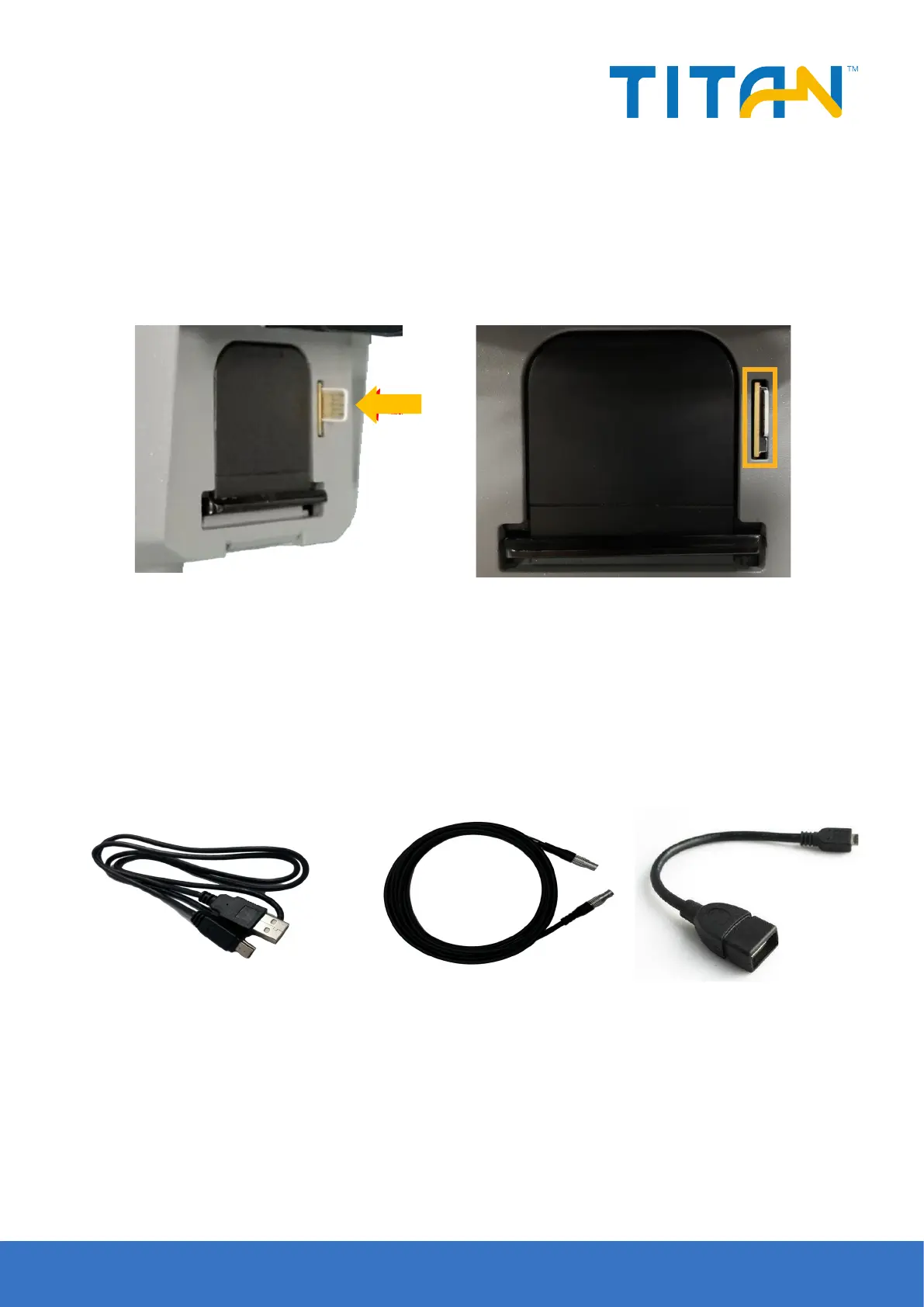
TR7 receiver supports Nano SIM card, the SIM card installation method is as follows:
1, Remove the battery cover without removing the battery, and the Nano-SIM card slot is exposed in ank.
2, Nano-SIM card notch direction is consistent with the card slot
3, Insert the Nano-SIM card into the deck with the front side (with metal contacts on one side) down.
4, The entire Nano-SIM card is placed in the card insert and the installation is completed.
Figure 4-1 Figure 4-2
Figure 4-3 Mini USB data cable Figure 4-4 Five-pin data cable (DG-3) Figure 4-5 OTG cable
4.2 Data cable
Mini USB data cable: Connect the TR7 host and the computer to upgrade the firmware and download static
data.
Five-pin data cable (DG-3): to connect the host and external radio to transmit dierential data.
OTG cable: for USB ash disk’s OTG rmware upgrade and static data download.
4.3 Antenna
There is one standard radio antenna and one 4G network, you can select the appropriate antenna according to
the operation mode. The UHF radio antenna is used in the internal UHF mode, and the external 4G antenna is
used in the internal GSM mode.


 To Next Page