TR7 GNSS System User Manual
26
www.titanposition.com
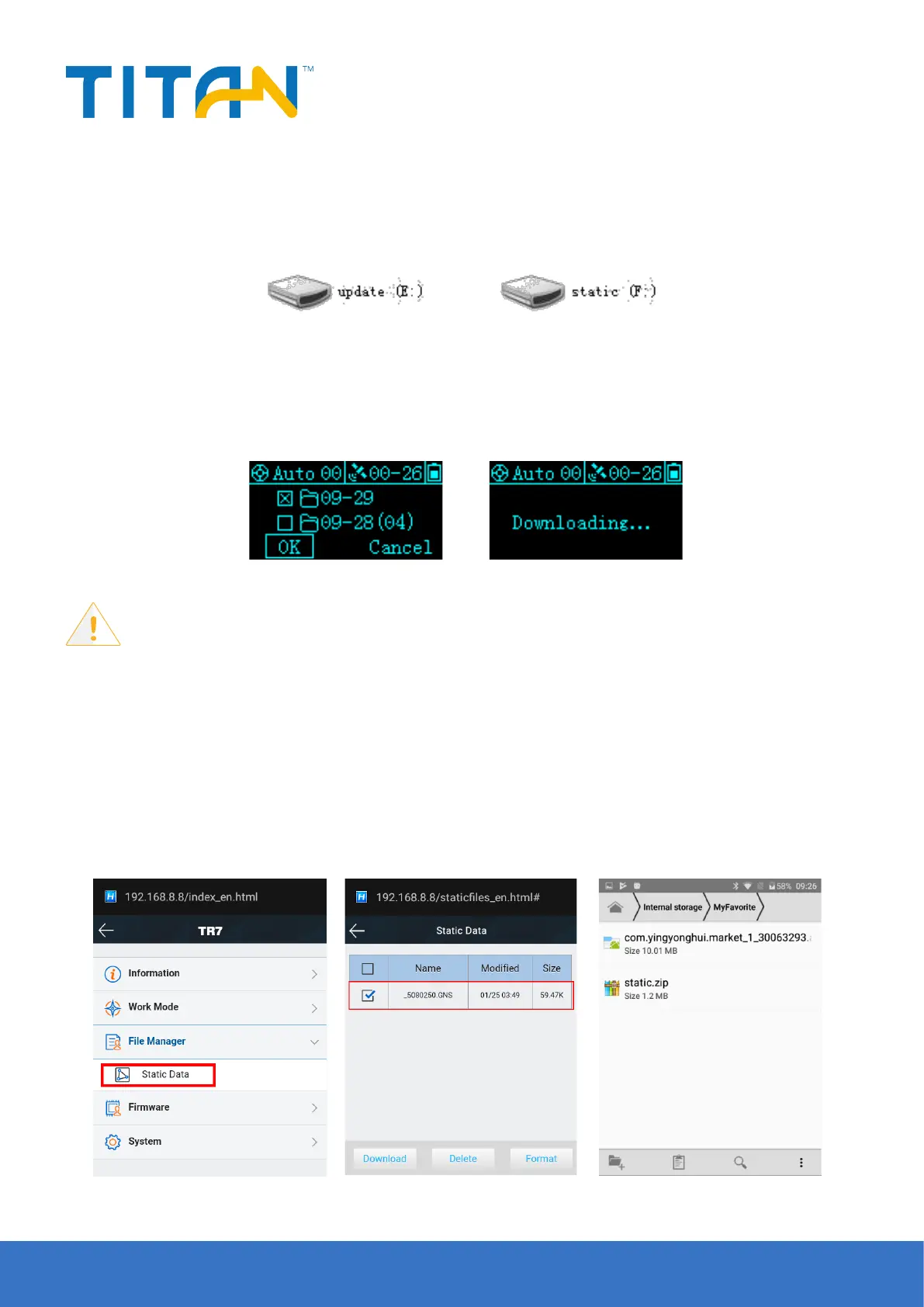
Figure 2-31
Figure 2-32 Figure 2-33
Figure 2-34 Figure 2-35 Figure 2-36
2.4.3 Static data download
1. Download the static data by USB cable
Connect the receiver with computer by the Mini USB data cable, and copy the static data to computer. The static
measurement data is in the gnss folder of the static drive.
2. Download static data via OTG and a USB drive.
Insert the OTG cable rst, then insert the USB drive, and you can select static data le and download the static
data of host directly by clicking FN.
Notice:
Don’t move OTG cable or USB drive during static les download.
3. Download static data through the WEB management system
Open the WiFi of the controller and connect the device WiFi(the device WiFi name is the S/N), and then input the
IP address 192.168.20.1 in the browser, to log into the WEB management system. Then, open the le manager
interface, and select the static le that needs to be exported. Click Download and Save, the le can be download
to the controller
.
The default save path for WEB-side downloaded static data on the controller is: Store> MyFavorite; Meanwhile,
you can customize the save path as needed.


 To Next Page